The POS Software Blog

The POS Software Blog

News from Tower Systems about locally made POS software for specialty local retailers.

CategoryProduce store software

Small business POS software user meetings around Australia

S

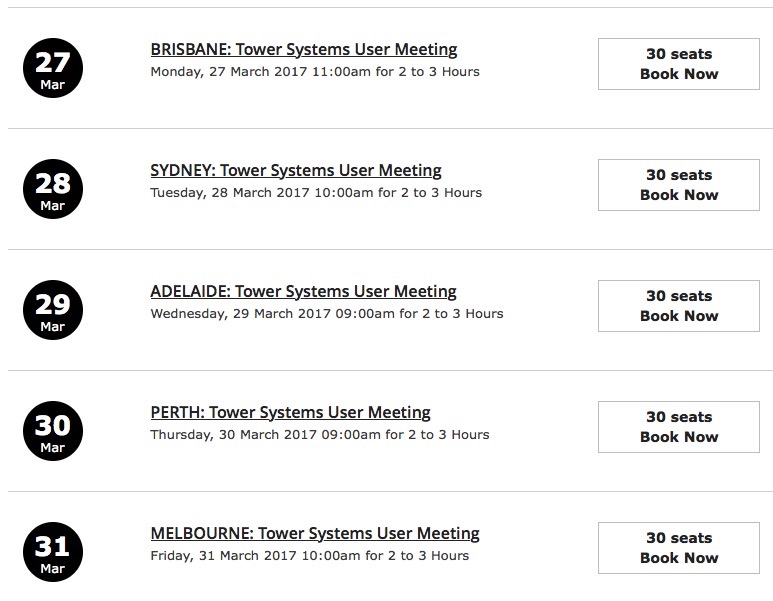
Tower Systems has announced details of its first series of face to face user meetings for 2017. This is the company putting itself in front of customers in key locations.

We have scheduled sessions for Brisbane, Sydney, Adelaide, Perth and Melbourne, starting March 27, 2017.

We will demonstrate the new look and feel of Retailer, our Shopify / Magento and Woo Commerce integrations, our Xero integration and much more. Plus there will be time for your questions. Free training. An opportunity to pitch your suggestions.

This is an excellent chance to leverage more from your relationship with us. Click here to book and see venue details. Yes, we will announce more dates soon.

This is an excellent opportunity to learn more about the software, discuss change requests and provide feedback on our services.

It is rare today that POS software companies offer sessions like this, except from Tower Systems – we do it regularly as a core customer service offering.

We ae grateful to our customers for their support.

Five free to implement marketing tips that will work for any small business retailer

F

Each of these five small business marketing tips has worked in a variety of retail businesses. They are fast to implement, easy to implement and are cost free based on the success they generate for small business retailers.

We have developed these five ideas through our many years only serving small and independent retail businesses. They are the best, easiest and fastest to engage:

  1. Immediate rewards. On your receipts. $$$. This gets shoppers spending more per visit. With the right settings, over the counter pitch and policies you can expect double digit growth for little effort. This loyalty program is a game changer for independent small retail businesses in that big businesses will not follow you, they will not be able to match what you pitch. This sets you apart. It excites shoppers and that is what drives the value you get from the program. We have it running in many hundreds of small retail businesses.
  2. Email marketing. Capture email addresses and email shoppers to pitch offers tuned to their interests. With an average response of 30% to the right pitch you can drive repeat visits.
  3. Product knowledge. Share this in receipts, automatically served based on products in a purchase. Shoppers will appreciate your help and extra-mile assistance. This is a perfect way to pitch one of your points of difference.
  4. Change the price narrative. If you have a nearby competitor, make price comparison difficult through multi-buy or BOGO pricing. Both are supported in our software. Make price comparison hard and increase sales as a result, of a perception of value.
  5. Smart placement. Your existing data can indicate what is best placed with what in your business. Leverage this data, make better placement decisions and increase sales. The deep dive basket analysis data insights can change your approach to product placement and increase shopper efficiency as a result.

Tower systems serves only independent small retail businesses in selected product niches. This is our mission and we are grateful every day for the opportunity.

Not your average POS software company

N

This video shows how Tower Systems is not your average POS software company. We are proud to serve our retail customers with practical advice and insights based on our own retail business management experiences:

Retail management advice: How to prepare your independent retail business for sale

R

Selling an independent retail business is like selling a house, you need to prepare it so that it looks appealing to prospective purchasers.

The process of preparing a retail business for sale can take time, depending on the state of the business. The earlier you start the better.

The keys are too leave yourself plenty of time and have a plan. The advice we provide here is based on years of service to small business retailers across many different retail channels.

Here is our overview advice of what you need to do to prepare your independent retail business for sale.

  1. Maximise profit. What anyone will pay will depend on the profitability of the business. While you should be on this every day, if it is a new project for you, start six months prior to putting the business on the market.
  2. Eliminate dead stock. It looks bad on the shelves and looks bad on the books. Purchasers should not pay full wholesale for inventory more than six months old as your poor buying or management is not their obligation.
  3. Streamline operations. Make the business look easy to run by ensuring it is easy to run for you. The easier it looks to run the more interesting to people who don’t understand the business.
  4. Make the business look appealing. Ensure displays are stunning, the shelves full and every pitch the very best you can make. You want them to want your business because they like it.
  5. Be happy. Owners who talk their business down will find it harder to sell the business. If you are complainer, keep it to yourself or in the family.
  6. Keep your social media presence up to date. Today, many people check out a business online prior to looking at it in-store. Maintain up to date Facebook and other
  7. Get your paperwork in order. Early on, get business documents together and check:
    1. Premises lease.
    2. Equipment lease documents.
    3. Franchise document.
    4. Supplier agreements.
    5. Details of any forward orders.
    6. Any other documents relating to the operation of the business including manuals for any equipment items.
  8. Choose your broker carefully.

Success at selling your business depends in part on the work you do to prepare it for sale. Extra focus now can help you get timely price satisfaction.

Reinventing the POS software experience for small business retailers

R

We have begun previewing new-look POS software for our specialty retail marketplaces. This new look represents more than a year of work in design, development and testing. It offers our customers a fresh look, it keeps our software current with design standards relevant to retail in 2017.

This latest new look for our POS software continues the Tower Systems commitment to maintaining fresh and relevant software for our retail partners. It is what helps our software stay ahead, be loved by existing customers and winning the hearts of new customers.

The first personal previews of the new software started a week ago at the Sydney Gift Fair. They continue in a week’s time at the Melbourne Toy Fair. Then we will show the software off at our face to face user meetings around the country.

The new software is a result of terrific collaboration across multiple divisions of Tower Systems. It is a great team effort.

We develop, sell and support software for: gift shops, jewellers,  bike shops, toy shops, fishing/outdoors businesses, garden centres/nurseries, pet shops, produce stores, firearms businesses and newsagents.

Six things to do before you choose a POS software company for your business

S
  1. Compare websites. Go deep. Look at ease of contact, support connections. Look for details of the real people being the business.
  2. Compare software. On your desktop, next to each other.
  3. Compare training. Sit in on a training session. Compare usefulness, professionalism.
  4. Look at online tools. get a login and see what real users see.
  5. Use it. In a shop,l behind the counter. See first hand the user experience.
  6. Learn the total cost of ownership. Get this in writing, for the first three years. See the real cost of owning each of the software packages you are comparing.

There is a huge difference between software products. These six points could help you avoid POS software that is not right for your business.

Advice from POS software co. Tower Systems on how and when to quit stock in your retail business

A

How do you identify product that is not working? When do you quit a product that is not working? Why should you quit stock? How do you quit the stock? How long should quitting stock take? What if the item does not sell no matter what you do?

These are all questions we will answer here for you in the form of suggestions. What you ultimately do is 100% up to you. Your choices need to reflect your own situation and circumstances.

Identifying product that is not working.

Product is not working if it is not paying its way – paying for the floor space it takes and the time you spend on it. Check your sales, rank all your stock based on sales – look at the bottom performing stock. Your software should have a ranked Sales Report that lets you list all your stock ranked by unit or $$ sales. Use this to create your list of items to consider.

The other way to identify stock that’s not working for you is to check your back room or other storage facility. Stock that is not generating cash regularly has to be considered dead in our view.

When do you quit a product?

You quit, exit, products when they are not paying their way, when a season is done or when you want to exit that category for some other reason.

Let’s say your rent is $1,250 per square metre per year. If your gross profit averages, say, 50%, you will need to sell $2,500 worth of product to pay for a metre of space. However, this is not the complete consideration as you have labour, power and other costs to cover. The suggested rule of thumb is that your retail sales need to be at least three times that necessary to cover the cost of the space. In the scenario covered here, you should be earning at least $7,500 from a square metre of space. If stock is not delivering this, quitting it could be necessary.

Why quit stock?

To keep your shop fresh, to not be weighed down by dead stock to make your shop look more relevant, to stop hoarding.

How to quit stock.

Here is how we quit stock in retail businesses we operate. These businesses are in shopping centres where retail space is limited and expensive. We are necessarily aggressive.

  1. Set a deadline. We’d suggest two weeks for quitting a product or range of products.
  2. Choose your timing. The best time to quit stock quickly is on your busiest trading days. For many this will be the weekend. Consider structuring your quitting program to run from Thursday through Sunday.
  3. Set your initial price. The discount must be compelling. We’d suggest 50% off. A smaller discount in this marketplace will not get noticed. Think about your discount words: in some areas, HALF PRICE works better than 50% OFF. Sometimes, 2 FOR 1 can be even more effective. A $$ price can work better – for example a dump bin with everything priced at $1. People then don’t have to work anything out.
  4. Move the product to a high traffic location. Display it as a line you are quitting – in a dump bin or in open boxes. This must be in a location away from where the product is usually located. Do not make an attractive display. Consider placing the stock somewhere that people almost stumble over it.
  5. Put up a sign that is either black on white or white on read. Nothing fancy. Even a hand written sign is good. Do not make a complex or attractive sign.
  6. Adjust your price. If sales are not strong enough, go harder with your discount. From 50% off we suggest a drop to a $$ price point. It can be challenging selling something you would have sold for $20.00 at $1 but that $1 is better than getting nothing for the product at all.
  7. Give it away. If the products are not selling, consider giving the stock away to a local charity. Getting it out of your shop for no compensation can be better than it taking space and giving off the wrong message about your business.
  8. Keep track of time. If you decide to be out of the stock within two weeks, stick to that and make it happen with your pricing and placement decisions.
  9. Use the bin. If you can’t sell the item and you can’t give it away, use the bin.
  10. An alternative: If you have a large amount of stock to quit, consider hiring a local hall and running an off site sale. Talk to your suppliers about getting extra stock in for this. You could even plan to do this as an annual event. Consider, too, linking with a local charity to drive interest and create a fund raising opportunity for them.

Quitting stock takes strength and commitment. We urge you to do it to keep your business fresh. Product not selling gives shoppers a bad impression of your business.

Take a look at your shop floor and in your back room. Look at what you can get rid of right away to reduce the anchor of dead stock on your business.

Too many retail businesses have old stock gathering dust. One of the best ways to separate your business is to regularly quit stock that is not performing as it should.

This advice is an example of how Tower Systems helps small business retailers beyond POS software.

Retail business management advice: best practice approach to stock take

R

In years working with small and independent retail businesses, the team at Tower Systems has learnt plenty including the indicators of in which retail businesses theft is more likely to occur.

Our experience is that theft is more likely to occur in businesses where stock is not managed properly.

By not managed properly we mean where:

  1. All items sold are not tracked at the point of sale.
  2. Where new stock arriving in the business is not properly arrived through the software.
  3. Where spot stock-takes are not undertaken regularly to maintain an accurate stock on hand account.
  4. Where stock given away or thrown away is not written off.
  5. Where stock returned to a supplier is not scanned out.

Our advice on reducing the cost of employee theft and customer theft is simple – follow our advice, manage your stock and without a doubt the cost of theft in your retail business will be lower than it would have been.

If you think the cost of managing stock is too great, think about the cost of $25,000, $50,000 or even $250,000 in theft. Yes, we see this all too often in retail businesses – where stock is not managed.

Managing your stock = less theft and less theft = increases product and increased profit = you get more when you sell your business.

Local small business POS software support

L

All sales to new customers of the Tower Systems POS software have membership to the Tower AdvantageTM support membership included in their package.

Tower AdvantageTM is what we call our support service. We trade marked it because it is unique to us.

Our small business retail support is 100% local, managed out of our Hawthorn, Victoria, office with support staff located there as well as at several interstate Australian locations.

The office based help desk is open from 7am to 6pm Monday to Friday and from 7:30 to 3:30 on Saturdays – AEST. For urgent support outside these hours we have a mobile based after hours telephone support.

Help desk access is backed by access to our escalation process whereby customers have access to our Customer Service Manager then to our Chief Operating Officer and then to our Managing Director. The direct numbers of each point of escalation are provided to all of our customers.

Each week we run online training interactive courses covering subjects with a business outcome in mind. These programs are run through our WebEx platform and Customers can attend as many of these courses as they like. We would also be happy to develop along with ARL, some ARL specific training courses if wanted.

All customers also have access to our online personal training. These sessions booked in advance deliver one-on-one training on any desired subject. We do not cap the amount of one on one training time a customer can book.

At the end of the first year customers are invoiced for support for the next year. Customers have the option to pay monthly or pay up front for discounts on multiple years of access. Our support fees are optional, meaning if a customer chooses to not be supported they can revert to a pay per call for access to the help desk.

Customer service is important to us. We know that delivering good service is as important to us as it is to our customers. We are committed.

Disaster planning advice for small business retailers from POS software company Tower Systems

D

As a service to its 3,500+ small business retail customers, Tower Systems offers disaster planning advice. This advice is regularly revisited and revised to ensure its appropriateness.

Here is our current small business retailer initial steps disaster planning advice. We call this initial steps as there is more to be said, more help we provide, but were will keep that for a more confidential discussion with our customers.

DISASTER PLANNING FOR YOUR RETAIL BUSINESS

How protected is your retail business in the event of disaster? Since we are a software company, our interest is more to do with data and technology.

Are you as protected as you can be?

This is an easy topic to ignore and most small business retailers do. Those most likely to plan for a disaster are those who have gone through it. Once bitten, twice shy as they say.

Insurance. Insurance coverage is vital to helping overcome any type of disaster. In addition to ensuring that your insurance policy covers all disaster situations of concern to you, including flood, theft, water inundation, fire, earthquake, riot—be sure to carefully read the policy, ensure that your insurance policy / policies cover payouts for the following:

  1. Business interruption. The amount should equal your anticipated gross profit for whatever period you choose to be covered.
  2. Data recovery. Including the hiring of experts to recover data from backup sources or the manual entry of data that cannot be automatically recovered. Ensure you are covered to the point of recovered data being useable.
  3. Lost stock. This is stock stolen, lost from the business.
  4. Damaged and unsaleable stock. This is stock which is water damaged, scuffed or dented and which will not attract full price.
  5. Dated stock. This is stock that you cannot sell by the due date.
  6. Glass. Many policies require explicit statement of glass coverage.
  7. Temporary trading premises. Business interruption may cover this.
  8. Key person injury and/or death. This will usually be a separate policy. Depending on the disaster, coverage may also be available through the overall business policy.

Ensure that the value of stock, fixtures and fittings covered by your policy is an accurate reflection of the real value of these items. Use your POS system to track all stock movements in and out. The stock on hand in your software should be your coverage.

Ensure that your insurance policy protects for the seasonal nature of your business Data Protection. Business data is a valuable asset. Follow these steps:

  1. Backup your business data every day, at the end of the day, without fail. Better still: use a cloud based backup service that undertakes the backup as the day unfolds without you having to every do anything to backup.Maintain a separate backup for each day of the week.
  2. Remove the backup from the business property.
  3. Store the backup in a safe, dry place.
  4. Check the usefulness of the backup by restoring and checking the data.
  5. Store original business software in a safe off-site location.
  6. Check the backup every three to six months – to make sure the backup is actually backing us current data and can be read. A backup you cannot read is a waste of time and money.
  7. Change your passwords regularly.
  8. Do not share passwords widely.

Disaster Planning. Here are some general suggestions on planning for a disaster in your business property.

  1. Ensure your roof is secure and free of leak points.
  2. Do not place computers on the floor. Put them on a riser.
  3. Use a power filter.
  4. Ensure all electrical wiring is to code.
  5. Keep off-site copies of: Business contracts and agreements; employee contact details, business account and other passwords, insurance details, recent photographs of fixtures, fittings and stock.
  6. For records you cannot easily copy or that may change as the trading day unfurls, consider having a go bag ready for you to grab if there is a risk to the premises such as a bushfire.
  7. Maintain a register of all employees in the business premises at any time.
  8. Prepare and place in a prominent place an evacuation plan.
  9. Maintain a professional grade OH&S compliant first aid kit. Have this checked regularly.
  10. Regularly maintain all fire extinguishers – check with your local fire brigade about this.
  11. Ensure that the business premises is safe and maintained to the local building codes and OH&S regulations.
  12. Have a trained first aid officer in staff. Your local St Johns or similar will be able to provide training.
  13. Use government resources such as the emergency planning kit at the federal government website: http://www.business.gov.au/business-topics/templates-and- downloads/emergency-management-template-and-guide/Pages/default.aspx

The disaster planning help for small business retailers from Tower Systems reaches way beyond what we have shared here.

Tower Systems helps small business retailers cut paperwork

T

The Tower Systems installation and training team and the customer service post sales support team both help our small business retail customers to reduce paperwork with practical business focussed advice.

From more efficiently managing regulatory obligations to managing internal business management paperwork, Tower Systems through its software and its people can help.

Our advice is founded in our own experience running successful retail businesses for more than twenty years. There is no doubt that using our software in our own businesses makes a big difference to the practical value of the advice we provide. It separates us from POS software companies where the advice is more tech focussed.

Cutting paperwork for us is more than a marketing pitch, we offer practice help in achieving this so resources in the small retail business are freed for more valuable activity.

Our company motto is we’re here to help. Our focus on paperwork is one example of how we pursue this for our customers.

How the Tower Systems software for pet and produce stores helps these specialty retail businesses

H

A good Point of Sale system pays for itself every day by helping retailers increase customer spend per visit, bring customers back more regularly, reduce the cost of slow or dead stock, reduce mistakes and make better business decisions.

Australian POS software company Tower Systems is grateful for the opportunity to help Pet and Produce stores in the country and city leverage more benefits from being part of the group. See our pet shop software and our produce business software.

Consistent stock files, electronic invoices, easier business-to-business comparison and more targeted business development assistance are just some of the benefits you can expect from a more consistent solution.

But being independent businesses we understand you need a computer system over which you have absolute control and security within your business.

That is what the Tower Systems solution offers – locally run software for your type of business in your business over which you have control yet that can be run in a manner that helps the group help you.

Tower Systems has a strategy for helping groups in the pet and produce space at a group level and at a store level.

At a store level, here are some of the benefits you can expect from using the Tower Systems software in your pet or produce business:

  1. Fast, accurate selling.
  2. Easy connection to Xero, MYOB or quick books.
  3. Easy connection to a website if you have one.
  4. Easy management of customer accounts.
  5. Identifying of shopper and employee theft.
  6. Tracking of stock movement.
  7. Handling of customer loyalty – points and discounts.
  8. Easy reordering based on sales.
  9. Easy handling of multiple price levels for items.
  10. Easy handling of multiple sale pack sizes (or volumes) per product.
  11. Easy performance reporting comparing trading periods, supplier performance and other key business performance metrics.
  12. Security over business data.
  13. Security over business settings blocking changes you do not want made.
  14. Peace of mind thanks to consistent processes established through the software for managing stock, customers and other aspects of the business.

Our software does much more than what is on this list though. To find out about the features and facilities, please contact one of our retail experts and they will be glad to discuss your needs in detail.

How Tower Systems helped its customers save money on support fees

H

For the first time since 2014, Tower Systems is increasing its software support fees. The increase will be less than 7%. The 2014 increase was the first in four years.

Following the fee increase, Tower Sys6ems customers will be paying considerably less for software support in real terms than seven years ago.

This is an extraordinary saving for thousands of small business retailers.

We announced to our customers the plan to increase fees a month ago and provided them an opportunity to lock in the old fee prior to the increase taking effect at the end of this month.

This advance notice of a support fee increase is rare in the POS software marketplace. We did it out of respect and appreciation of our customers.

We are proud to be in a position to help our customers save money year on year on software support coverage.

Tower Systems launches free POS software training for February 2017

T

Yesterday, we announced to our small business POS software customers a suite of terrific free live training opportunities for February 2017. This training goes beyond what people expect from their POS software company as it draws together best practice retail business management and other retail strategy insights in the context of how the software can help.

Tower Systems is proud to offer access to free live group training and business management inspiration every week. It is a differentiator for us.

Small business paperwork campaign resonates with indie retailers

S

We are thrilled with the response to our paperwork campaign supporting operational efficiency in small and independent retail businesses. This is a campaign for existing Tower Systems customers as well as prospective customers.

Screen Shot 2017-01-05 at 2.15.30 PM

Launched by Tower Systems as part of a broader training, POS software enhancements and business support package, this focus for 2017 encourages small business retailers to better manage paperwork for the benefit of the business and those served by the business.

Eliminating paperwork is easy when your POS software directly links to the right tools such as web platforms, appointment facilities and accounting software.

Special POS software offer from Tower Systems for small business retailers

S

POS software company Tower Systems last week launched a special POS software offer for independent small business retailers in Australia. This offer includes several 2017 New Year bonuses that will benefit those who engage between now and January 25, 2016.

Tower Systems has written to retailers in selected retail channels with details of the offer.

The Tower Systems 2017 POS software includes bonus software, support and other valuable small business benefits.

Small business retailers keen to leverage this loved POS software can contact Tower Systems directly to find out more: via our website or by phone on 1300 662 957.

Small business retailers do not typically purchase POS software this time of the year. This offer from Tower Systems rewards those who make an unseasonal purchase.

Six reasons our Australian POS software is ideal for Australian small and independent retail businesses

S

We are proud of our POS software designed and developed in Australia for Australian retail conditions.

  1. Serving local needs. designed with Aussie retailers, based on their suggestions and using them as part of a comprehensive beta program.
  2. Local support. Based out of our head office in Hawthorn Victoria with Australian capital city based local offices. We are local and serving you in your time zone.
  3. Connected with Australian suppliers.  yes, our software helps you link to suppliers, cutting mistakes and saving time.
  4. Local training. In your shop and over the phone.
  5. Local user meetings. Well over 50 done in regional and rural Australia offer the last year.
  6. Deep channel support. For all the specialist retail channels that we serve, we have mature and sustained engagement enabling us to provide channel specific connections.

Tower Systems is proud to serve Australian retailers with Australia POS software.

How our POS software company helps small business retailers reduce the risk of ransomware

H

Here at Tower Systems we help small business retailers with everyday computer use advice. We have recently mailed to all of our customers this COMPUTE USE POLICY that will, if followed, reduce the opportunity for the user business to be impacted by a ransomware attack.

This advice was emailed and mailed to our customers as a service. We share it here for the broader community of small business retailers who stop by this place.

COMPUTER USE POLICY

  1. The computers in this business are business tools. Their security is vital to the safe running of the business.
  2. Do not use any computer for any form of personal use without permission. This means:
    1. No playing games.
    2. No looking at porn.
    3. No Facebook.
    4. No downloading movies, TV shows, music.
    5. No browsing websites unless they are websites used regularly by this business for running the business.
    6. No connecting your phone to the computer.
  3. Do not open emails including business emails unless you have permission.
  4. Do not click on any link in any email unless you are 100% certain the email is from a trusted source.
  5. Do not clear the browser cache.
  6. Never put a USB stick in a computer unless you are certain of the source.
  7. Never permit anyone to use a computer in the business unless you have permission.
  8. Never give anyone a computer password from the business.
  9. If someone you don’t know calls and tells you to do something with the computer, make sure they have authority.
  10. Never write down any business password you are entrusted with.
  11. Never connect a USB stick with the computer unless you have permission.
  12. If you do something wrong own up to it immediately.

In retail today

I

IMG_2339Being Christmas Eve it has been crazy busy in the shops today with last minute shopping.

Since we are a POS software company that owns retail shops we have been personally and practically involved in retail today, behind the counter, using our software serving shoppers with last-minute Christmas purchases. This photo is from our shop at Knox City in Melbourne today before we opened for customers. Thankfully it is the only time of the day the shop was empty.

We are grateful for another busy day in retail and another day of retail experience that inform some choices we make in our software.

The POS Software Blog

Categories

Categories

Categories

Recent Comments

Monthly Archives