The POS Software Blog

The POS Software Blog

News from Tower Systems about locally made POS software for specialty local retailers.

Categorygift shop software

Gift shop software that helps you stay the course

G

Gift shops come and go. Walk down most shopping strips in Australia or New Zealand and you’ll see it. A new shop opens with a fresh fit-out and a lot of hope. Another closes. A third changes hands, sometimes more than once in a few years.

There are plenty of reasons. Rent, staffing, the wrong mix of stock, an owner who is simply worn out. But we see a pattern in the gift shops that last. They’re consistent. They buy well, they know what’s selling, and the owner isn’t buried in admin every night.

That consistency is bankable. It’s what keeps a shop profitable through a slow winter, and it’s what a buyer pays for when the time comes to sell. Good software won’t do the work for you. It can make that consistency a lot easier to achieve.

A gift shop can carry hundreds of different products from dozens of suppliers. Every delivery brings paperwork. Keying it in by hand is slow, and it’s where mistakes creep in.

Tower Systems imports supplier invoices for you, with AI tools that handle most formats. Product data loads when you scan a new item, so the description and category are there without typing. Some of our customers tell us the AI tools save them hours every week.

Hampers and gift packs are another time sink in a lot of shops. Our software treats a hamper as one product made from its parts. Sell it, and the candle, the chocolate and the card all come out of stock at once. You know what you have without counting.

If you sell online, your Shopify, WooCommerce, Magento or BigCommerce store stays in step with the shop. Sell an item at the counter and the website knows. Click and collect orders are managed in the same system. Gift cards, special orders and club or group pricing are covered too.

Saving time is half of it. The other half is making better calls about stock, pricing and space.

Gift retail is seasonal. Tower Systems tracks which products sell in the lead-up to Mother’s Day, Christmas and other key periods, so next year’s order is based on what actually sold rather than a hunch. The embedded AI tools surface insights you’d otherwise find weeks or months later, if at all. Things like a supplier whose range has quietly stopped moving, or a category that deserves more shelf space.

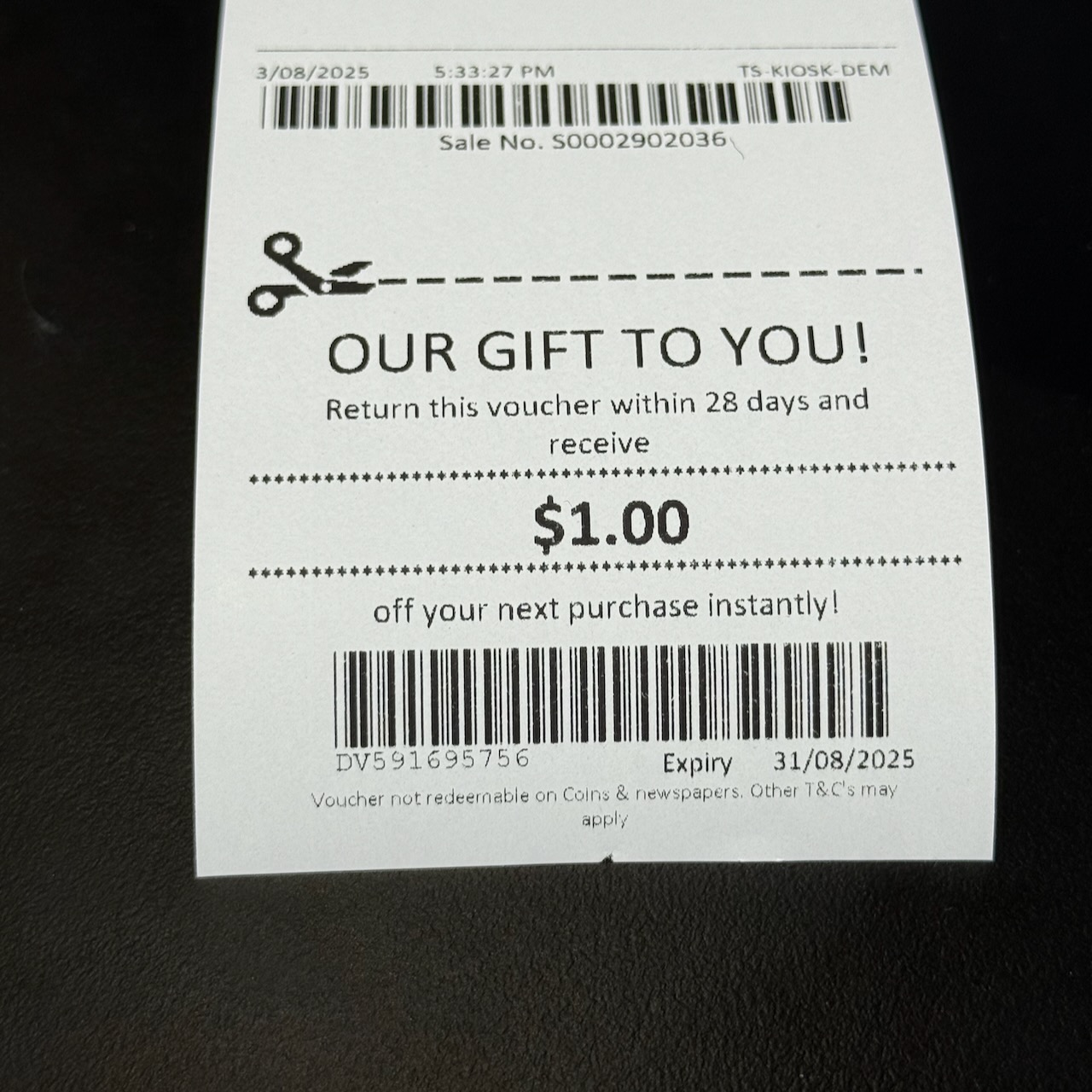
Loyalty works the same way. Instead of a points scheme customers forget about, you can print a voucher on the receipt that brings them back within a set time. You can record special dates and preferences too, so your team can offer the personal service that sets a local gift shop apart.

None of this replaces the owner’s eye for product. It backs it up with facts, and over time that’s what steers a shop toward steady profit.

Staying the course also means having people you can rely on. Our help desk is based in Australia and New Zealand, and it’s open on Saturdays when gift shops are busiest. You talk to a person, not a script. You also choose when to install software updates, so nothing changes at the counter in the middle of December.

The cost should be predictable too. Some software companies take a percentage of every sale. We don’t. You pick your own EFTPOS provider and keep control of what you pay.

If you’re opening a gift shop, buying one or looking to strengthen the one you have, we’d like to show you how Tower Systems could help. Already on other software? Send us your data first and we’ll confirm whether it can be brought across.

You can read more about Tower Systems for gift shops, call 1300 662 957 (0800 444 367 in New Zealand) or email sales@towersystems.com.au.

Contacting a human is easy.
Why gift shops outgrow Square and Shopify POS

W

Square and Shopify POS are fine tools. They’re built for everyone, which means they’re built for no one in particular. That matters more in a gift shop than in most retail businesses.

A gift shop is not a cafe. It’s not a clothing store either.

You carry many items, sometimes thousands of items, often only one or two of each.

You buy from dozens of suppliers, some of them small and quirky. Your trade swings hard with the seasons: Mother’s Day, Christmas, Valentine’s Day. A generic point of sale system doesn’t understand any of that, because it wasn’t built for it.

Here’s where software made for gift shops earns its keep.

Supplier invoices load electronically. When a delivery arrives with 200 new lines, you don’t type them in. The invoice imports, items are created or updated, and you’re back on the shop floor. Retailers tell us this saves hours every week.

Loyalty built for occasional shoppers. Points programs suit businesses people visit daily – that’s their function, to get people in more often, which is easier in a cafe or supermarket. Gift shop customers might visit a few times a year. Our loyalty prints a dollar voucher on the receipt, something shoppers can see and spend. Retailers using it report customers returning sooner and spending more per visit. Now, if you want a points based system, it’s there, included.

LayBy done properly. Not a workaround, not a plug-in. LayBy is part of how plenty of people shop for gifts, and the software handles it natively, including payments, reminders and reporting.

Reordering based on evidence. The software shows what’s selling, by item, category and supplier, so you reorder winners and quit losers. In a shop where margin is made through buying decisions, this is gold.

Reporting that shows where you make money. Which suppliers perform. Which categories carry the shop. Which don’t. You can’t get that from a system that treats every retail business the same.

Developed locally. Your type of retail is local. Software developed locally is more likely to serve that local focus you have.

There’s one more difference worth naming. Square makes its money clipping the ticket on every sale you make. We’re a software company. We’ve served local Australian retailers since 1981, and when you call for help, a real person answers, here in Australia.

If your software was made for everyone, it wasn’t made for you. That’s the case for POS software made specifically for gift shops.


We are Tower Systems. sales@towersystems.com.au

Garbage In, Garbage Out: How to Know if Your Retail Stock Data is Actually Accurate

G

A POS system reflects what you put into it. Feed it bad data and every report it produces is wrong. That might sound obvious, but in a busy retail environment — where stock arrives daily, staff turn over, and returns pile up — inventory data degrades faster than most retailers realise.

Poor data costs real money. It means stockouts on best-sellers, cash locked up in product that will not move, and numbers you cannot make decisions from. You do not have to guess whether your stock-on-hand figures are right. There are practical ways to check, and the right tools make staying accurate far less work than most people expect.

The stocktake: still the gold standard

Nothing confirms inventory accuracy like a physical count. Closing the shop for a full weekend count is not necessary anymore.

Tower Systems supports targeted rolling stocktakes on a specific shelf, category, or supplier group. Run them during quiet trading periods — before opening, after a delivery, or during a slow mid-week afternoon. Small, frequent counts catch discrepancies early, before they distort your buying decisions and margin reports. A full-store stocktake a couple of times a year, combined with regular section counts, gives you a solid base to work from.

Stop errors at the back door: AI invoice import

A lot of bad retail data enters at inward goods. Manual entry of cost prices, supplier codes, and product descriptions from paper invoices introduces typos. Every time. It is not a staff problem — it is a process problem.

Tower Systems has an AI Invoice Import tool built directly into the software. It reads digital PDFs, spreadsheets, supplier accounting exports, and even photos of printed invoices, then matches items and imports the data without manual entry. Fewer keystrokes means fewer mistakes, and fewer mistakes means stock counts you can trust.

Two daily habits that hold it all together

Systems help, but discipline matters too.

Track every sale individually. Generic open-department keys destroy stock counts over time and make category reporting worthless. Process returns at the time they happen — scanning them back in later means the numbers are wrong in the gap, sometimes for days.

Neither habit takes long. Both make a material difference.

The bottom line

Every manual entry is a risk. Every workaround compounds the problem. Rolling stocktakes and automated invoice importing reduce human handling of data, and less handling means fewer errors. When the data is right, you buy better, you waste less, and your reports tell you something useful.

Find out more at www.towersystems.com.au.

Advice for Small Business Retailers: Here’s Why Vibe Coding Your Own POS Software Probably a Mistake

A

Let’s talk about vibe coding and vertical market software.

Hi, I’m Mark Fletcher. I founded Tower Systems back in 1981. Back then I was a programmer. My languages of choice were Fortran (for more technical application) and PL/1 (for more commercial coding). The last programming I did was in the very early 1990s.

I also have owned retail shops for decades. Today, I have one physical shop and four online retail businesses. That retail experience is relevant to this. You can check me out on LinkedIn: https://www.linkedin.com/in/mark-fletcher-tower/

Early this year, I vibe coded a couple of applications. It was exciting, fun. One was a possible commercial project. I deployed a test version. It was very cool. But, it wasn’t commercial, certainly not to a standard I’d want money for.

I mention all that for perspective for what I want to say in this comparison of vibe coding versus buying commercial software. I should also note that I sold Tower Systems to Vela APX, a Constellation Software company. I’m still in the business and loving it by the way.

How does vibe coding compare commercial vertical market software?

Vibe Coding is a mainstream topic thanks to social media content pitching it. Plenty of people are making money selling courses and workshops about vibe coding and while vibe coding is cool, there are reasons that businesses need to be careful in approaching it.

Retailers read about vibe coding, about anyone being able to spin up an app in a weekend, and they start wondering: why am I paying for software when I could just build it myself?

It’s a fair question. But most of the time, the answer is: don’t.

Here’s the thing about commercially released software: it’s been through a process. Think of it like food from a licensed kitchen. Before it reaches you, someone has checked it, tested it, made sure it does what it claims. When you vibe code something yourself, you might end up with something that looks right and feels right. But unless you’re a developer, it probably has gaps.

Where does commercially released vertical market software differ to vibe coded software?

I spoke recently with a retailer who’d done exactly this. They’d built their own tool, and it handled some of what they needed. But not all of it. There were steps at the end of key processes that the software couldn’t complete, and so they completed them manually. Two to three hours a week, every week. When we looked at Tower Systems software covering the same ground, it handled the whole process end to end. Our software costs a few dollars a day. Their manual workaround was costing them hours.

There’s another reason to go commercial that doesn’t get talked about enough: collective knowledge. Software used across hundreds of businesses accumulates feedback that a single-user build never can. Every retailer using Tower Systems is, in a sense, contributing to the product. Their experience, their edge cases, their suggestions, that all feeds back into what gets built next. Retailers benefit from that even if they never submit a single support ticket.

The latest Tower Systems release is a good example. A meaningful chunk of the enhancements came directly from retailers. Not from our team guessing what might be useful, from people actually running shops telling us what they needed.

What is the value difference between commercial and vibe coded software?

When you’re weighing up vibe coding versus commercial software, think about what you’re actually comparing. On one side: something built quickly, for free, by someone who isn’t a software developer, with no QA process and no community behind it. But, since it’s personal you may feel more love for it. On the other: software built over decades, tested before release, shaped by hundreds of retailers across Australia and New Zealand, and updated regularly. But, since it is commercial it has a cost.

The food analogy I shared earlier holds. You wouldn’t buy a meal from a home kitchen that hasn’t met basic health standards. The same logic applies to software running your business.

Tower Systems builds specifically for specialty retail: bookshops, farm supply businesses, gift shops, bike shops, pet shops,  jewellers,  newsagencies, garden centres, toy shops, music shops, and more.

If you want to talk through whether it’s right for your business, reach out: towersystems.com.au, sales@towersystems.com.au, or call 1300 662 957.

Yes, this post is a sales pitch. It’s also true. And, it’s written by me: Mark Fletcher. Someone with decades of experience in software development and decades of experience owning and running retail businesses.

Oh, and, yes, these are all my own words.

Why Your Gift Shop Is Probably Sitting on $30,000+ of Dead Stock — and How to Find It

W

You know the feeling. You walk the shop floor before opening and there it is, a display area or a section of shelving that hasn’t moved in months, it looks good, you like it, but it hasn’t moved.

Typically, these are products you were certain would fly off the shelves, products you fell in love with at a trade show, products that are now quietly costing you money every single day they sit there.

Dead stock is one of the most common and least talked-about problems in independent retail.

Retailers don’t like talking about dead stock.

Most gift shop owners we speak to are genuinely surprised when they run their first proper dead stock report. The number is almost always higher than they expected. For a shop turning over $500,000 per year, it’s not unusual to find $25,000 to $40,000 worth of inventory that hasn’t sold in more than six months.

That’s not just money tied up on a shelf. It’s cash that could be buying products your customers actually want. It’s space that could be displaying your best performers. It’s your shop looking fresh and curated rather than cluttered.

How dead stock accumulates without you noticing

In a busy shop, reordering often happens on autopilot. A rep visits, you place an order based on instinct and what sold well last season. A supplier runs a trade deal and you buy more than you need to hit the minimum. A new range arrives and the old one doesn’t get cleared properly.

None of these decisions feel wrong at the time. But over 12 months, they compound. And because the stock is spread across hundreds of product lines, it’s invisible in your day-to-day operations.

The retailers who manage this well aren’t more disciplined than everyone else. They have better visibility. They know, at any point, exactly which products haven’t sold in 90 days, 120 days, or six months. And they act on that information before it becomes a problem.

Finding your dead stock in minutes, not hours

Retail software, POS software, should make this straightforward. A good stock control report lets you filter products by days since last sale, sorted by quantity on hand and value on hand. That combination, products with high stock levels that haven’t sold recently, is your dead stock.

Once you have that list, the path forward is clear:

  • Markdown and move it. A good discount on a product that hasn’t moved in six months is not a loss, it’s a cash recovery.
  • Bundle it. Combine slow-moving items with your bestsellers in a gift pack or value bundle.
  • Return it to supplier. Some suppliers will accept returns on slow-moving stock. It never hurts to ask.
  • Donate it. For stock that won’t sell at any price, a local charity can use it.
  • GET RID OF IT.

The AI advantage

Tower Systems’ AI-enabled POS software takes this further. Rather than running a report and manually identifying patterns, the AI insights tool analyses your report data and surfaces specific, actionable recommendations. It’s smart, helpful, and on your side.

The goal isn’t just to clear today’s dead stock. It’s to stop it accumulating again next season.

The cost of doing nothing

If your shop is holding $30,000 in slow-moving stock, that’s capital sitting idle. Reinvested in your top 20 bestselling lines, the same capital could generate significantly more revenue. The first step is knowing the number. Run the report. Be honest about what you see.

Book a free demo at towersystems.com.au.

Greeting Card Management: How Retailers Track Margins and Win

G

This post is for newsagents, gift retailers and any business selling greeting cards. Greeting cards are a high-frequency, habitual purchase. They offer strong margins,  typically 50 to 60 per cent on a retail basis. And they are, in the hands of most retailers, managed poorly based on our years of experience.

Greeting cards respond to attention in retail. Manage them well and make more money.

The result is a category that should be a consistent profit engine but often disappoints. Slow lines sit in prime fixtures while bestsellers run out. Returns are processed late. Supplier credits are missed. And the owner, buried in the daily demands of running a busy shop, never quite has time to audit what is actually happening on the card stand.

Here is how the retailers who manage this category well do it.

Know Your Range — and Edit It

The greeting card category has a long tail. Most card publishers offer designs across dozens of occasions, price points, and aesthetics. The temptation is to stock broadly and trust that customers will find what they need.

The data tell a different story. (By the way, we use data as plural since it is. Data points in the singular while data is a collection of data points. Sorry to get nerdy about this.) In most retail environments, a relatively small proportion of a card range, Usually 20 to 30 per cent of the titles, generates the majority of sales. The remaining stock ties up fixture space, fixture capacity, and working capital without earning its keep.

Effective card management starts with knowing your sell-through rate by title, by publisher, and by occasion. Your POS software should be able to produce this report quickly.

Manage Your Fixtures Like Real Estate

Every facing on a card fixture has a dollar value. The positions at eye level, at the entrance to your card section, and adjacent to your most-visited areas are worth more than the positions on the bottom row or in the back corner.

Place your bestselling titles — the everyday occasions, the humour lines, the price-pointed birthday cards that your customer base buys regularly — in your highest-traffic positions. Reserve your lower-traffic positions for niche occasions and slower lines.

Review your fixture allocation at least every quarter. A card range that was well-merchandised for Christmas does not necessarily suit the mix you need for the back-to-school and Valentine’s Day period.

Returns Management: The Margin Leak Nobody Talks About

Most greeting card publishers operate a returns or rotation system. Slow-selling titles can be returned for credit within specified periods. It sounds straightforward. In practice, it is one of the biggest sources of margin leakage in the card category.

Common problems include:

  • Returns processed after the credit window has closed
  • Damaged returns that the publisher rejects
  • Credits that are never reconciled against supplier invoices
  • Stock that is eligible for return but never identified and pulled

Your POS software should help you manage this systematically, flagging stock that has been on the floor for longer than your agreed rotation period, tracking the value of outstanding credits with each publisher, and reconciling credits when they arrive.

Retailers who manage this process carefully recover meaningful value that would otherwise quietly disappear.

Pricing Discipline in a Discretionary Category

Greeting cards are a discretionary purchase,  customers choose whether to buy, what to spend, and where to buy. This means your pricing needs to be competitive, but it does not mean discounting erodes your margin.

The retailers who win in the card category are those who offer clear price architecture: a good selection at entry-level price points, a solid core range at mid-price, and premium options for customers who want something special. This structure lets the customer self-select rather than feeling pressured, and it maximises the average transaction value across your card buyer base.

Be cautious about deep discounting on card stock. A card returned at 40 per cent off has probably lost you money once you factor in freight, handling, and the fixture space it occupied. Sell it through correctly priced, or return it in time for a credit.

You Are Not Your Customer

We have seen retailers only stock cheap cards, saying their customers will not buy expensive cards only to find that a trial of more expensive cards results in excellent sales. Too many retailers limit their business because of their own price bias.

Using Your Data to Drive Ranging Decisions

The best greeting card buyers in independent retail use their POS data to have better conversations with their publisher representatives. When a rep visits, they come prepared: sell-through rates by title, average sales per week by occasion, and a clear view of which new designs they want to trial and in what quantities.

This data-led approach puts you in control of the ranging conversation rather than the publisher. It also protects you from being oversold on new ranges when your existing stock is already well-represented.

Tower Systems newsagency and gift shop software gives retailers the category-level data they need to manage their card range actively. If your current system makes this reporting difficult, it is worth understanding what a purpose-built platform can do.

The greeting card category rewards active management. Tower Systems gives you the data to do it well. Book a free demo at towersystems.com.au.

The 5 Biggest Inventory Mistakes Gift Shop Owners Make

T

Not to be a downer but we see gift shop owners making mistakes that are easily avoided. This post offers advice based on what we have seen in an effort to help more avoid the mistakes and run a healthier and happier gift shop.

Running a gift shop looks Luke fun to many while it’;s hard work to those in it.

A gift shop is a business. Treat it as such and it will be more likely to thrive.

With hundreds of SKUs, dozens of suppliers, seasonal peaks, and the constant pressure of cash flow, inventory management is where many gift retailers quietly lose money , without ever quite identifying where it went.

These are the five mistakes we see often, and what you can do about each of them.

Mistake 1: Buying on Instinct Rather Than Data

Walk into any trade show or supplier showroom and the temptation is real. A beautiful new range catches your eye, the sales rep is enthusiastic, and before you know it you have committed to a minimum order of something you have no evidence will sell.

Too many gift shop owners love shopping for stock. That’s it. That’s the statement. They love to shop. The rest of the work running a shop too often is less loved.

Buying on instinct is the most expensive habit in gift retail. Your sales data — by SKU, by category, by price point, by season — is the most valuable buying tool you own. Before placing any order, ask yourself: what does my data say about this category? What price points have moved in this space in the past twelve months? What is my current sell-through on similar lines?

Good POS software makes this analysis fast. If pulling this data takes more than five minutes, your software may be working against you.

Mistake 2: Not Tracking Stock at the SKU Level

Some gift retailers operate with a rough sense of what is on the floor,  restocking when shelves look thin, writing off losses at year-end without ever understanding their source. This is inventory management by feel, and it is expensive.

Tracking stock at the SKU level means you know, at any moment, how many units of each line you have on hand, what it cost you, what it is worth at retail, and how fast it is moving. This precision prevents two of the most common losses in gift retail:

  • Over-ordering slow lines because you cannot see they are already in stock
  • Running out of fast lines because no reorder trigger was in place

The investment in setting up your software correctly, with every product accurately coded and categorised,  pays dividends for years. Do it once, properly. Follow the advice of your software supplier.

Mistake 3: Ignoring Shrinkage Until Stocktake

Shrinkage,  the gap between your theoretical stock and your actual stock, has multiple causes: theft, supplier short-shipment, point-of-sale errors, and damage. Most gift retailers only discover their shrinkage once a year at stocktake, by which time the losses are already embedded.

A better approach is to conduct regular cycle counts on high-value or high-risk categories throughout the year. Spend thirty minutes each week counting a different section of your store. Discrepancies caught early can be investigated. Discrepancies found at year-end can only be written off.

Your POS software should make cycle counting straightforward,  a quick comparison between your system’s expected count and a physical count, with the ability to log the result and flag variances for review.

Mistake 4: Building Gift Packages Without Tracking Components

Hampers, gift sets, and curated bundles are powerful margin-builders in a gift shop. But they create an inventory management problem if your software is not set up to handle them correctly.

When you sell a hamper containing a candle, a ceramic mug, and a box of shortbread, your software needs to deduct each individual component from stock automatically at the point of sale. If it does not — if you are managing bundles manually or recording them as a single custom item — your stock figures for each component become unreliable.

Unreliable stock figures lead to over-ordering, under-ordering, and the kind of end-of-year surprise that makes stocktake deeply unpleasant. The right POS software handles bundle building natively, keeping your component stock accurate in real time.

Mistake 5: Neglecting Supplier Invoice Reconciliation

You order 24 units. The supplier sends 22. You receive the invoice for 24. If your team is processing invoices manually and under pressure,  which is most of the time in a small gift shop,  this discrepancy may never be caught.

Structured invoice reconciliation, where your received quantity is checked against your invoiced quantity before the invoice is approved for payment, is one of the simplest ways to protect your margins. It is also one of the most frequently skipped.

POS software with AI-assisted invoice importing makes this process fast. Supplier invoices can be imported electronically, matched to purchase orders, and flagged for any quantity or pricing discrepancies, without manual data entry and without the risk of human error that comes with it.

The Common Thread

Every one of these mistakes has the same root cause: operating without reliable, timely data. The gift retailers who avoid them are not necessarily working harder,  they are working with better information.

Tower Systems POS software is built specifically for gift shop retailers. It handles high-SKU inventory, bundle management, electronic invoice importing, and AI-powered business insights. If your current software is not giving you this level of control, it is worth taking thirty minutes to see what is possible.

Tower Systems is purpose-built for gift shop retailers. See it in action — book a free demo at towersystems.com.au

Is Your Gift Shop Leaking Cash? 5 Hidden Profit Traps to Watch

I

Running a gift shop in Australia is as much about the “vibe” as it is about the stock. But even the most beautiful shopfront can have a “leaky bucket” when it comes to the bottom line.

With ever moving shopper habits and the rise of boutique “experience” shopping, the difference between a stressful month and a profitable one often comes down to the details you can’t see on the shelves.

Here are five more hidden profit leaks that might be draining your business, and how to plug them.


1. The “Dead Money” Shelf

Every retailer has a soft spot for certain products. Maybe you love those hand-poured candles from a local maker, but if they haven’t moved in six months, they aren’t “stock”—they’re dead money.

The Leak: Holding onto slow-moving items because you “might” sell them eventually. This ties up your cash flow and prevents you from buying fresh, trending stock that actually turns a profit.

  • The Fix: Run a Stock Turn Report. Identify anything that hasn’t moved in the last 120 days. Be ruthless. Bundle it with a bestseller or create a “Local Favourites” hamper to clear the deck and get your cash back into the bank.

2. The EFTPOS Fee Creep

In a world where “cash is rare,” merchant fees are a silent killer. Many gift shop owners set their bank terminal up years ago and haven’t looked at the fine print since. Small percentages on every transaction add up to thousands of dollars by the end of the financial year.

  • The Fix: Review your merchant rates. Are you using Surcharge-Free EFTPOS or Least Cost Routing? If your POS software integrates directly with your terminal, you can often automate the surcharging process, ensuring the bank’s fees are passed on or managed more efficiently, putting that 1.5% or 2% back into your pocket.

3. The “One-and-Done” Customer

It is significantly more expensive to find a new customer than it is to keep an existing one. If someone buys a beautiful ceramic vase and you never hear from them again, you’ve leaked the “lifetime value” of that customer.

  • The Fix: Use Clienteling. Your software should allow you to quickly capture a name and an interest (e.g., “Loves Australian Botanicals”). When a new range arrives, a simple, automated SMS or email to those 50 specific people is far more effective (and cheaper) than a generic Facebook ad.

4. Pricing Inertia (The Inflation Gap)

With supplier costs and freight prices fluctuating constantly, “setting and forgetting” your retail prices is a recipe for disaster. If your supplier raises their price by 50 cents and you don’t update your POS, your margin shrinks instantly across every single sale.

  • The Fix: Use Automated Price Updates. When you import your invoices (ideally using an AI PDF Importer), your system should flag cost increases immediately. This allows you to maintain your GP% (Gross Profit) without having to manually check every single item against an old price list.

5. The Labour Cost of “Busy Work”

If you or your staff are spending Saturday mornings out the back unboxing stock and manually writing out price tags or entering data into a spreadsheet, you aren’t just “working”—you’re leaking profit through labour inefficiency.

  • The Fix: Shift the focus to the shop floor. Automation isn’t about replacing people; it’s about freeing them up to actually sell. If your POS handles the labels, the stock receiving, and the re-ordering at the click of a button, your staff can spend their time gift-wrapping and upselling, which is where the real money is made.


Stop the Leaks Today

You don’t need to be a data scientist to run a profitable gift shop. You just need the right tools to show you where the gaps are. At Tower Systems, we specialise in helping Australian specialty retailers simplify their business so they can focus on what they love. Call 1300 662 957 or 0800 444 367 (NZ) or email sales@towersystems.com.au.

Advice for gift shop owners: Finding the right path for your gift shop software

A

Choosing a point of sale system for your gift is a significant decision for any gift shop owner.   At Tower Systems, we understand that while we are a software company, our primary goal is to provide advice that stands up to scrutiny. We want customers for whom our software is a genuine fit. For small business retailers in Australia and New Zealand, the following guide offers a structured, professional approach to making the right choice.

If we think we are not right for you, we will tell you and explain why, and wish you all the best on your search.

Define your operational needs

The first step is to be certain of what matters to your business today. Look at your daily operations and identify what drives efficiency, profitability, and personal enjoyment. In a gift shop, this might involve how you manage diverse inventory, handle special orders, or track customer loyalty.

Do not only look at the present. Consider what will matter in the mid-future. Your software should be able to scale and adapt as retail trends evolve. This includes looking at integrations with accounting platforms like Xero or digital receipt options that modern shoppers expect.

Consider social and corporate responsibility

Reflect on what matters to you from a social responsibility perspective. For many Australian and New Zealand retailers, dealing with a locally based company is important. You may prefer to support a business that is Australian-made and supported, one that pays its fair share of tax locally.

Personal customer service is another factor. Decide if you value having access to local support staff who understand the specific nuances of the Australasian retail landscape.

Take ownership of the process

Don’t outsource the research. By managing the process directly, you remain in control and fully understand the capabilities of the tools you are considering.

Work at your own pace. Be wary of sales pitches that include “limited time deals” designed to make you act quickly. If a provider claims their software has specific functionality, ask them to show you. Anyone can say yes to a feature request, but actions speak louder than words. Only believe what you see demonstrated live.

Focus on value over price

It is a mistake to choose software based price. The right system is an investment that should deliver a measurable return. Ask yourself four critical questions when evaluating any POS software:

  1. Will it make the business more money?

  2. Will it save time for you and your staff?

  3. Will it increase the eventual sale value of the business?

  4. Will it make you happier in your daily work?

More expensive software may offer advanced features that deliver a far better financial return than a cheap or free alternative. The goal is to harvest value through better inventory management, smarter loyalty programs, and efficient postcode tracking to understand your reach.

Scrutinise the contract

Always read the contract thoroughly. In the small business sector, long-term lock-in contracts often favour the software provider rather than the retailer. A fair agreement should allow you to exit with 30 days’ notice if the software is no longer serving your needs. Avoid being trapped in a long-term payment plan for a system that does not fit your workflow.

The importance of retail-savvy support

Software is only as effective as the people who support it. Look for a provider that offers training and support from individuals with actual retail experience. In the gift shop world, understanding how to manage seasonal peaks and varied suppliers is vital.

Important local gift shop software needs

Based on our experience serving local independent gift shops, here’s what matters, from what they tell us:

  1. Easy and accurate selling.
  2. Time saving AI tools analysing business performance.
  3. Integration with Xero.
  4. Integration with Shopify for online sales.
  5. Easy comparison of supplier performance.
  6. Auto replacing ment to reduct stock outs.
  7. Good stocktaking tools.
  8. Loyalty facilities shoppers love.
  9. Easy importing of supplier invoices.
  10. Access to integrated EFTPOS for the bank of choice.
  11. Regularly evolving software.
  12. Local support.
  13. Being heard.

It’s easy for a software customer to feel insignificant or unheard. At Tower Systems we only serve local small business retailers, independent retailers. Every customer is of equal value to us. Every customer is heard. 

Choosing the right software can significantly increase your profits, while the wrong choice can be a costly burden. Take your time, take detailed notes, and only select the system that feels right for your specific business. When local independent gift shops succeed, the owners, staff, and the entire community benefit.

If you would like to see how Tower Systems serves over 3,000 local retailers with specialized gift shop features, we invite you to request a no-obligation demo. You can reach our team at 1300 662 957 in Australia, 0800 444 367 in New Zealand, or via email at sales@towersystems.com.au.

The insights dashboard: Finding time to grow your business in POS software

T

For many small business retailers, the daily grind can be all-consuming. There is a significant difference between being busy and being profitable, yet finding the time to bridge that gap often feels impossible when you are managing a lean roster and a physical shop floor.

At Tower Systems, we understand this challenge because our team includes people with lived, current retail experience. We know you don’t always have an hour to walk the aisles looking for gaps or analyzing spreadsheets. That is why we developed the Insights Dashboard – a free facility built directly into our POS software that constantly monitors your business performance in the background.

Turning data into actionable steps

The Insights Dashboard is designed to provide immediate value, even if you only have thirty minutes to spare. It curates data and translates it into plain-speaking insights that help you make informed decisions quickly.

Two of the most impactful features within the dashboard include:

“What am I missing out on?” This tab identifies specific, actionable steps you can take to improve sales and boost profit based on your current data.

“What’s not working?” This provides a direct look at underperforming areas of your business, allowing you to address issues without having to manually hunt for them.

More than just a cash register

It is one thing to use POS software as a replacement for a cash register to process payments and work out change. It is another thing entirely to use that software as a tool for success. The Insights Dashboard acts as a starting point for your daily operations, offering a clear view of how to improve your business performance right now.

Because we build, support, and train our users on this software ourselves, we are personally invested in ensuring these tools work for the local, independent retailers we serve. Our goal is to help you run a more efficient and successful business by making your data work for you.

If you have a spare window in your day, we encourage you to explore the dashboard. It is a powerful resource for any retailer looking to move beyond “busy” and toward genuine growth.

At the heart of Tower Systems is a commitment to the success of local, independent, specialty retailers. We recognise that your time is your most valuable asset, which is why our Australian-based team focuses on creating tools that provide clarity instead of complexity. Whether we are helping you bridge the gap between your shop floor and a Shopify store or providing the data-driven insights needed to make 2026 your best year yet, our goal remains the same: to empower your business to thrive.

We are grateful for the opportunity to serve the shops that anchor our communities and look forward to continuing that partnership through innovation and honest, local support.

…

The right POS system for any retail business depends on the specific needs of the retail business. Tower offers POS software made specifically for local small business retailers in a selection of retail channels. To see if we might help you…, request a free, no-obligation demo today. 

Call 1300 662 957 in Australia or 0800 444 367 in New Zealand. Or, email sales@towersystems.com.au. 

Enhancing independent retail with vertical market POS software

E

Selecting the right point-of-sale system is a critical decision for any independent retailer. In this video, Mark Fletcher, founder of Tower Systems, discusses why vertical market software is often a superior choice compared to generic, one-size-fits-all solutions. He explains how specialised technology can help local businesses maintain a competitive edge in an increasingly crowded marketplace.

Tailored solutions for specialty niches
Generic software often lacks the nuanced features required by specific industries. For instance, jewelers require non-adhesive labeling for delicate inventory, while garden centres need labels that can withstand the elements. Similarly, stores selling products by weight or length, such as fabric shops or butchers, require precise fractional calculations and scale integration. Vertical market software is built with these unique requirements in mind, ensuring that the technology supports rather than hinders daily operations.

Driving efficiency through automation
Modern retail management now relies heavily on automation to save time and reduce errors. The software discussed uses artificial intelligence to monitor inventory levels and predict future stock requirements. By automating supplier invoices and reordering processes, business owners can step away from the back office. This shift allows staff to focus on customer service and floor sales, which are vital components for the success of any specialty shop.

Strategic data utilisation
The video also explores how specialszed software turns raw transaction data into actionable business intelligence. Rather than just recording sales, the system tracks specific customer buying patterns and seasonal trends relevant to the particular industry. This data allows independent retailers to make informed decisions regarding marketing and stock selection. By leveraging these insights, business owners can create more personalised shopping experiences that build long-term customer loyalty.

Supporting the local retail community
Beyond the technical features, the value of a specialized system often lies in the support behind it. Tower Systems provides localized assistance tailored to the Australian and New Zealand retail landscapes. This ensures that help desk staff understand the specific challenges and supplier relationships unique to local newsagents, pet shops, and bike stores. Choosing a partner that understands the local context can be as important as the software itself.

…

The right POS system for any retail business depends on the specific needs of the retail business. Tower offers POS software made specifically for local small business retailers in a selection of retail channels. To see if we might help you…, request a free, no-obligation demo today.  

Call 1300 662 957 in Australia or 0800 444 367 in New Zealand. Or, email sales@towersystems.com.au. 

What’s the best website platform for a small retail business Wix, Shopify, Woo Commerce or Squarespace?

W

We are often asked this question by small business retailers: What’s the best website platform for a small retail business Wix, Shopify, Woo Commerce or Squarespace?

We have years of experience developing websites for small business retailers using Shopify, Magento, Big Commerce and WooCommerce. The advice we provide in this article is based on our years of experience serving thousands of small business retailers.

The best e-commerce platform for your business will depend on your technical experience, your budget, your position in your online journey and the goals you have for your website. Each of these platforms offers different benefits. from the outset, though, in our experience, Shopify is the best solution for easy of use, ease of change without technical skills, the ability to scale and ease of winning shoppers from the already considerable Shopify customer ecosystem.

Wix offers easy drag and drop, which can see like a big time saver for the novice. In reality, Wix websites can often become messy, overloaded. It can be a good platform to figure out what you want but our experience is that it’s not ideal once you are up and running and building your online business. We think it’s unlikely you’ll find hero websites for small business retailers based on Wix. If you need a site up in an hour and want total freedom to drag things around the screen, Wix could be a good choice today.

WooCommerce is a plugin for WordPress. It’s made for use by technically skilled people. You do the work, and once you;’ve done that you will tend to have to do more work. This tech work can distract you from running your retail business. Woo is terrifically flexible, which comes as a labour cost for you or for the web developer you hire. If you already have a WordPress site and want to avoid monthly subscription fees, this offers the most freedom, provided you have the technical skills and truckloads of time to manage it.

Squarespace is offers beautiful looking websites with an easy to use back end for adjustment. It’s heavily image-focused. You can’t “break” a Squarespace site as easily as a Wix site because the editor forces you to stay within a grid. Squarspace lacks some of the finesse of Shopiufy for businesses that need more, especially when it comes to shipping flexibility. fI selling “the vibe” is as important as selling the product, Squarespace might be your answer.

Shopify is the best solution for local small business retailers in our experience. Shopify themes make it easy for you to change the look and feel of your website without hiring a web developer. Shopify integrates with terrific local shipping options (Sendle, My Post Business etc) and Shopify validates Australian addresses incredibly well at checkout, which saves you money on “return to sender” errors. It is the industry standard for a reason. If your goal is to grow, Shopify handles the “boring” stuff (hosting, security, checkout compliance) better than anyone in our experience.

We have years of experience using Shopify ourselves – when we offer advice to retailers on e-commerce, it comes from a place of personal experience as well as extensive technical experience and years building Shopify websites for so many different retailers.

Now, we’re not saying Wix, Squarespace and WooCommerce are bad. What you choose for your business needs to be what you want/need.

What we are saying is do your research – choose the ecommerce platform that serves your technical skills, budget, business plans and how you see your business living online.

Low cost websites may be low cost because of the work you have to do to manage and modify them.

Fast to setup websites may be fast because they don’t go as deep within your business.

Key to success is you knowing what it is that you want / need for yourself and for your business. Saying you want a website is not enough. What do you want from it?

Take your time. Figure out what you need, want and can afford. Look at examples of websites for your type of business. Consider web developers local to you, people who understand your business, people you can speak with. Ask why they recommend what they recommend.

We recommend Shopify for speed to launch, ease of change, non technical back end management, ease of scale, wonderful integrations and access to a huge ecosystem of shoppers. It’s what we use and what many of our local small business retail customers use.

Web development is unregulated. Be careful. There are some who know the words to say to dazzle less technically literate folks into spending money with them only to never deliver what the business wants / needs. Get any promises in writing – including delivery timing and website functionality.

Be sure you know the business you are dealing with. Often, we developers are not local as they may pitch.

Do your due diligence before you sign any contract or pay any money. We’ll say again: take your time.

This decision rests entirely on your business’s ultimate ambition. If you view your online store as a serious, scalable retail channel, one that you need to easily manage alongside your physical operations, integrates effortlessly with local logistics, and provides a reliable, secure foundation that won’t require a developer every time you want to make a change, then Shopify is our recommended investment.

While Wix and Squarespace offer beautiful simplicity for the start-up, and WooCommerce offers technical control, Shopify is purpose-built for the commercial rigor of a growing retail business, offering the best balance of ease-of-use, power, and a vast ecosystem of apps and support designed to help Australian retailers move more stock with less technical overhead.

Shopify is a good small business e-commerce solution, which can grow as you grow. We had one customer using Shopify go from $50,000 in their launch year to $2.5 million by year four. The growth came from their smart business decisions. Shopify made it easy to manage the growth.

…

If you are considering a website for your retail business, consider Tower Systems. Call 1300 662 957 in Australia or 0800 444 367 in New Zealand. Or, email sales@towersystems.com.au. If we feel we are not right for you, we will say so.

Retail Automation: Why the Tower Systems & Xero Link is a “No-Brainer” for Business Owners

R

Okay, yes, for sure, we are biased. This is a blog post pitting our POS software Xero integration. We think it’s awesome. We made it to be awesome, for local small business retailers. We first made it back when we had our own shops and used our POS software ourselves and our in-house CFO needed to save time and gain access to accurate data. That was years ago. The Xero POS software link we have today are as good, as useful – and solely made for local small business retailers.

Running a retail business often means wearing multiple hats. One moment you are on the floor serving customers, and the next you are in the back office trying to make sense of spreadsheets. In a recent discussion between Mark and Michael from Tower Systems, they explored how the Tower Systems POS integration with Xero is changing the game for retailers—specifically by removing the headache of manual bookkeeping.

Here is why this integration is rated an “11 out of 10” by the experts.

1. Tested in the Real World

Michael isn’t just a software trainer; he’s a former retail business owner who managed his shop remotely from another state. He relied entirely on the data flowing from his POS to his accounting software to run the business.

For Michael, the integration wasn’t just a feature; it was a necessity. It allowed him to trust that the financial data being used for BAS and tax reporting was 100% accurate without him needing to be physically present to check the till every day.

2. Accuracy Over Manual Entry

The biggest takeaway from their conversation is the elimination of human error. When you manually enter daily sales figures, mistakes happen. By automating the flow of data between Tower Systems and Xero, you ensure that your books are pristine.

As Michael notes, “We didn’t have to pay someone else to input any of our data manually… it was just there”. This automation frees up business owners to make better decisions based on accurate, real-time data rather than fixing data entry errors.

3. It’s Included (Yes, Free)

A common pain point in the software industry is the “hidden cost” model, where essential features like loyalty programs or accounting integrations cost extra.

Mark highlights a key advantage of the Tower Systems approach: the Xero link is included at no extra cost. Whether you are a small startup or an established store, you get the same professional-grade integration without paying for an additional module.

4. The “Golden Rule” of Setup

If you are ready to set this up, Michael offers one crucial piece of advice: Wait until you have been trading for a week or two.

It might seem counter-intuitive, but it is impossible to test a data link if there is no data to export. By waiting a short period, you can perform a “catch-up” export for those first few weeks, ensuring everything lines up perfectly.

Furthermore, always bring your bookkeeper or accountant to the setup meeting. While the software is easy to use, having a financial professional present ensures that your tax codes, liability accounts, and ledger mappings are compliant from day one. As Michael explains, he can translate the “software speak” into “bookkeeper speak,” bridging the gap so you don’t have to.

Summary

If you are still doing your retail books manually, you are losing time and risking accuracy. As Michael puts it, why wouldn’t you use a tool that saves you hours of work and helps you sleep better at night knowing your data is correct?

…

The right POS system for any retail business depends on the specific needs of the retail business. Tower offers specialty retail business software made for local small business retailers. To see if we might help you…, request a free, no-obligation demo today. 

Call 1300 662 957 in Australia or 0800 444 367 in New Zealand. Or, email sales@towersystems.com.au. 

Software made for local gift shops helps them shine

S

Local gift and card shop owners in Australia and New Zealand  need to be careful when considering a computer system for their business.  While some computer companies claim to have software suited to gift and card shops, few actually do.

There’s an overseas company claiming free software. What they want is a percentage of every sale you make. Support is offshore. Software is developed offshore. Value is not obvious for local small business retailers who want to pitch local.

There is another overseas software company chasing business here but not offering any local sales people or support. For businesses where local matters, we think this will matter too.

Gift shops are specialty retail businesses with specialty retail needs. That’s where we play here at Tower Systems, we make POS software for specialty retailers, in Australian and New Zealand.

Just as you would not go to a general practitioner for specialist medical advice, gift and card shop owners ought to be wary of buying from a general computer business.

While generic software programs may handle general aspects of the business, they will most likely not link to card companies, provide industry specific reporting or handle other aspects unique to your business like special orders or loyalty tuned to your local business needs.

The card company link is important since key card companies in Australia provide electronic invoices and receive returns data electronically – saving considerable time in-store.  There are other benefits from a deeper card company relationship through specialty software that can make a big difference.

Another area where specialist gift shop software will help is with the tracking of boxes.  For example – imagine a computer system which tells you where the box for an item you have just sold is located.  No more searching drawers or shelves in the back room.  A specialist gift shop software package will tell you where the box is instantly and save your time for customer service.

Specialist gift shop point of sale software can do more than track boxes or track your sales.  It can drive the business on many fronts – increasing sales, reducing costs and enhancing the sale value of the business.

Good software will also help you operate in your individual way – many gift shop owners have expressed that they do not want to become a clone business since if they wanted that they would have bought a franchise.

Gift shop owners ought to consider specialist gift shop facilities when considering the best IT solution for their business. For example, consider these facilities:

Rewarding Customers.  With the fuel and other loyalty programs around today it is important for a gift shop to have a loyalty offer.  The best loyalty offers are those which bring people back to your shop to accrue rewards which can then be spent in store.  Good gift shop software will track customer purchases and allow you to build a reward system which builds your business.

Special orders.  Imaging having a system which sends your customers a text message advising if an item ordered in specially has arrived.  This saves you time and ensures the customer if reminded to collect the item.

Basket analysis.  Knowing what customers are buying with what helps you analyse your business beyond raw sales success.  For example, if you sell a range of glassware it may be that one item, not the top seller, is sold more often with other items and thereby is more ‘efficient’ for the business.  While strong single sales are good, sales with multiple items are more valuable for a gift shop as it boosts the margin per sale.  Good basket analysis tools can be gold in the hands of a goof business operator.

Fast Seller Tracking.  It is challenging to watch every item in the shop.  Fast Seller tools do this for you and alert the owner when an item is moving faster than in the past or faster than other items in the category.  Knowing this allows the business to respond and use this traffic to build other sales.

Employee sales tracking.  Knowing who sold what and when allows the business to pay incentives for success.  Major retailers use commissions very effectively to get employees from behind the counter and into the body of the shop guiding customers to purchase.

Analysing sales.  Unlike other retailers, gift shops are individual businesses, often carrying items which are one off.  Sales therefore need to be coded so that the owner can track the department, category and supplier equally with the individual items.  This enables buying to be within the successful categories if not the exact same item.  Armed with this information at trade shows helps nurture better buying.

Ratios.  Good business starts with good measurement and good measurement is all about ratios – return on floor space, return on investment and stock turn.  While a gift shop may look attractive and have friendly staff, if the stock is not turning the business will fail.  .

Good software can make or break any business.  This is why gift and card shop owners need to ensure that the software they choose is suited to their business.  Settling for a general software program may cost less in the short term but the saving may be false if it does not help the business grow.

…

The right POS system for any retail business depends on the specific needs of the retail business. Tower offers specialty retail business software made for local small business retailers. To see if we might help you…, request a free, no-obligation demo today. 

Call 1300 662 957 in Australia or 0800 444 367 in New Zealand. Or, email sales@towersystems.com.au. 

AI: Levelling the Playing Field for Small Business Retailers

A

You might have seen the news this past week that Coles is rolling out an enterprise-wide partnership with OpenAI. When we saw that story at Tower Systems, our first thought wasn’t about the competition. It was: “This is fantastic news.”

This move by a retail giant validates what Tower Systems has been focused on for some time: AI isn’t just a gimmick for the big end of town; it’s a genuine “competitive game-changer” for independent, local retailers, including jewellers, bike shops, gift shops, produce businesses, newsagents and other small businesses we serve. It’s leveling the playing field. And the best part? You don’t have to wait. While Coles is just announcing their plans, local, independent retailers are already using powerful AI tools every single day.

We recently made a video discussing this, where we highlighted how Tower Systems has been embedding AI tools from OpenAI, Google Gemini, and others directly into our point-of-sale software for a long time now. It’s not about “future tech”; it’s about practical tools that solve real problems for small business owners.

In the video, we discuss how our customers are already using AI to:

  • Save hours of admin by automatically analyzing and importing virtually any supplier invoice, with no special setup required.
  • Market smarter by generating unique product descriptions and blog posts that speak in their business’s authentic voice.
  • Boost profitability with plain-English reports that identify what’s not selling, what’s overstocked, and even potential theft, long before it becomes a major issue.
  • Prevent lost sales by getting alerts on popular items you’re about to run out of.

As mentioned in the video, we rely on these and more AI tools in our own retail shop – to save time, make better-informed decisions, and run a smarter, more efficient shop.

This technology is here, it’s accessible, and it’s already making a fundamental difference for local businesses. The Coles announcement is a great signal for the entire retail sector and all who serve it that AI is no longer an option; AI is an essential part of modern retail.

We encourage you to watch the video to see a full breakdown of what this means for local small business retail and how you can leverage this power in your own independent business today: https://www.youtube.com/watch?v=hwRHiHlWcVg

As you can probably tell, we’re excited about AI. It makes accessible to small business retailers opportunities for more effectively competing – as plenty are already finding. It’s a terrific opportunity for efficiency and growth.

And, when you’re researching AI, get to the facts. Some software companies say they have AI tools, when they don’t. It’s important you see for yourself what’s available today as this matters

The 5 steps to finding the right software for your shop

T

Finding the right software for any shop is vital for the right software can add tens of thousands of dollars to the bottom line of your business. The wrong software, on the other hand, can cost a retail business tens of thousands of dollars.

The right software is the software that best serves your needs for a cost that is genuinely affordable and is flexible for you as the business evolves.

Here are our recommended 5 steps to finding the right software for your shop.

Step 1: be sure of what you need.

Make a note of everything you want to use the software for, with sub notes as to the detail. Make notes about the service expectations you have – for example, how easy is support to access, what are the hours of availability, what additional training options are there, is there a process for suggesting software enhancements.

The more detailed your approach before engaging any company the better the outcome for you. This is not something to wing.

Choose the software and the team behind it and not one individual.

Step 2: know your budget.

How much do you want to spend monthly all up for all terminals in your business and any additional facilities you want to use? Is the contract a lock-in or can you quit at any time? How do you pay? Are there any additional costs – some software companies require you to use a specific payments platform for transactions in the shop, which can have a cost beyond average.

Total cost of ownership is a thing – be sure you fully understand this for each POS software package you consider.

Good software companies are transparent about their pricing.

Step 3: see it for yourself.

Have the software demonstrated to you, completely to your satisfaction, covering every area of the software you request. Ask many questions. Get them to record the demonstration and give you a copy – their response speaks to their transparency.

If you are not sure, see it again. A good software company will welcome demonstrating the software to you again.

Each demonstration is an opportunity to learn more about the software company as well as the software itself.

Step 4: do it yourself.

Don’t outsource this. Do the work yourself. Treat it as the big decision it is. Take your time. Raise every doubt you have. Get every promise in writing. The more thorough your approach, the better the outcome for your business.

Consultants can be helpful. But, they are not the ones who will use the software, and, sometimes they can bring a bias to consideration that is not in the interests of your specific business.

Step 5: get to it.

Okay, you’ve made your decision. Now work it, get the most from it. Learn it well and make sure all in your business do too. Use it. Push it. Treat it as an asset that needs to deliver a return. Prove through your approach that your homework paid off.

A bonus step: be in control.

Take your time. Make the decision when you are ready. Beware tricks and manoeuvres designed to get you to make a decision when you are not read.

This is your decision to make, when you are ready.

Choosing your software is not just a one-off purchase; it’s the start of a long-term relationship with the software provider. The company you choose will become a key partner in your business operations. Their approach to service, their culture of innovation, and their understanding of your specific retail needs will directly impact your ability to grow and adapt. This is why Step 1 (being sure of what you need) and Step 3 (seeing it for yourself) are so critical—you are not just assessing a product, you are assessing a partner.

The advice provided here will stand the test of scrutiny. Our approach here at Tower Systems is to provide transparent advice on which you can rely. If at any time in our discussions with a prospective customer we feel we are not the right fit for a business, we will say so.

Our ideal POS software customer is a local independent small retail business, a specialty retail business with no more than 10 retail outlets. Most of our customers have one shop. Our focus on small businesses gives us a customer community where all are equal.

As a company based in Hawthorn, Victoria, we are situated to serve Australian and near by businesses well. We are grateful to count plenty of shops in New Zealand as customers.

…

While the right POS system for any retail business depends on the specific needs of the retail business, Tower Systems was built to serve  Australian and New Zealand local small business specialty retailers. To see how we can help you…, request a free, no-obligation demo today. 

Call 1300 662 957 in Australia or 0800 444 367 in New Zealand. Or, email sales@towersystems.com.au. 

An easy way for retailers to apportion the cost of freight across products on a supplier invoice

A

From Frustration to Efficiency: Simplifying Freight Cost Allocation

Handling the cost of freight can be a significant challenge for any retail business. For some, a substantial freight charge on an invoice can be a source of frustration. For others, the practical struggle lies in accurately apportioning that single cost across all the different items in the shipment.

Let’s start with the frustration. The simple truth is that every single item you receive has a freight cost associated with getting it to your store. Sometimes this cost is clearly itemised on your invoice; other times, it’s hidden within the cost of the goods themselves. But either way, it is always there.

The second challenge is the practical one: how do you accurately assign a portion of a $150 freight bill to hundreds of individual products on an invoice? This is where our Tower Systems POS software can help make the process easy.

In our software, you can take the total freight charge shown on an invoice and have it automatically apportioned across all items received. This ensures the landed cost of each product is accurate. The system is flexible, too. If you feel a specific product should carry more or less of the freight burden, you can easily adjust it manually. Plus, if your invoice has more than one freight charge, you can add them all in to be spread across the items.

Handling freight costs accurately and quickly is essential for maintaining healthy margins. Our software is designed to save you time on these crucial back-office tasks. We believe that every minute saved is valuable. Labour has a cost, and the more we can do to help retailers reduce this, the better.

Our software provides independent small businesses with a framework for consistency in their operations. By simplifying processes like freight allocation, we help you establish a reliable and accurate method for reflecting the true cost of your goods, paving the way for smarter pricing and better business decisions.

We love helping local small business retailers thrive. We do this for bookshops, sewing shops, music shops, garden centres, pet shops, toy shops, produce businesses, stockfeed businesses, jewellers, firearms dealers and more – all specialty retailers, all with unique needs, yet businesses with common needs when it comes to managing freight costs.

The power of a $2 Discount: Unlocking bonus revenue you didn’t know you had

T

In a shop using our Tower Systems POS software the other day, we saw first-hand the valuable difference $2 can make. A customer completed their planned purchase and received a discount voucher on their receipt offering $2.00 off their next purchase. They glanced at the voucher, paused, turned around, and picked up a leather purse for $99.95.

“Why not treat yourself,” they said almost to themselves.

This single, small moment perfectly illustrates the powerful psychology of a simple, tangible reward. The $2.00 wasn’t just a discount; it was the permission the customer needed to indulge. It transformed a completed transaction into a brand-new, high-value sale.

This is something we have seen and heard about from retailers since we first launched discount vouchers in our POS software twelve years ago.

This powerful sales-driving tool isn’t a future feature or a costly add-on. Discount Voucher facilities are built into our Tower Systems POS software right now. They are easy to set up, effortless to manage, and continue to deliver bonus revenue for a minimal, often zero, cost.

Why these simple vouchers work so well

The effectiveness of this feature lies in its straightforward and honest approach. In a world of complex loyalty schemes, the direct discount voucher cuts through the noise.

  • Transparency is key: We all know what a dollar is worth. When you offer $5.00 off, the value is immediate and universally understood. This clarity is more compelling than abstract points systems. Who knows how much a point is worth? The customer has to do mental gymnastics, recall the rules of the program, and wonder about the true value. A dollar discount is instant gratification.
  • It feels like ‘found money’: A voucher printed on a receipt feels like an unexpected gift. This positive emotional response creates goodwill and encourages the customer to spend their newfound “cash” immediately, just as our purse-buyer did.
  • It drives immediate action: The voucher creates a compelling reason for a customer to either return to your store soon or, even better, to continue shopping right there and then. It turns a single purchase mission into a browsing and discovery session.

Putting vouchers to work in your business

Your Tower Systems software provides the flexibility to tailor voucher campaigns to your specific business goals. You can set them up in minutes to:

  • Reward every customer: Set up a simple “catch-all” voucher that prints on every eligible receipt, offering a small discount on their next purchase. This is a brilliant way to encourage repeat business.
  • Drive larger sales (spend & get): Configure vouchers to be issued only when a customer spends over a certain amount. For example, “Spend $100 and get a $10 voucher for your next visit.” This incentivises customers to increase their basket size.
  • Move specific stock: Need to clear out last season’s items or promote a new product line? Create vouchers that are only valid for specific departments or categories (e.g., “$5.00 off any purchase from our new giftware range”).
  • Re-engage lost customers: Use your customer data to identify shoppers who haven’t been in for a while and send them a targeted “We Miss You” email.

The setup is simple, the impact is real

Activating this feature is straightforward. Within your Tower Systems POS software, you can easily define the voucher’s value, set an expiry date to create urgency, specify a minimum spend for redemption, and control when and how it is issued. The POS automates the entire process—from printing the offer on the receipt to tracking and redeeming it—ensuring it’s a seamless experience for both your staff and your customers.

Don’t underestimate the power of a small incentive. The story of the $2.00 voucher and the $99.95 purse is not an anomaly; it’s a repeatable strategy. We have seen this ourselves.

Explore the discount voucher facilities in your Tower Systems software today. Start turning every transaction into a compelling opportunity for your next sale.

Are you looking for an alternative to Shopify POS?

A

If you are looking for an alternative to Shopify POS for your shop, our Tower Systems POS software could be worth considering.

Now, to be clear, what we are talking about there is POS software for a physical shop.

Shopify started life as an e-commerce platform and that remains the core focus of their business. The Shopify POS app or service is an add-on for the physical shop.

Like many POS software companies, years ago we went through an approval process with Shopify to be an approved integrated POS software solution for Shopify – to offer in-store POS that’s integrated with their e-commerce platform. we continue to offer this today with many of our POS software customers using this.

What’s different about our POS software offering and how we compare to Shopify POS is that we are an in-store first solution, a physical retail first solution. That’s our specialty. In our software we go deep into serving the needs of retail businesses, workflow needs, operational needs, business growth needs. We also go deep into the needs of specific vertical retail channels: jewellers, bike shops, music shops, bookshops, pet shops, firearms dealers, camping shops, gift shops, newsagents, produce businesses, farm supply businesses, garden centres and many more.

This deep specialisation in our POS software matters because it addresses unique, real-world workflows that generic systems cannot. For a bike shop, it means seamlessly tracking serialised inventory from purchase to sale and managing workshop repairs. For a jeweller, it involves handling intricate repairs, managing consignment stock, and tracking precious metals. For a garden centre, it could be integrating scales to sell bulk landscape supplies by weight or it could be managing price changes to products when repotting or it could relate to producing product labels on weatherproof labels. These are not edge cases; they are the core, daily operations for these businesses, and our software is built from the ground up to make them efficient and profitable.

The needs of a physical shop are different to online, especially a retail business in an area of specialisation.

We think that a physical shop will be better served by something made first for their type of business and that any online business they have will be better serves by software made for the online business. That’s why we see our Tower Systems POS software as a viable alternative to Shopify POS for a physical store.

Make your own decision though. Do your research. Be sure to test all of your business specific needs against any POS software you are considering, including Shopify POS. And when you are dong the research, talk to the company, see how they handle your queries – some POS software companies are hard to talk to, you can’t pick up the phone and speak to someone. If personal contact will matter to your and your business, the availability of it should be a factor in your consideration as to the best POS software for your business.

When looking for an alternative to Shopify POS be clear about any doubts you have re Shopify POS (if any) and ensure the software alternatives you are considering do adequately address these doubts.

If you are looking for an alternative to Shopify POS for your retail business, consider Tower Systems. Our POS software might fit your needs. We’d be grateful for an opportunity to do this.

Now, here are some features and benefits with our Tower Systems POS software that customers tell us they love:

  1. The transparent approach to suggesting software enhancements.
  2. Easy access to support.
  3. Easy sales processing.
  4. Smooth counter workflow.
  5. Specialty retail functions for a range of specialty business types.
  6. Built-in AI tools.
  7. Loyalty tools customers love.
  8. Easy customisation options.
  9. The ability to sell anywhere, including on the road.
  10. Theft mitigation tools.
  11. Built in business insights.
  12. Scale integration.
  13. Selling by fractions.
  14. Selling products in kits.
  15. Comprehensive local delivery / dispatch tools.
  16. Roster integration.
  17. The ability to suspend sales.
  18. Easy import of supplier invoices without needing to use some EDI tool.
  19. Tracking and leveraging customer events.
  20. Integrated with Xero for accounting.
  21. No locked-in payment platform requirement.
  22. No cost based on each transaction.
  23. No lock-in contract.

Our POS software is about much more than this list.

Our extensive feature set is a direct result of our ‘in-store first’ philosophy. Functionality like direct scale integration for selling by weight, tools to handle fractional quantities for items sold by length, or the ability to seamlessly suspend a sale to serve another customer are born from decades of working directly with retailers on their shop floors. These are not just items on a checklist; they are robust solutions to real-world, physical retail challenges. While an e-commerce platform may eventually add such features as an afterthought, for us, they are foundational because the success of your physical shop is our foundational purpose.

Tower Systems in-store POS software solution integrated with Shopify for e-commerce gives you the best of both worlds with a single source of truth as to inventory and all transactions. While we integrate with Big Commerce, Woo Commerce and Magento, the majority of our online retail businesses integrate through our PSO software with Shopify for e-commerce.

We’d be happy to connect you with existing customers so you can talk retailer to retailer about the Shopify integration. We can also connect you with retailers who have switched from SHopify POS to our Tower Systems POS software. They can speak for themselves as to why and how it has gone for them.

If you are looking for an alternative to Shopify POS, Tower Systems might be a good choice. Let’s talk to explore that for you. No pressure. If there is anything you need that we don’t cover, we will tell you.

Before we go, here’s what we don’t have that Shopify does have when it comes Shopify POS – a huge marketing budget. We’re not paying to come first in search listings or to run billboard ads on social media. Most of our business is won by word of mouth – local small business retailers pitching us to their fellow retailers, for which we are sincerely grateful.

When we see someone ask the question what’s the best POS software for my business? or the question what’s a good alternative to Shopify POS?, we say: hey consider us here at Tower Systems. We will gladly show you what our software offers and let you experience the personal service we provide.

We’re not right for everyone, we know that. We might be right for your business. Let’s find out.

…

While the right POS system for any retail business depends on the specific needs of the retail business, Tower Systems was built to serve  Australian and New Zealand local small business specialty retailers. To see how we can help you…, request a free, no-obligation demo today. 

Call 1300 662 957 in Australia or 0800 444 367 in New Zealand. Or, email sales@towersystems.com.au. 

#SmallBusiness #Retail #POSsoftware

Your business, your POS, your way: flexible software for Aussie small business retailers

Y

In the diverse landscape of Australian local small business retail, a one-size-fits-all approach rarely works. A boutique on a bustling city laneway has different needs and technical realities than a hardware store in a regional town, and different needs to a produce business in a rural setting. At Tower Systems, we understand this. That’s why  our Point of Sale software offers genuine flexibility, putting you in complete control of how you run your business.

We believe your POS system should adapt to your business, not the other way around. Ask any of our thousands of local small business retail customers. They can speak to flexibility, the ability to conduct retail their way.

Love the Cloud? We’ve got you covered.

If you want the freedom to access your business data from anywhere, at any time, you can choose to run your Tower Systems POS software 100% in the cloud. This setup is perfect for the modern retailer on the move, allowing you to manage stock, run reports, and keep an eye on sales whether you’re at a trade show, at home, or on holiday.

Prefer to keep it local? No worries.

For many retailers, the top priority is rock-solid stability at the counter. If the internet goes down, you still need to serve your customers. We get it. That’s why you can run our POS software entirely on local computers in your shop. Your sales, stock management, and day-to-day operations continue seamlessly, completely independent of your internet connection.

Got sketchy Internet? We’ve built for it.

This is where our commitment to Australian small business shines. We know that internet reliability can be a challenge, especially outside of major metro areas. If your business operates with a less-than-perfect internet connection, our software provides the perfect solution.

You can run your core POS functions locally, ensuring the till is always operational, and have the software sync your data to the cloud, if thats’s what you want, whenever a stable connection is available. It’s the ultimate safety net, offering the resilience of a local system with the convenient backup and remote access benefits of the cloud. No more stressing when the internet drops out during a busy Saturday rush.

You choose.

Your business is unique, and your POS software should reflect that. Whether you want a pure cloud, strictly local, or a hybrid setup that gives you peace of mind, Tower Systems provides a flexible solution that is appropriate for your specific needs.

We empower you to run your business, your way.

Now, if all this sounds a bit shiny, let us show you. We love talking one-on-one with local small business retailers. We’d also love to connect you with some of our customers.

Your voice, our code: how our small business retail customers shape our POS software

Y

Having the right tools is crucial for success, especially in local small business retail. At Tower Systems, we believe that the best people to help us shape our Point of Sale (POS) software are the ones who use it every day: our customers. That’s why we’re proud to showcase our groundbreaking Software Ideas platform, a revolutionary tool that puts you in the driver’s seat of our software development.

Back in 2009, inspired by Jeff Jarvis’ book What Would Google Do?, we embarked on a mission to open up our software development process. The result was the launch of Software Ideas, a proprietary platform we created that empowers our Tower Systems POS software customers to suggest and vote on software changes. This world-first in the POS software space continues today in 2025 to be a cornerstone of our commitment to genuine and transparent cooperation with our small business retail customer community.

The Software Ideas platform is a simple yet powerful tool for collaboration. Here’s how it works:

  • Suggest: Have an idea for a new feature, function, or report in our Retailer software? Submit it through the Software Ideas platform.
  • Vote: Browse the ideas submitted by other users and vote for the ones you’d like to see implemented. Each customer has one vote, making every voice heard.
  • Collaborate: Add your own notes and comments to existing ideas, fostering a community of innovation.

Our software development manager reviews every submission, combining similar ideas, contacting customers for further input, and putting them up for public voting. This transparent process allows us to prioritise the features and functions that are most requested by you, our valued customers.

We are proud to say that every update to our POS software includes enhancements suggested by our customers through the Software Ideas platform. In fact, our latest update, currently in the final stages of quality assurance, contains eight enhancements that originated from this very process. We make sure to identify these user-suggested enhancements in our update notes to demonstrate the power of your engagement.

Every idea is thoroughly costed and evaluated, and the list of live ideas is considered for each software update package we create. This is not just a suggestion box; it’s a dynamic and influential part of our development cycle.

The Software Ideas platform is more than just a feature; it’s a testament to our belief in a two-way partnership with our customers. It’s a unique service that encourages retailers to join our community, knowing that their voices will be heard and their needs will be met.

We are committed to acting on the will of our customer community, within the development budget funded from support fees and sales revenue. We are also committed to complete transparency. If a change request is not feasible for technical reasons, we will explain why.

Sixteen years on from its launch, we are proud to point to the valuable success of Software Ideas. It has not only enriched our POS software but has also strengthened our relationship with the retailers we serve. We want our customers to tell us what to do, to help us make our software better. The launch of Tower Systems Software Ideas is a direct result of trusting our customers to help us innovate and grow.

If you have an idea for how we can improve our software, we encourage you to visit our website and become a part of the conversation. Together, we can continue to build a POS system that is truly by retailers, for retailers.

Thank you to our customers for their ideas and encouragement – their engagement is the heart of Software Ideas.

Is changing your POS system worth the effort for a small business retailer?

I

It is easy to feel handcuffed to a POS software, especially if the company you are using makes it hard for you to switch systems. Some software companies make it difficult to export your sales, product and other data. Some charge heavily for this and related services. Some even make talking about switching software difficult.

Here at Tower Systems we think the extent of difficulty in switching from a POS software solution could speak to the confidence that software company has in their product and service.

Some POS software companies actively make it hard, and expensive, to switch thinking that keeps you their customer for longer.

Recent experience tells us that the bigger the push-back from a company, the more motivated some small business retailers are in switching POS software.

Here at Tower Systems, we see your data as valuable asset, and it belongs to you. Our commitment is to provide easy access to your own information, without hidden fees or intentionally difficult processes. Our confidence lies not in providing a solution so valuable and a service so responsive that you won’t have a reason to. For us, the freedom to leave is the most compelling reason to stay.

Our belief in freedom is backed by our commitment to delivering tangible value every day. From specialist features designed for unique retail channels to our accessible, Australian-based help desk support, we focus on providing the tools that actually help you run a better business. We are confident that by empowering you, we build a partnership you will choose to be in for the long term.

Retailers should use the software that best serves the needs of their business, that helps the business succeed. Sticking with software because switching too hard could be a bad decision, encumbering the business with costs that hold the business back.

if you are using POS software that is hard to switch from, research the cost of staying with what you have versus the cost of switching. next, consider the benefits of making the search, and place a value on this. This simple exercise may show that short term cost has a longer term gain, or not. The key is that you do the research, so you can make an informed decision.

We will say it again: the extent of difficulty in switching from a POS software solution could speak to the confidence that software company has in their product and service.

…

While the right POS system for an retail business depends on the specific needs of the retail business, Tower Systems was built to serve  Australian and New Zealand local small business specialty retailers. To see how we can help you…, request a free, no-obligation demo today. 

Call 1300 662 957 in Australia or 0800 444 367 in New Zealand. Or, email sales@towersystems.com.au. 

What is good POS software to connect to Xero?

W

Our Tower Systems POS software connected to Xero. For many years we have been a partner of Xero, listed on their website, with a direct to Xero POS software integration that meets the Xero requirements as well as the requirements of the small business retailers we serve.

We are grateful to Xero for listing us as a POS software integration partner and for the opportunity to reach more local small business retailers through this.

What’s the best POS software to connect with Xero? That depends on your needs. We think our Tower Systems POS software is worthy of consideration for jewellers, garden centres, bike shops, pet shops, newsagents,. toy shops, games shops, fashion shops, fabric shops, haberdashery businesses, landscape businesses, music shops, firearms dealers, bookshops, health food shops, organic goods shops and plenty more.

Our POS software is made for local, independent specialty retail shops. Our POS software Xero link saves time, reduces mistakes and helps local retailers run more efficient and successful retail businesses.

Our powerful Tower Advantage Link platform allows Tower Systems’ specialist retail software to connect directly to Xero, one of Australia’s most popular and streamlined accounting services. Linking Retailer to Xero saves you precious time by completing the majority of your day-to-day accounting for you. We are experts at bringing independent retail businesses and Xero together and pride ourselves on connecting business owners with such an innovative, useful service.

If you are in Australia or New Zealand, select a POS software solution that is equally local like Xero. Our Tower Systems POS software is made in Australia and supported in Australia and New Zealand.

Save time, eliminate bookkeeping costs, cut mistakes and make better business decisions sooner with the Tower Systems POS software Xero integration.

The direct connection between your Tower Systems POS and Xero provides a live, accurate snapshot of your business’s financial health. Sales data, inventory adjustments, and customer payments flow seamlessly, eliminating delays and giving you the clarity needed to make informed, strategic decisions on the fly. This real-time visibility is crucial for agile specialty retailers, and our local support team is on hand to ensure your connection is set up smoothly, so you can leverage these powerful insights from day one.

So, to the question What is good POS software to connect to Xero? we think our Tower Systems POS software solution is good POS software to connect to Xero.

While the right POS system for an retail business depends on the specific needs of the retail business, Tower Systems was built to serve  Australian and New Zealand local small business specialty retailers. To see how we can help you…, request a free, no-obligation demo today. 

Call 1300 662 957 in Australia or 0800 444 367 in New Zealand. Or, email sales@towersystems.com.au. 

Omnichannel, or unified commerce, helps independent retailers thrive

O

Unifying a bricks-and-mortar store, a high street store as some call it, and a Shopify website for that same store can be a challenge. Not all POS systems make this unification easy.

Historically, software businesses have referred to this unification of as omnichannel. IT people love a buzzword.

The label doesn’t matter: unified commerce or omnichannel. They mean the same thing. What matters is that retailers have the toolset necessary to meet their customers where and when they want. This is the flexibility that retailers need from their POS system.

A unified solution is a POS system directly integrated with Shopify or one of the other e-commerce platforms like Big Commerce, Woo Commerce or Magento. This integration provides the business with robust deep retail management features in the POS system as online tools and flexibility in the Shopify platform. each has their area of specialisation.

The best approach is for the POS system to own and manage inventory and to feed sales and other business data through to an integrated accounting solution. In this world, Shopify captures online sales and these are reported real time to the POS system. The POS system, likewise, provides inventory data such as pricing, images and product descriptions to Shopify. This is all done non the background, seamlessly.

This unified approach to a bricks and mortar store and a Shopify website beings to the business the ability to manage inventory in one place, to accurately share sales transactions and to capture sales where it is mist suited by the customer,

A good POS system will make the link easy, seamless, with appropriate data flowing in both directions to avoid duplication of labour. This is where you need to research POS systems to ensure that you only consider those with the dynamic live link described, that works the way you want it to work for you.

If you have a question about whether a POS system does deliver a seamless Shopify integration it’s best you ask the question, ask them to show this to you. See it for yourself. This is vital. Make sure the connection works how you want it to.  Not all POS systems link with Shopify in the same way.

Unifying a bricks-and-mortar store with Shopify is easy with the right POS system partner and with the right approach, mindset and business processes on your side.

With the right POS system, local small business retailers can easily sell in-store and online. Tower Systems solves this challenge for Australian and New Zealand local small business specialty retailers. To see how we can help you…, request a free, no-obligation demo today.

Call 1300 662 957 in Australia or 0800 444 367 in New Zealand. Or, email sales@towersystems.com.au.

Locally made POS software is more suited to local retail needs

L

POS software made offshore is less likely to serve local retail business needs in Australian and New Zealand. And, for sure, local small business retailers in Australian and New Zealand have needs unique to their situation.

How’s a developer in India, Russia, Indonesia or Bulgaria going to understand and serve local retail needs. It’s unlikely they will since they are more likely developing software for the world market.

Oooh, the world market. It feels grand and something to lean into. In reality, the world market is generic, safe, average.

Local retail serves the local community. It is unique, local. It has local language and supports sharing local insights, such as product care information relevant to locals

If you look at your needs as a local retailer and then at software that may suit you, we are sure that you will find locally made and supported POS software more financially beneficial for your business than something made offshore, far away from your business and likely not tuned to the local needs of your shop.

Local software developers have an intimate understanding of market nuances. Locally developed POS software is purpose-built to address these.

Locally based software companies have an ability to provide more responsive support and quicker updates to address local market shifts, regulatory changes, or customer feedback.

When you choose a POS software, you are choosing a partner for your business, a partner for your business. The choice is It’s about a business that understands your business and its needs and the way you do business.

By supporting a locally based software company, you’re investing in a partnership that will grow with your business and the local economy. So, before you commit to a generic, one-size-fits-all solution, take a moment to consider how a truly local software can empower your shop to thrive.

Local retail businesses like yours are unlikely to be generic, so why go with generic software.

Take your time. Understand what matters to you. Look around. Don’t be pressured. Consider whether your localness matters to the future of your business.

…

While the right POS system depends on the specific needs of your retail business, Tower Systems was built to solve these exact challenges for Australian and New Zealand local small business specialty retailers. To see how we can help you…, request a free, no-obligation demo today.

Call 1300 662 957 in Australia or 0800 444 367 in New Zealand. Or, email sales@towersystems.com.au.

The POS Software Blog

Categories

Categories

Categories

Recent Comments

Monthly Archives