The POS Software Blog

The POS Software Blog

News from Tower Systems about locally made POS software for specialty local retailers.

CategoryUser Training

Advice for retailers: Do the staff actually know the software? A question worth asking this week

A

In many independent retail businesses, one person knows the software properly. Usually the owner, sometimes a long-serving staff member.

Everyone else knows enough to get through a shift. They can process a sale, take a payment and usually find a product. Beyond that, they call out for help.

It is a common arrangement, and it is riskier than it looks.

This worries us here at Tower Systems. We want retailers using our  POS software to get the maximum benefit possible from using the software.

We love seeing our customers thrive.

What it costs when the software is not understood or known

The obvious cost is interruption. Whoever knows the software cannot get much else done while they are answering questions about it.

The bigger cost is harder to see, because it is made up of things that never happen. A special order not taken because nobody was confident with the screen. A customer told an item is out of stock when the software could have shown it was on order and due within days.

And when the one person who holds the knowledge is away or leaves the business, the shop runs at a fraction of its capability until someone catches up.

Where the gaps usually sit

Rarely at the point of sale screen. Staff learn that quickly because they use it every hour.

The gaps sit around it: receiving stock, handling a supplier invoice, putting a customer on a repair or special order, using loyalty properly at the counter rather than skipping past it, and checking whether an item is on order rather than guessing.

Practical steps

Start with an honest audit. List the ten tasks that matter most in the business and note who can do each one without help. The picture is usually more concerning than expected.

Assign one facility per person per month. One person owns loyalty, another owns stock receiving. They learn it, then they teach it. This works better than a vague instruction to get better with the software.

Use the free training that comes with the software. New staff can attend a webinar or a customer meeting at no charge. The e-learning library and knowledge base are available at any hour, which suits a team that cannot all be free at the same time, and one-on-one telephone sessions can be booked as often as needed.

Make it part of onboarding. A staff member trained properly in week one never develops the habit of calling out for help.

Write down what is specific to the business. Tower Systems covers the software knowledge, but only the shop knows its own local decisions. How laybys are handled here, or which discount applies to which customer group. That belongs in a short internal document.

Rotate the tasks now and then, so the knowledge does not settle back into one head.

The result

A team that knows the software serves customers faster and interrupts the owner less. People who understand a system also notice earlier when it is telling them something is wrong.

Tower Systems provides free training, including sessions suitable for new staff. See our library of training videos made specifically for this purpose. Access is free and they can be watched anywhere.

Advice for retailers: Take every POS software training opportunity: the cheapest return available in retail

A

Most retailers use a fraction of what their software can do. That is not a criticism. Running a shop means the urgent work almost always gets attention before the important work does.

The gap has a cost, though. Admin gets done by hand when the software could have handled it. Stock gets ordered on instinct when the evidence was sitting in a report nobody opened.

Training closes that gap, and for Tower Systems customers it is already paid for.

What is included

Every new Tower Systems customer receives up to two days of personal onboarding training, tailored to their shop and their team and guided by a dedicated onboarding specialist. There are no consultants to engage and no training packages to buy. More training is available is needed.

And that is only the start.

Free webinars on diverse retail specific topics. Each session takes 30 to 60 minutes and covers one specific part of the software. Topics are chosen because they make a measurable difference in shops, like tightening stock control or cutting the time spent on admin. Retailers can attend live and ask questions, or watch the recording later.

There are free in-person customer meetings as well. These are face to face sessions where questions get asked and retailers share what has worked in their own businesses. That second part is often the more valuable half of the meeting.

Alongside the live options sit a large library of awesome training videos and a searchable knowledge base, both updated regularly and available at any hour. One-on-one telephone training can be booked as often as a customer wants.

Why it is worth booking

Retailers who know their software buy better and carry less dead stock. They also serve customers faster, because nobody is fumbling at the counter. None of this is dramatic, but over a year it adds up.

Consider one 45 minute webinar. If it saves twenty minutes a week for a year, that is more than fourteen hours returned for three quarters of an hour invested. Most sessions save more than that.

How to make it happen

Book the session first and read the description later. A session that waits for a quiet moment will keep waiting.

Pick one weak area rather than trying to learn everything at once. Stock control this quarter, customer loyalty the next.

Send someone other than the owner sometimes. A staff member who learns a facility and brings it back into the shop spreads the knowledge further than an owner who learns it alone.

Watch the recordings on a quiet trading day. Fifteen minutes at a time is plenty.

Come back to training years later, too. Access does not expire and the software keeps changing. Tower Systems usually releases three major updates a year, so a facility that did not exist at onboarding may be exactly what the business needs now.

The short version

Training in the Tower POS software is easily accessible. The only thing standing between a retailer and it is the diary. Details are on the Tower Systems website.

Free POS software training from Tower Systems. Still free, still regular.

F

Most POS software companies sell you the software and leave you to work it out. Tower Systems doesn’t. We run free training for our customers, on a regular schedule, and we have done for years.

Training long after you have started using POS software is valuable. We know and this is why we continue to offer free training to our customers.

This isn’t a one-off or a sweetener to close a sale. It’s an ongoing part of being a Tower Systems customer. Sessions run often enough that you can pick the topic you need, when you need it, rather than waiting for an annual roadshow.

The part people value most is the Q&A. You’re not watching a recording. There’s a real person running the session, and you can ask your own question about your own shop and get an answer on the spot. That’s rare. A lot of companies charge for it, or don’t offer it at all.

The training suits everyone. New staff finding their feet on the counter. Owners who want to use a part of the software they’ve never touched. People who’ve used Tower for years and want to sharpen up on the features added since they last looked.

Here’s what’s coming up.

  • Getting more from your sales reporting
  • Stock control that actually saves you money
  • Running a stocktake without closing the doors
  • Managing repairs and the jobs that come with them
  • Tracking the KPIs that tell you how the shop is really going
  • Loyalty and customer marketing built into your POS
  • New features you may have missed in recent updates

Topics rotate, so if the one you want isn’t listed this round, it’ll come around again. You can also tell us what you’d like covered. A lot of our sessions started life as a customer request.

It costs you nothing. It’s there because retailers who understand their software run better businesses, and that’s good for everyone. The shops that get the most out of Tower are almost always the ones that turn up to a session or two a year.

Click here to see the full list of sessions.

Free, ongoing training: getting more from your POS software

F

It is 12 June, and this afternoon at 2:00 PM AEST Tower Systems runs its latest customer training webinar — The Profit Lens: Unlocking Your Store’s Growth — covering reports, insights, and data-driven decision-making. With the financial year wrapping up, the timing is useful.

Most businesses use a fraction of what their POS software can do. That is not a criticism. When you are managing staff, serving customers, and handling day-to-day operations, there is no spare hour to explore features you have not needed yet.

The issue is that some of those unused features have a direct bearing on margin, stock efficiency, and customer retention. Not knowing they are there has a practical cost.

Short sessions, practical focus

Tower Systems runs free training workshops for customers regularly. Each session runs 30 to 60 minutes and covers one area of the software in depth. Recent topics include:

  • Profitability reporting — using insights dashboards to identify top performers and clear dead stock
  • AI tools — automating product descriptions, blog posts, and supplier invoices
  • Stock control — rolling stocktakes and mobile inventory tracking
  • Customer retention — loyalty profiles, vouchers, and gift cards

No cost. No upsell. Part of being a Tower Systems customer.

Fits around the counter

Sessions run live, with the option to ask questions directly. Every session is also recorded — if a customer walks in or a delivery arrives, you can watch it later.

The full schedule and past recordings are available at the Customer Meetings hub.

Now,  a note about the value of POS software training. It’s simple, really. The better you understand how to use any tool, the more value you can get from using the tool.

This is 100% true with any POS software. It’s why we offer so many free training opportunities to our customers, in fact to anyone. We love helping retail staff learn how to achieve more in and for a shop using our POS software.

Our free training program is structured, interactive and evolving as customers provide feedback on other topics they would like to see covered.

The free POS software training we offer here at Tower Systems has helped us win more customers, for which we are sincerely grateful.

POS Training for Retailers: How to Go Live With Confidence

P

Changing POS software is a big decision for any retailer. The software matters, but the training matters too.

A good system can still fail if the team does not understand it. Staff need to know how to sell, receive stock, complete end of day and protect business data. Owners need confidence that the changeover will not create chaos.

That is why POS training for retailers should be part of the buying decision.

Training is not just a support extra. It is part of how a retail business gets value from the software.

Good POS training starts with the basics

Retailers do not need to learn every advanced feature on day one. They need to master the essentials first.

The most important starting points are:

  • How to sell.
  • How to receive and create stock.
  • How to complete end of day.
  • How to back up.

These are the foundations. Once staff can do these tasks confidently, the business can build from there.

This approach matters because retail teams are busy. They learn best when training is practical, staged and connected to the jobs they do every day.

A go-live plan reduces risk

Changing systems should not feel like jumping off a cliff.

A structured go-live plan helps the business prepare. It gives the owner, manager and staff a clear path. It also helps identify the work that must be done before the first live trading day.

That may include:

  • Confirming a go-live date.
  • Cleaning up stock-on-hand data.
  • Checking customer balances.
  • Reviewing key workflows.
  • Training staff on the main daily tasks.
  • Making sure support resources are ready.

The goal is simple. When the business opens on the new system, staff should know what to do.

Short training videos make live training stronger

One of the best ways to improve POS training is to use short videos before live training.

This gives staff a first look at the software. They can see the screen. They can hear the language. They can understand the basic steps before they sit with a trainer.

Then, when live training happens, the session becomes more useful. Staff are not seeing everything for the first time. The trainer can reinforce the learning, answer better questions and focus on the business’s actual needs.

Short videos also help after go-live. A staff member can revisit a topic when they need it. A new employee can learn the basics without waiting for a full training session.

Hands-on learning matters

Retailers learn software by using it.

Watching a demonstration is helpful. But staff need to press the buttons, scan items, create stock, complete sales and work through examples themselves.

Good training gives the user control of the keyboard. That makes the learning more active. It also reveals where staff are confident and where they need more help.

This is especially important in small retail businesses where staff often need to handle many jobs. One person may sell, receive stock, answer the phone, update customer details and help with end of day.

Training should reflect that reality.

Retail experience improves POS training

Retail software training is stronger when the trainer understands retail.

There is a difference between knowing software screens and understanding what happens in a shop. A retail-aware trainer understands pressure at the counter, stock questions, customer service, supplier issues and the need for simple daily routines.

That experience helps the trainer explain not only what to do, but why it matters.

For example, accurate stock receiving is not just a back-office task. It affects stock-on-hand data, ordering, customer promises, website accuracy and reporting. A good trainer connects the task to the business outcome.

Specialty retailers need tailored training

Not every retailer uses POS software in the same way.

A jeweller may need training on repairs, resizing, labels and customer history. A bike shop may need help with variants, parts, repairs and service-related workflows. A garden centre may need support around seasonal stock, supplier ordering and outdoor product handling.

A newsagent may need training across high-volume stock, gifts, cards, stationery and industry-specific processes. A pet shop may need product categories, supplier invoices and customer loyalty. A uniform and safety business may need size, colour, style, group pricing, special orders and customer-specific requirements.

This is why generic training can fall short.

POS training should match the business type. It should help the retailer use the features that matter most to their own operation.

Training should continue after go-live

The first training session is important, but it should not be the end of learning.

After go-live, staff will discover new questions. Managers may want to use more reports. Owners may want to improve stock control. The business may start using mobile POS, e-commerce integration, loyalty tools or AI features.

Ongoing learning helps the business get more value from the software over time.

Useful support resources include:

  • Short training videos.
  • A searchable knowledge base.
  • Help desk support.
  • One-on-one training.
  • Product update information.
  • Practical examples by retail type.

The more accessible the training, the easier it is for staff to keep improving.

POS training helps protect the investment

POS software is an investment. Training protects that investment.

Without training, staff may use only the most basic features. They may create messy data. They may build workarounds that waste time. They may avoid tools that could make the business more efficient.

With training, the business has a better chance of using the software properly.

That can lead to cleaner data, better stock control, faster service, fewer mistakes and more confident staff.

Questions to ask before changing POS systems

Before choosing a new POS system, ask about training.

Important questions include:

  • Is training included in the changeover process?
  • Are there short videos staff can watch before training?
  • Is one-on-one training available?
  • Does the trainer understand retail?
  • Is training tailored to the business type?
  • Is there a go-live plan?
  • Is there a knowledge base for later questions?
  • Can new staff access training after the system is live?

These answers can make the difference between a stressful change and a confident one.

Confidence comes from preparation

Retailers should not have to work out new POS software alone.

The right training helps staff learn the essentials, prepare for go-live and build confidence over time. It also helps the business use more of the software, not just the basic sales screen.

If you are thinking about changing POS systems, look closely at the training behind the product.

Book a Tower Systems POS software demo a

New free POS software training for small business retailers

N

Unlock the full potential of your business with our brand-new series of free customer training webinars! Designed specifically for retail success, these rotating sessions cover everything from mastering POS essentials and AI integrations to smart ordering strategies and e-commerce syncing.

Whether you want to dive deep into profit-driving reports, master complex stock bundles, or perfect your stocktaking with mobile tools, there is a session tailored for you. Every webinar includes a live Q&A, giving you direct access to expert advice. Check out the full schedule at towersystems.com.au/customer-meetings.html and join us to start getting more value, more efficiency, and more profit from your Retailer software!

Today, we launch a new series of customer training webinars, to help everyone using our software get more value from its use. You can find the details here: https://www.towersystems.com.au/customer-meetings.html

These sessions will rotate, and additional topics will be added over time. Each session will have time for Q&A. Please join in and get more value for your business from Retailer.

  • Session 1: Retailer Essentials: Mastering POS & Support. Topics: Support resources, POS shortcuts, backing up, EOS email, Retailer updates.
  • Session 2: Loyalty That Drives Sales: Building Loyalty That Sticks. Topics: Discount Vouchers, Loyalty points, Catalogue specials.
  • Session 3: The Profit Lens: Unlocking Your Store’s Growth. Topics: Reports, Insights Dashboard, Visual Deck.
  • Session 4: The Future is Now: AI Tools for Modern Retail. Topics: AI integrations and implementation.
  • Session 5: Smart Ordering Strategies: Never Miss a Sale Again. Topics: Order by Sales, Reorder Report, Automatic Orders.
  • Session 6: Quotes to Cash: Seamless Special Orders. Topics: Quote and Invoice Management, Special Customer Orders.
  • Session 7: Build Bundle and Sell : Selling Complex Stock. Topics: Manufactured Goods (MFG), Kits, and Packs.
  • Session 8: Accuracy Matters: Stocktaking & Going Mobile. Topics: Stocktaking, Roam.
  • Session 9: Beyond the Shopfront: Mastering the your ecommerce connections. Topics: Webstore integration and sync troubleshooting.
  • Repeat sessions: Accuracy Matters: Stocktaking & Going Mobile. Topics: Stocktaking, Roam.

Investing in training is about future-proofing your business.

When you and your team truly master your software, you shift from simply “managing” your daily tasks to actively optimising growth.

Fine-tuning your skills reduces costly errors, uncovers hidden profit margins through better reporting, and ensures you’re leveraging the latest tech, like AI and mobile stocktaking, to stay ahead of the competition. Ultimately, a well-trained team is a confident, efficient team, and that’s a direct investment in your bottom line.

How can I keep my staff trained in the POS software we use in the shop?

H

It’s vital all staff in a retail business know how to use the POS software the business operates. The business benefits, customers benefit, the staff benefit. It really is a win, win, win – to be cliché.

So, How can I keep my staff trained in the POS software we use in the shop? If you are a Tower Systems POS software customer there are several ways your staff can be up to date and knowledgable in using ur POS software:

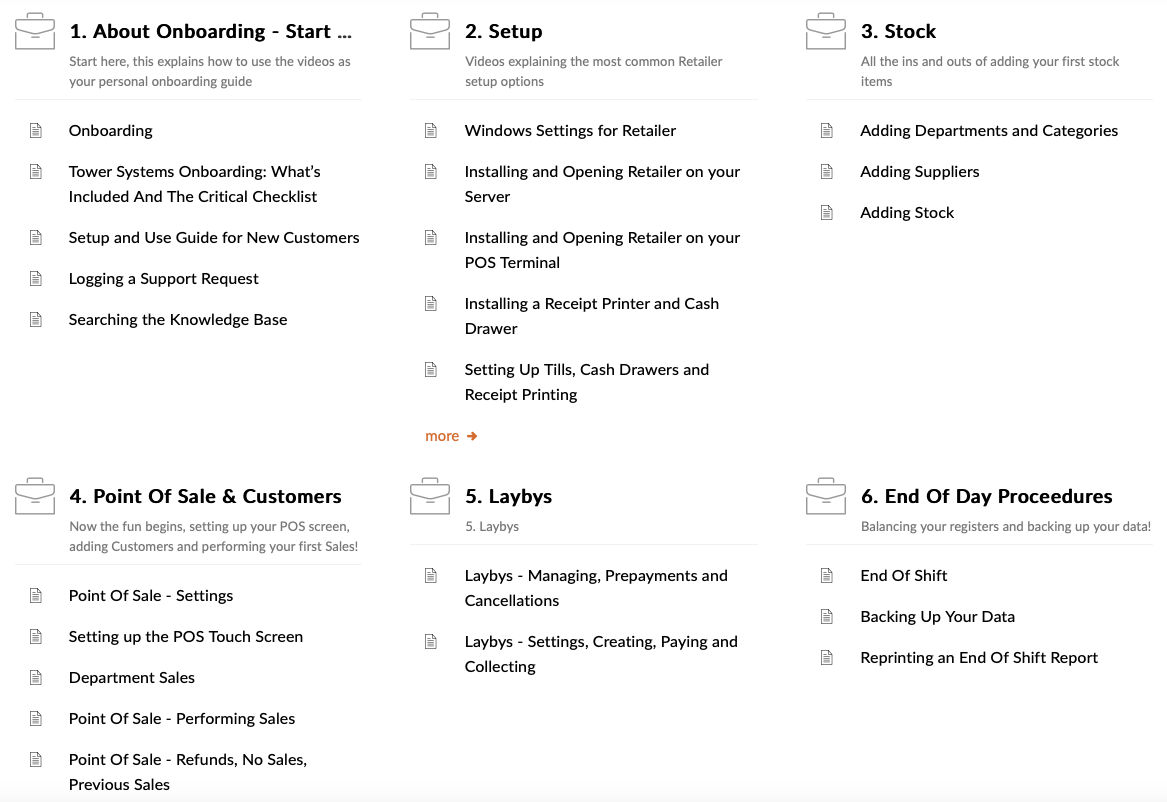
Training videos. All of our customers have free access to a comprehensive library of training videos. these are what we call stackable videos, short, single topic. They run for under ten minutes each. We have them organised in a curriculum so you can go down a path of learning for each part of the software. There is no limit to how many times you watch a video. You don’t need to have our software running on a PC to access a video.  Also, our videos are regularly updated – to make the currency of the software. We also make videos based on customer requests.

Knowledge base. This is a library of 700+ articles on how to use the software, organised by topic, accessible from anywhere and easily read by anyone regardless of technical knowledge.  Our Tower Systems POS software knowledge base is our user manual. It goes where you go. It is maintained as the software evolves.

User meetings. we host online forums where customers can learn from our POS software experts. Anyone is welcome to attend. They are recorded, too, and the recordings shared with all of our customers.

One-on-one training. Every one of our customers has access to this. It’s a paid-for service with training tailored to your specific business needs.

Help desk support. Live. Human delivered. Answering queries and pointing you to the best resources for your needs.

AI chatbot. This has been trained in our software and only our software. It’s success rate is excellent.

Here at Tower Systems we make it easy for staff in a retail business in which our software is used to tap into resources for learning how to use the software and through this how the business can thrive.

Good knowledge of the current software is vital to the success of the business. If you have a need outside of what we do, please reach out and we will do our best to help.

What training is available for POS software in a small retail business?

W

The training provided in the use of POS software varies by POS software company. Be sure to ask what training is provided prior to choosing your POS software.

Consider training for when you first start to use the POS software and training you may want to access for new employees or as you start to use extended facilities as you become more familiar with what the software could offer your business.

The difference between POS software companies in terms of user training available is considerable.

Tower Systems offers its POS software users access to one-on-one training tailored to each business, serving their specific needs.

Tower Systems also offers its POS software users unlimited access to a regularly updated library of training videos, structured in an easy to follow curriculum. Across hundreds of videos customers can learn at their own pace, review and have others trained in the business. Each video is short, single topic, and can be accessed from anywhere.

Tower Systems offers its POS software users access to text based training through 800+ articles in a regularly reviewed and updated knowledge base. For those who learn by reading, this is an excellent resource.

Tower Systems offers its POS software users access to free and regularly run user meetings. Hosted online, these live sessions provide customers with easy access to training as well as feedback opportunities on using the POS software.

Tower Systems makes access to training easy, knowing that the better a user understands how to use the software the more useful it will be and the more benefit coal for the local retail business in which it is used.

Before you decide on POS software for your retail business ask about training opportunities. Engage with some of the training to gauge its usefulness for your type of business. Assess it for yourself.

Training could be the key to you enjoying the POS software. It should not be an after thought in your consideration.

Serving thousands of local small business retailers, here at Tower Systems we understand the importance of good, easy to access and relevant training. This is why we invest in maintaining our training assets and people to be the best possible for the different retail channels we serve.

Tower Systems adds more POS software training videos for local small business retailers

T

Retailers are loving our growing library of training videos. With more than 150 new videos released in the last six months, our retailer customers have access to easy ti access and understand training that can add terrific value to what they achieve from using our POS software.

All of our customers have access to these videos. Plus, they can share links with staff. This is especially helpful when new staff join a business – they can learn efficiently and receive consistent advice on how to use the parts of the software with which they will interact.

Here is an example of the type of training videos on a topic thread. These relate to our Stock manager tool, a tool for efficient management of stock data in our POS software.

Our customers have access to settings for the playing of the videos. For example, they can speed them up, plus them and more – to suit their own engagement experience.

The video training library has already expanded significantly in 2024, adding more value to what is available for our POS software customers. We are proud of the differentiation the video training library offers.

POS software training when you want it, even overnight

P

Imagine being able to learn parts of your POS software as and when it suits you, and that any of your team members can do this – even on a public holiday like today.

Tower Systems makes learning POS software easy thanks to an awesome comprehensive knowledge base and an ever-expanding library of POS software training videos.

Most of these videos have been shot in the last six months. As the software is updated, so are the videos – making the POS software training video library up to date and freshly valuable.

We are grateful to be able to provide this resource to our customers, to help them learn how to get the most out of using our POS software.

POS software customers loving expanded self-serve video training library

P

Our small business retail POS software customers are loving engaging with the expanded video training library we offer.

With more videos being added weekly, we are making it easier for retailers and their employees to learn more about our software and we know that the more they understand how to use our software the more productive they are with it.

This is important as productivity is vital in small business retail.

Our POS software training library is a unique asset of our business. All the videos we offer are fresh made this year with the most recent content added this week.

Retailers and their employees can easily access these training videos – from work and from home. This easy accessibility helps everyone interested in learning get the most from the opportunity.

Tower Systems customers have free access to this POS software training resource.

Retailers loving POS software easy to access training

R

The library of training videos available for our local retailer focussed Tower Systems POS software is helping more retailers and retail business employees make better use of our software.

Organised in a comprehensive curriculum covering key day to day aspects of our POS software, the videos make learning operational threads of the software easy, even for those with no software experience.

Customers love that they can jump in, engage with training, and watch it over if they wish.

We are grateful to our customers for feedback as this helps us in future content production for our video training library.

Any one of our customers can access this library, and benefit from deeper understanding of how to use our POS software.

The easy way to learn how to use POS software

T

Learning how to use POS software can be a pain, especially if you are new to a business that has been using the software for some time. Usually, in that case, you are trained by someone who has been trained by someone else in the business who may have been trained by the software company – if you’re lucky.

Here at Tower Systems we take a different approach. We make it easy for everyone using our POS software to tap into good professional and current content training.

Our library of training videos is regularly enhanced. each video is single topic, short and accessible regardless of level of technical skill.

We make it easy for any retailer or retail staff member to learn how to use our POS software.

We understand the value and power of knowledge, that’s why we make accessing training easy, and free for our customers.

Each of our videos is what we call snackable. By that we mean they are like a snack – quick and easy to digest. we have found this approach to training to be more useful, more appreciated, more valuable to the business. The shorter form videos are also more easily maintained y us, and we know our customers appreciate this.

Our approach to POS software training means that someone can join a business where our software has been used for several years and get free access to our training rather than relying on colleagues for training. We know this is differentiating for us, we have made it so, and we are proud of it.

The better retail employees know how to use our software the more value they are to the retail business and the customers it serves, also, the better they could feel about their work, their own value. It’s a genuine win win here.

With more than 16 hours of fresh training content available in video form and more than 600 searchable articles, our POS software customers can rely on being able to learn and refresh easily and without extra cost. We think this approach to accessible and free POS software training is key to serving the needs of local small business retailers.

Outcome-focussed training packages help retailers get more from POS software

O

Tower Systems released several new outcome-focussed training packages last month and customers are grateful. While each of these areas is covered in training, packaging them this way has caught the attention of more as retailers understand each of the needs.

  1. What am I not seeing in terms of performance of my business as captured in the software? In this 2 hour session we will train you on the key metrics tracked by the software, show how you can see them and consider business decisions available to you as a result of this, and we will do this with you using your data. $440.00.
  2. I am worried about theft and need to know what I can check in the software to see if it is an issue. In this 2 hour session that is for owners only, we will log into your system and show you using your own data what hidden tools there are in the software for tracking theft and hour you can use them. $440.00.
  3. My data is a mess. Please help. Over this 4 hour session we will work with you, logged into your system with you, reviewing a whole range of your data, talking through what we see and can do to clean up the data, and showing you how we do it, as we do it. This results in cleaner data and live training for you on what you can do yourself. $700.00.

These sessions are run by one of our POS software experts working with you, on your data. They are for a specific length of time. We have set the time based on our experience doing this work.

We are always looking for ways to help nurture more value for retailers who use our POS software in their shops. This focus on nurturing value uniquely positions Tower Systems.

As retailers ourselves we understand the importance of measurable achievements attributable to good use of our POS software. This is where training sessions like those noted above play an important role.

The training sessions are delivered one-on-one and they are available to any of our customers.

Tower Systems is grateful to serve more than 3,000 local small business retailers.

25% off POS software training

2

Over the last couple of weeks we have been offering our all of POS software customers 25% off the cost of POS software training. This offer is part of our end of financial year package of offers for our local indie retailer community.

We have pitched the discounted POS software training offer in our regular customer emails.

Here at Tower Systems our POS software customers have access to a comprehensive and fresh video training library for no cost. Plus, they have access to hundreds of up to date articles and written training in our knowledge base.

Some customers prefer to learn through one-on-one training. This is when there is a cost for training, and right now, to the end of the financial year, it’s 25% off.

We have a team of professional trainers for our POS software. They know retail and they know our software. Each session is tailored to the needs of the specific customer.

Learning how to use POS software – advice for local small business retailers

L

Learning how to use POS software can be challenging. There is the tech enology to learn, a whole bunch of new words and, often, difficulties with accessing the learning resources.

Tower Systems makes it easy for retailers, especially local small business retailers, to learn how to use POS software.

Retailers using the Tower Systems POS software have access to a curriculum of fresh training videos  for no cost whatsoever. This library is available to be accessed 24/7, from home, from work, on the train.

The free to access Tower Systems POS software training videos are what we call snackable. That is, they are bite-size, easy to watch, learn and implement. Piece by piece. Small steps. easy to learn steps. This allows POS software users to jump in on a topic they need to lear about, or to do the whole suite of videos and more thoroughly learn how to use the POS software.

Making training easy to access is a key reason for the success of Tower Systems. Providing learning content that is accessible to anyone regardless of their education or business experience is something the Tower Systems customers tell us they love.

Check out the current list of videos available. But note that this is evolving rapidly with new videos being added all the time.

The Tower Systems POS software video training library is complimented by a. comprehensive knowledge base that is accessible 24/7 and easily searchable using up to date search techniques to guide useful answers with minimal fuss.

If you are a small business retailer and you are finding learning how to use POS software is challenging or are struggling to access the type of training you need to get more form your POS software, take a look at the resources Tower Systems provides its thousands of Aussie and New Zealand local small business retailers. See how we help them learn the Technology biology so that it truly becomes a loved and useful tool in running their retail businesses.

Using POS software should be enjoyable, useful and valuable. easy access to good POS software training is key to this. What Tower Systems offers is a competitive advantage and we are committed to maintaining this with more evolution of our POS software user training resources.

We encourage our customers to suggest video topics. These suggestions really do guide our video training production.

The videos themselves are created by our help desk team – the team providing day to day support to our retail POS software user community. Many on our help desk team have recent retail experience that helps them create content that is more practical and useful for local small business retailers.

It’s easy to say that you offer good training and another thing entirely to show it. This is why we are happy to show any sales prospect our library of training videos as well as our knowledge base. Sales prospects can choose not only the right software for their business but also the right training and user support materials for their business. Each of these assets supports the other. Software alone is not the answer.

Tower Systems makes learning how to use its POS software easy, accessible and useful. Since we only serve local indie retailers, what we offer really is personal and small business focussed. And, it’s 100% backed by human interaction when you want or need.

2020 has been the year of the POS software training video

2

We are grateful to our team members and our customers who have participated in creating a record number of training videos that facilitate easy access to on-going learning as to how to use and get the most from our POS software.

Our videos produced this year range from fully produced in-studio content to videos of conversations from which people can learn.

Here is one example of the many videos produced for our customers this year, a video for new customers.

Tower-newcustomer from mark fletcher on Vimeo.

Helping to train new retail business owners

H

We understand the stress of taking over an existing retail business. There is plenty to learn. It usually needs to be learnt quickly. Too often, the folks selling the business move on without providing the level of training that is needed, especially training in POS software.

This is why we have created a special new owners package – for businesses recently sold where our software is running. It offers new owners a new installation trying experience, offering the best outcomes for them to learn the software and review data structures to ensure are they are perusing good business outcomes.

This enhanced new business owner training package is another way we are adding value to small business retailers who use our POS software.

Free POS software training for small business retailers

F

Retailers using the POS software from Tower Systems have access to unlimited free training.

Free training in POS software for small business retailers comes in a range of forms:

  • One-on-one.
  • Group online.
  • Single topic videos.
  • Step by step advice on more than 600 topics.

All of these options are available to all small business retailers using the POS software. However, it is the one-on-one training retailers love.

Our POS software customers can schedule this when it suits their needs. It can be on one topic or covering multiple topics. There is no cap on the number training sessions. Further, there is no charge for the training – because we know that the better the software is understood the more the customers get from using it. This is a classic win-win.

We moved to a free training model a few years ago, when we uncapped the training a retailer could tap into in a year. Our customers love it. They love that new team members can join their business and receive free training from us. Their business and our business benefit. It’s terrific.

Lowering the cost of ownership of the software makes it more affordable as well as more useful.

By not relying on on our customers getting training from paid consultants or others outside our business is us being accountable to our customers. Too often we see POS software companies pointing their customers to other businesses for training in the software. This detaches them from accountability and removes a wonderful feedback opportunity.

Tower Systems only develops POS software for niche independent small business retailers. Our focus is deep into selected retail channels. Our training is as specialist as our software as it dives deep into each niche version of the software as appropriate to the retail channel in which the person being trained operates.

To tap into our free one-on-one training, retailers connect to our website and use our appointment scheduling software to book their free training time. The can make multiple bookings, ensuring that they have training slots for when they wean them

Free POS software training is a terrific benefit, one we are grateful to be able to offer to retail businesses using our POS software.

Free Xero / POS software training for small business retailers

F

We offer access to free training today in our POS software Xero link:

Join us Tuesday October 6 @ 10:30am. We’ll explore the direct to Xero link, answer the most common questions we are asked and answer all of your questions. We will record this meeting and share it for those who cannot make it live.

Email us at support@towersystems.com.au for login details.

More free training videos released for POS software users

M

We have released plenty of new training videos over the last two weeks for retailers using our POS software. each video covers a different part of our POS software, and offers insights into how to use that part of the POS software.

Here is one such video. This one covers our awesome MultiBuy facilities in our POS software, tools retailers can use to guide loyal engagement by shoppers. All customers have free access to all of these videos:

Small business retailers love unlimited free POS software training

S

Tower Systems is proud to provide small business and indie retailers using our  POS software with to free one on one training in the use of the POS software regardless of the version of the software they are using.

Yes, that’s right. Free training. Free one-on-one training. In our POS software. Delivered anywhere in Australia or New Zealand.

We do this because we know that free training makers for more knowledgeable POS software users and more knowledgeable POS software users are happier users and that is good for us too.

There are no strings to this free POS software training offer for small business retailers.

This is a genuine offer by the POS software company to help indie retailers using the Tower Systems software to get more from the software, to unlock tangible benefits for their businesses and for themselves.

It is rare that a POS software company provided free training to any customer, especially those who might have bought the software years ago and not paid for software support for many years. But that is what Tower Systems has delivered with this offer. That is what the company now has available for its customers.

To book for a free training session, all Tower Systems POS software customers need do is email bookings@towersystems.com.au and our training booking team will find out the topics you would like covered in the training, determine the best person to co9ver these areas of the software for you and arrange a time for the free training session.

Our hope its to drive business efficiency, business profitability and business enjoyment for all involved. We know that these are common outcomes from the POS software training that we have provided and can provide in a variety of business situations.

We create, sell, support and enhance POS software for specialty retailers: jewellers, garden centres, produce, toy, firearms, fishing, outdoors, newsagents, pet, gift, book, bike and adult. The free training offer is for retailers in these retail channels, regardless of the age of their POS software, regardless of whether they are covered by a software support agreement.

We are grateful to be in a position to make this investment in our small business user community.

If you know a business using our POS software, please let them know about  this free offer from us. Everyone is welcome!

The POS Software Blog

Categories

Categories

Categories

Recent Comments

Monthly Archives