Reasons retailers choose Tower Systems
R

The POS Software Blog
News from Tower Systems about locally made POS software for specialty local retailers.
At Tower Systems we give local specialty retailers agency. We think you should decide when to install a software update. We don’t push it onto your counter on our schedule.
We release updates regularly. Many of them include improvements our customers asked for. When an update is ready, it’s up to you when it goes in.
It sounds like a small thing. Independent retailers tell us it isn’t.
Why forced updates hurt independent retailers
Plenty of software companies update on their own schedule. The update arrives whether you are ready or not.
For a small retailer, timing matters. Nobody wants a change to their POS in the week before Christmas, in the middle of a stocktake or on a busy Saturday morning. A new screen layout or a changed workflow can slow the counter at exactly the wrong moment.
You know your business. You know when it’s quiet, when your experienced staff are rostered on and when you have time to learn something new. That knowledge should decide when an update goes in.
What goes into our updates
Our updates are shaped by the people who use the software. Through our Software Ideas platform, customers suggest improvements and every customer can vote on them. Those suggestions guide what we build.
So an update from Tower Systems usually includes something a retailer like you asked for. It might be a faster way to process a supplier invoice. It might be a new report or a tweak to a screen you use a hundred times a day.
We want you to have these improvements. We just think you should choose when they arrive.
Why we do it this way
I’ve run retail businesses and built software for them for more than 40 years. Independent retailers are business owners. They make hundreds of decisions every week about stock, staff, pricing and the shop floor. I think it’s odd for a software company to take one of those decisions away from them.
Giving you control over update timing is a matter of respect. It’s your business and your counter. It should be your call.
Independent retailers tell us they value this. Some update the day a release is available. Others wait for a quiet Monday. Both are fine with us. If you’d like help, our local help desk team can talk you through what’s in an update before you install it.
Ask before you choose
If you’re comparing POS software, ask each company one question: who decides when updates are installed? The answer tells you a lot about how they see their customers.
To talk with us about Tower Systems:
Australia: 1300 662 957
New Zealand: 0800 444 367
Email: sales@towersystems.com.au
Contacting a human is easy.
Ask a POS software company what an extra terminal costs. The answer tells you a lot about how they price.
Some companies charge for their software based on how many terminals are connected to it. Add a terminal and you pay for more than the hardware, you pay more for the software too.
Here at Tower Systems, adding a terminal costs nothing extra. A retailer running the software on one computer pays the same as a retailer running it on 8 computers in one location.
The price is published on the Tower Systems pricing page. Anyone can check it.
Tower also does not charge fees based on transaction volume or transaction value. Sell more, and your software cost stays where it is.
Our approach to POS software pricing is transparent and easy to follow. We’ve always taken this approach.
With a fixed price, retailers know exactly what the software costs. Tower is also not taxing retailers for the growth they achieve.
There has been a commercial benefit as well. Not charging for extra terminals has kept Tower price competitive. That helps local small business retailers get more financial value from the software.
We benefit from this approach too. It brings more retailers to our community – all small business retailers, independent retailers. Having a large community of locally owned businesses using our software means the costs of us doing business are spread – this is a way we can offer the pricing we do offer.
If you are comparing POS software, ask two questions of companies offering software that serves your business needs.
The right software at the right price is a big win for any business.
Too often we see retailers who have gone for software solely based on price only to find that the price they thought it was in not the price they are paying. This is why we also p[itch transparency. Top your homework, make sure you understand the price of the POS software you are considering.
We make our pricing accessible to anyone as a demonstration of our approach to transparent accountability.
Shopping for POS software can all too often mean hidden fees, vague quotes and pricing you can’t get without a sales call. The question we’re asked often is the simplest: how much does it cost? We’re happy to answer.
Our pricing is published at towersystems.com.au/pricing. No sales call required. We don;t need to know who you are.
Our pricing is the same for everyone. This matters because it builds trust.
We offer four tiers: Startup, Standard, Advanced and Ultimate. A new pop-up shop has different needs and cash flow than a multi-lane, high-volume store, so you choose the level that fits.
Every tier, including Startup, includes:
Higher tiers add specialist modules without a new installation. Advanced unlocks kitting, for businesses that bundle stock items into sellable packages or gift sets. Ultimate unlocks dispatch management, for high-volume shipping and delivery operations. AI retail tools are also available as you move up the tiers.
Why publish pricing when most of the industry hides it? Because hidden pricing wastes everyone’s time, yours most of all. If our software isn’t in your budget, you deserve to know that in two minutes on a web page, not after three phone calls and a demo you sat through out of politeness.
Watch for per-transaction pricing elsewhere in the market. A small percentage of every sale looks harmless until you multiply it across a year of turnover. Flat subscription pricing means your software cost doesn’t grow just because you had a good month. Your good months are yours.
The tiers also protect you from paying for capability you don’t use. A pop-up shop doesn’t need dispatch management, so it shouldn’t fund it. When the business grows, the upgrade is a subscription change, not a migration.
Have a look at the pricing page, compare the tiers side by side, and talk to us when you’re ready. Not before.
We are all setup and read to go for the Reed Melbourne Gift Fair, which starts today.
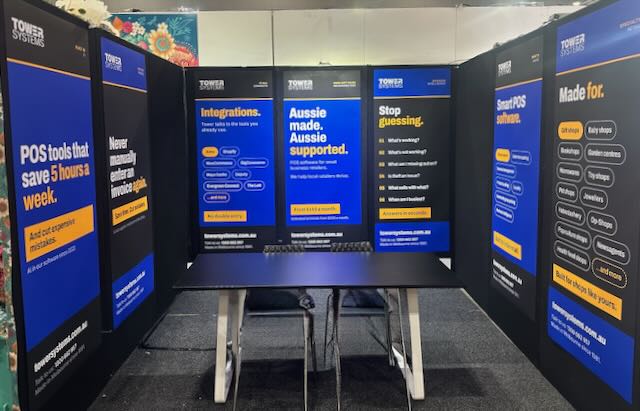
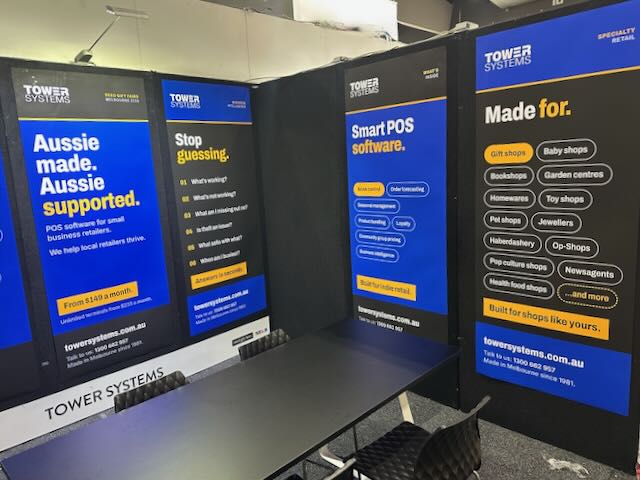
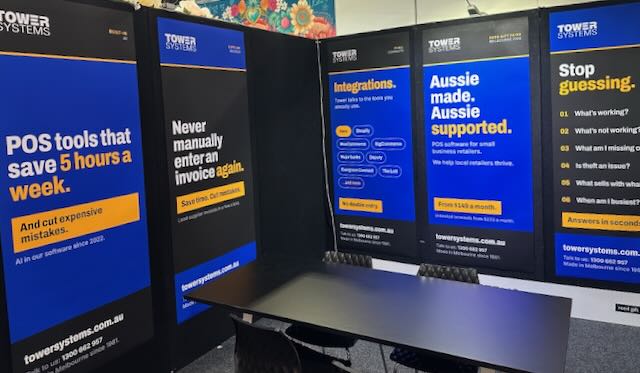
On our stand we will be demonstrating the very latest in POS software for gift shops, jewellers, garden centres, newsagents, toy shops, music shops, bookshops and more.
This is smart POS software. Melbourne made. Melbourne supported.
Gift retail has its own rhythm. Seasonal buying, one-off suppliers, products that need good photos and descriptions to sell online. Our software is built for that. Supplier invoices load in around 30 seconds. AI writes product descriptions and SEO content for you. Reports come with plain advice on what to do next. It connects with Shopify, BigCommerce, WooCommerce and Xero, so your shop floor and your online store stay in step.
If you are walking the fair with buying on your mind, five minutes at our stand could save you hours every week back at the shop. Bring your questions. We like the hard ones.
What sets us apart we think is the help behind the software. Our help desk is in Australia, staffed by people who know retail, and training is part of the deal rather than an extra. When you call, you speak with someone who understands what a busy Saturday in a gift shop looks like. Plenty of the retailers on our software came to us from bigger-name systems where they felt like an account number.
AI is doing real work in our software, and it has been since 2022. We call it Retailer AI, and it draws on Gemini, Claude and ChatGPT inside the POS software itself. A typical business saves between 5 and 8 labour hours a week, worth $175 to $280 at a $35 an hour pay rate. One retailer used it to find more than $10,000 in dead stock. There is plenty of AI hype about at the moment. This is not that. It is invoices loading themselves, reorders drafting themselves and reports that tell you what to do next.
The Melbourne Gift Fair is the best week of the year to see all of this in person. Bring a sales report or a supplier invoice from your own shop if you like, and we will show you what the software does with it on the spot. No script and no canned demo. If you cannot make it to our stand, book a free demo and we will bring the software to you after the fair.
Most point of sale software is built to handle everything for everyone.
Generic is good if you run a generic business.
The same system serves a cafe, a clothing boutique and a hardware store from the same generic template. That works fine — until a retailer needs their software to actually understand how their business runs.
At Tower Systems, we build POS software for specific specialty retail channels. Newsagencies, jewellers, bike shops, garden centres, pet stores, toy shops, gift shops, produce and farm supply. Each operates differently. We build for each one specifically.
Generic software solves generic problems
A generic POS system handles the basics. It processes a sale, takes a payment, records the transaction. For a simple business, that is often enough.
Specialty retail is not simple. A newsagency manages put-away and returns for hundreds of magazine titles on different supply cycles. A jeweller handles repairs, quotes, laybys and special orders, each with its own workflow. A garden centre sells by weight, by season and by plant variety, with stock that lives and dies. A bike shop books workshop jobs and tracks serial numbers for warranty claims.
None of these needs is unusual within its trade. Generic software treats them as edge cases anyway. The retailer ends up working around the software rather than the other way around.
Specialisation is built in, not bolted on
There is a real difference between software configured to approximate a specialty workflow and software built for it from the start.
Configuration asks the retailer to bend a general tool toward their needs — custom fields, manual workarounds, compromises on how things are named. Purpose-built means the workflow is already there, designed around how that trade operates, tested by retailers in that field, refined over years of real use.
When the software is built for a specific trade, the language matches. The reports answer the questions that trade actually asks. The daily tasks follow the rhythm of the business. Less time adapting.
Specialisation compounds
Deep specialisation is not something you add once. Every year spent serving a particular trade teaches more about how it works, what is changing, and where retailers need support next.
That shows up in practical ways. A supplier integration that cuts hours of manual entry. A stock tool tuned to seasonal buying. A report that flags slow lines before they tie up cash. Each is modest on its own. Together they produce software that genuinely fits the business — and that is hard to replicate by configuring a general platform.
What this means for specialty retailers
The retailers who do well in specialty channels are not competing on price with the chains. They compete on what the chains cannot easily copy: product knowledge, specialist services, supplier relationships, the way they deal with customers.
Good specialty software should support those strengths. Software that does not understand your trade asks you to do the opposite.
The Tower Systems approach
We go deep rather than wide. We serve a defined set of specialty retail channels, and we build, sell, train and support our software in Australia. That focus is deliberate.
If you run a specialty retail business, ask any POS system this: does it understand my trade, or am I expected to adapt to it? The answer usually becomes clear quickly.
Today, let’s look at one thing too many retailers do not consider when looking at POS software and it is one thing that could make the world of difference to the value they harvest from using the POS software.
Choosing a POS software company deserves more scrutiny than most retailers give it. A polished website or a free hardware deal can look attractive upfront. Neither tells you much about what happens once you are a customer.
When something goes wrong mid-shift, a retailer often needs to talk through a problem before they can clearly describe what they need. That kind of back-and-forth is how the real issue gets identified. A chatbot cannot do it. An email queue rarely can either.
Some POS providers have removed phone contact entirely. For retailers who think better in a conversation, that creates friction — and it tends to show up as wasted time rather than anything that appears on a quote.
Clients can reach Tower Systems by phone, email, or chatbot. Contact details for the leadership team go to every customer from the start, so there is a clear path for anything that needs more than a standard reply. Call us and see for yourself how easy it is to speak with someone.
Is the support team local? Do they know standard retail terminology? Do they work in the same time zone? A scripted offshore call centre and a direct conversation are not the same thing, and the gap becomes obvious the first time something urgent needs fixing. Personal service matters when it comes to helping retailers since retail is personal after all.
A POS system that is difficult to get help with ends up costing more than it looked on paper. Retail runs on relationships, and the relationship with a software provider is one a business relies on most when things are not going well.
Tower Systems has supported independent retailers across Australia for decades. Visit towersystems.com.au to find out more.
Most retailers assume their backup is running. It’s a fair assumption because it does work most of the time. The thing is, it’s the time it doesn’t work that causes stress and loss.
Retailers set backup up once, see a confirmation somewhere, and move on. The problem shows up later — usually when they desperately need to restore data — and they find out it’s been failing quietly for months.
It happens more than you’d think. A process that worked fine gets interrupted by a software update, a network change, a setting nobody touched but somehow shifted. The confirmation messages keep appearing. The actual backup stops working. Nobody checks because it never occurs to anyone to check.
By the time it matters, the data is gone.
Tower Systems cloud backup runs continuously through the day. No end-of-day process, no manual trigger, nothing to schedule or remember. Every change made in your system is captured as it happens. Two copies — one onsite, one offsite. If your hardware dies, your premises flood, or your internet drops, the other copy is there.
That difference is real. A backup running once at midnight leaves a full day of trading exposed. A backup running perpetually through the day means the worst case is losing minutes, not hours of transactions.
We also offer a free backup check service. We test-restore your backup to confirm it’s actually working — not that it appears to be working. Those are different things. A backup you haven’t tested is not a safety net. It’s a hope. This service exists because we’ve seen too many retailers discover the hard way that what they thought was protecting them wasn’t.
Your POS data is the record of your business. Sales history, customer data, supplier records, stock on hand figures built up over years of trading. Losing it isn’t an inconvenience you recover from in an afternoon. For most small retailers it’s simply gone.
Backup doesn’t bring in new customers or lift your margin. It protects everything you’ve already built. Talk to the Tower Systems team about cloud backup and the free backup check service — both are straightforward, and one of them might save your business.
This question came up yesterday. We’ve demonstrated our POS software to a retailer. They love it. At the end though they thought it best to stick with what they have because it’s less hassle.
Switching POS software is stressful, for sure. It costs money. It disrupts your day. And there is the discomfort of walking away from a system you have run for years and know inside out, and maybe relationships you appreciate.
Resistance to switching POS software is normal. Most retailers who stay put do so because change feels like too much hassle.
Sticking with old software is a choice. You are choosing comfort over growth. If you are happy with how the business is performing, there is no reason to change anything. Leave it alone. But if you want the business to be worth more, the tools you use matter.
Old software tends to leave money on the table. Workflows that should take seconds take minutes. Pricing that should move with your costs sits still. The numbers you rely on to make decisions are often old, partial, or both. You end up running the shop on a hunch. There are things old software misses.
Rent is up. Wages are up. Most of your costs are up. A small retailer cannot stand still in that environment. You have to find profit just to cover the increases landing on you each year.
You need software that can help you make more money.
When retailers think about changing software, they get stuck on the transition. The install. The training. That first week where nothing feels familiar. The hump is real and I will not pretend otherwise.
But the hump is temporary. Look past it and good software gives you the tools to actually compete. A current system lets you change markups across a whole product range in a few clicks, so you can lift the margin on each item without scaring off customers. Do that across the shop and the gain adds up fast.
The point of upgrading is not the software. It is a business that makes more money and, honestly, is more enjoyable to run.
Want to know if your current software is costing you? Answer these.
Three yeses and your system is doing its job. Keep it. A single no means it is worth looking at what else is out there. No drama, just research.
There is one more question: are you happy? If the answer is no, focus on what happy might feel like.
If you do decide to move, the friction is mostly in the changeover, and that is where a good supplier earns its keep. At Tower Systems we convert your data, train you one on one, and back it with a large library of how-to videos so you are not stuck waiting on hold.
We are Australian made and Australian supported, with our development and support folk also in New Zealand. We work with independent local retailers, not big franchises. A lot of the software in this market is run by offshore companies with a remote help desk and a queue. When something goes wrong at 9am on a Saturday, who picks up matters.
Do not let a temporary hurdle talk you out of a more profitable business.
We’d love to see if our POS software could make you happy. sales@towersystems.com.au
Years ago we helped a retailer investigate an employee theft problem. Using encrypted transaction data from their POS software, we isolated the days and times where discrepancies were appearing, matched them against the roster, and identified the most likely person. When confronted, the employee admitted to taking around $20 a day.
The reason they gave was not what the owner expected.
The boss took cash from the till for lunch. So they did the same.
The idea of stealing hadn’t occurred to them independently. They watched the owner take money from the register without ringing it through and drew a straightforward conclusion: this is normal here.
The owner hadn’t thought of it as theft. A few dollars for lunch — their business, their money. But watched by a staff member, it looked exactly like what it was: taking cash without processing it.
That’s one of the harder things to sit with in small business retail. The standards your team follows aren’t the ones written down anywhere. They’re the ones you demonstrate every day, on the floor, in front of people who are paying more attention than you think.
Handle cash loosely and some staff will handle it loosely. Take shortcuts on process and some staff will take the same shortcuts. Not everyone, and not immediately — but you’ve shown them it’s acceptable, and that’s enough.
The practical response isn’t complicated. Run every transaction through the system, your own lunch included. Pay yourself properly rather than dipping into the till. Use your POS the way you expect your staff to use it. And when something looks off in your data, investigate it — not assuming the worst, but not ignoring it either.
The encrypted transaction data in this case did its job. It gave the conversation a factual basis rather than an accusation, which matters both for resolving the situation and for treating the employee fairly.
But the real problem wasn’t the employee. It was what the owner had been quietly teaching them for months without knowing it.
In our POS software we have tools available for early detection of employee theft, tools many retailers have used to catch theft earlier than they otherwise might.
…
The right POS system or website for any retail business depends on the specific needs of the business. Tower offers POS software and websites made specifically for local small business retailers in a selection of retail channels. To see if we might help you…, request a free, no-obligation demo today.
Call 1300 662 957 in Australia or 0800 444 367 in New Zealand. Or, email sales@towersystems.com.au.
The Lincraft closure made news last week. Eighty years, every store, gone. It’s the kind of story that sits with you if you’ve been in retail long enough to remember when chains like that felt permanent.
We know it hit small business retailers because of conversations we have had since the news broke.
It’s not the whole retail story, though.
The independent retailer who had their best April in three years won’t make the news. Neither will the gift shop owner who spotted a new category gaining ground and moved on it before the season. These things are happening. We see them in the data.
The difference between retailers finding growth and those feeling stuck usually isn’t location or foot traffic or product range. It’s whether they’re looking at their data. Good data, understood and acted on, is the foundation underneath every independent retail success story we see.
Your POS data knows things you don’t. It knows which supplier is quietly underperforming while a newer one gains ground. Which category is lifting your average sale value. Which days your margin is strongest. What your best customers are buying that your average customers aren’t.
The Tower AI tools are built to surface exactly that — the things not sitting in front of you. Not the obvious wins you already know about. The patterns buried in twelve months of transaction data that you won’t catch on a busy Tuesday. A product that’s been growing 15% month on month and still hasn’t made your reorder list. A margin opportunity in a category you’ve been pricing conservatively out of habit rather than intention.
A chain waits for a report from head office. You can act on your data this week, before the next order goes in. That gap is real and it matters.
The pressures Lincraft cited are real too. Changing consumer behaviour, rising costs, overseas competition — none of that is going away. But the response isn’t to carry the weight of the industry headlines. It’s to look inside your own business and find what’s working.
Green shoots don’t announce themselves. They show up as a slow climb in basket size, a category quietly outperforming its shelf space, a customer type coming back more often than they used to. Your data has already found them.
If you haven’t spent time in the Tower reporting and AI insights tools recently, start there. Not with a big strategic review. Just one question: what’s growing in my business right now that I haven’t noticed yet?
The answer is probably already there.
Most external stocktaking services work manually. Clipboards, hand counts, a spreadsheet sent through when they’re done. It looks thorough. It costs real money. For most independent retailers it’s the wrong tool for the job.
Your stocktake is about the operational future of your business, not merely some accounting function.
A manual stocktake is an accounting exercise for sure. It produces a stock valuation at a point in time — useful for your accountant, useless for your POS system. Your on-hand quantities stay wrong. Your reorder triggers stay unreliable. Your buying stays based on gut feel rather than what the data actually shows.
Stocktaking is an inventory management job. It belongs inside your POS software. When you count through the system, you correct the discrepancies that build up through normal trading — unscanned returns, receiving errors, theft, the odd mistake at the register. The software gets an accurate picture of what you have. That flows through to purchasing, ranging, shrinkage tracking, and the AI tools built into modern retail software.
That last point matters more than it used to. The smarter features in retail POS — demand forecasting, slow-mover flags, reorder suggestions, margin analysis — all depend on the data behind them. Accurate stock figures produce useful outputs. Wrong figures produce noise. A POS-based stocktake is one of the most direct ways to improve everything your software does.
External stocktakers aren’t always the wrong answer. If they’ll work inside your POS rather than around it, that can work fine. Ask before you book: will this improve my POS inventory data, or just give my accountant a number?
If it’s the latter, spend the money elsewhere. Train a staff member. Block out a Saturday. Count through the system you use every day. It takes more effort upfront and pays back every time your software makes a better call because it knows what’s actually on the shelf.
Get the stocktake right in your POS software and you set your business up for good decision-making and valuable portability because of this. That’s what we see in our years of service local small retail businesses.
Take your time. Do the work. reap the rewards.
Here’s a video of a stocktake Q&A with a retailer earlier this week. It’s live on our YouTube channel:
A stocktake is one of the most useful things a retailer can do. It’s also one of the most put off. This session is about both — why accurate stock data matters and how to get it done.
We recorded this on June 16, 2026, as part of the Tower Systems library of practical support for independent retailers. We cover spot stocktakes and full store stocktakes, walk through security, talk about taking a backup before you start, and draw on experience from doing stocktakes in shops we’ve owned and run ourselves. We also answer questions from a retailer thinking through what they want to achieve in their own store.
This advice works for any small business retailer, not only those using Tower Systems software. The recording is part of a broad suite of stocktake advice and tools we provide to local small business retailers, to help them get this done accurately and efficiently. The education we offer is foundational.
Accurate stock on hand data changes what you can see in your business. You find the dead stock sitting in a back room that the system still thinks is sellable. You spot the gap between what your records show and what’s physically on the shelf. You get category performance data you can actually trust. From there, your reports mean more, year-on-year comparisons hold up, and if you’re feeding stock data into AI tools, the outputs are useful rather than misleading.
Tower Systems customers can access this session through the knowledge base, the chatbot, the training video library, or directly through the help desk. Stocktaking comes up constantly in support conversations, which is why we’ve built a substantial amount of material around it. Retailers who understand stocktake well get more out of everything else the software does.
Tower Systems builds and supports POS software for local specialty retailers — newsagents, gift shops, garden centres, jewellers, bike shops, bookshops, toy shops, pet shops, produce businesses, farm supply stores, fishing shops, haberdashery, antique shops, charity retailers, and more.
Find out more at towersystems.com.au.
Buying an existing retail business is a lot to manage at once.
Staff to meet. Suppliers to call. A hundred small decisions before lunch. And somewhere in the middle of all that, a POS system you have never used before. The previous owner may have walked you through the basics. Plenty do not.
Tower Systems does something about that.
Two hours, one-on-one, on us
Every person who buys a retail business running Tower Systems software gets two hours of free personal training. Not a recorded walkthrough. Not a group session where your questions get queued. A real person from our team, working through the software with you, focused on your store.
No cost. No catch.
What those two hours actually look like
You set the agenda. Need to understand end-of-day reporting? We start there. Stock management the priority? Same. Have a specific supplier setup or loyalty program to get right? We work through it.
The point is not to demonstrate every feature. It is to get you confident on the parts of the software you will use every single day — so you are not guessing your way through week one.
Owners who do this training get up to speed faster and catch problems earlier. Two hours at the start is worth a lot more than two hours trying to untangle something that went wrong three months in.
We know independent retail
Tower Systems has built POS software for independent retailers for more than 30 years — newsagencies, gift shops, garden centres, homewares stores. Our support team has seen most situations and worked through most problems. They are not reading from a script.
That shows up in the training. It is specific, not generic. Aimed at people running actual businesses, not hypothetical ones.
Book your session
If you have recently taken over a business running Tower Systems, call us and lock in your two hours.
1300 662 957 or www.towersystems.com.au.
…
The right POS system or website for any retail business depends on the specific needs of the business. Tower offers POS software and websites made specifically for local small business retailers in a selection of retail channels. To see if we might help you…, request a free, no-obligation demo today.
Call 1300 662 957 in Australia or 0800 444 367 in New Zealand. Or, email sales@towersystems.com.au.
Your POS software runs your business. Every sale, every stock order, every end-of-day report flows through it. When something breaks — and at some point it will — who picks up the phone is not a trivial question. You’re local. Your software needs to reflect this.
Built here, for here
Australian retail is not a scaled-down version of US or UK retail. School holidays shift buying patterns. Public holidays differ by state. GST works the way it works. A gift shop in regional Queensland has different pressures to a homewares store in suburban Melbourne. :language is different too.
Software built overseas is designed for overseas conditions. Australian localisation gets added later, if at all. Tower Systems was built in Australia for Australian independent retailers from the beginning. That is not a slogan — it shows up in which features exist, how compliance is handled, and whether the terminology actually matches the way local retailers run their businesses.
Someone answers when you call
Offshore support means time zone maths. You log a ticket on a busy trade morning and wait. The reply arrives after close, points to a help article, and does not quite address what you asked.
Tower Systems support runs in Australian business hours. The people you reach understand local retail. They know what a rough Saturday looks like. They understand the pressure of a stocktake before a long weekend. You do not have to explain your context from scratch every time.
A register that stops processing at 11am on Saturday is not a problem that waits.
Retailers shape what gets built
With a large offshore provider, you are one customer among millions. Feature requests go into a global queue and most never come back out.
Tower Systems works directly with Australian independent retailers — gift shops, garden centres, homewares stores, toy retailers. What those businesses run into day-to-day feeds into the software. When a real gap surfaces, there is an actual conversation about it. That does not happen when your vendor is twelve time zones away and has ten million other customers to think about.
A practical decision
Buying Australian-made software keeps money in the local economy. It supports jobs and businesses operating in the same communities your shop serves. It also means you are dealing with a company subject to Australian consumer law — if something goes wrong in the relationship, you have genuine options. That matters when you are committing to software you will run your business on for years.
Decades in independent retail
Tower Systems has been building POS software for Australian independent retailers for decades. Through recessions, a pandemic, and the steady reinvention of what a viable local retail business looks like, the software has been shaped by retailers actually working through those conditions.
That experience does not come from a global template. It comes from being here.
If you run a gift shop, garden centre, homewares store, or any independent retail business and want software built for your operation, talk to Tower Systems.
Call 1300 662 957 or visit www.towersystems.com.au.
A POS system reflects what you put into it. Feed it bad data and every report it produces is wrong. That might sound obvious, but in a busy retail environment — where stock arrives daily, staff turn over, and returns pile up — inventory data degrades faster than most retailers realise.
Poor data costs real money. It means stockouts on best-sellers, cash locked up in product that will not move, and numbers you cannot make decisions from. You do not have to guess whether your stock-on-hand figures are right. There are practical ways to check, and the right tools make staying accurate far less work than most people expect.
The stocktake: still the gold standard
Nothing confirms inventory accuracy like a physical count. Closing the shop for a full weekend count is not necessary anymore.
Tower Systems supports targeted rolling stocktakes on a specific shelf, category, or supplier group. Run them during quiet trading periods — before opening, after a delivery, or during a slow mid-week afternoon. Small, frequent counts catch discrepancies early, before they distort your buying decisions and margin reports. A full-store stocktake a couple of times a year, combined with regular section counts, gives you a solid base to work from.
Stop errors at the back door: AI invoice import
A lot of bad retail data enters at inward goods. Manual entry of cost prices, supplier codes, and product descriptions from paper invoices introduces typos. Every time. It is not a staff problem — it is a process problem.
Tower Systems has an AI Invoice Import tool built directly into the software. It reads digital PDFs, spreadsheets, supplier accounting exports, and even photos of printed invoices, then matches items and imports the data without manual entry. Fewer keystrokes means fewer mistakes, and fewer mistakes means stock counts you can trust.
Two daily habits that hold it all together
Systems help, but discipline matters too.
Track every sale individually. Generic open-department keys destroy stock counts over time and make category reporting worthless. Process returns at the time they happen — scanning them back in later means the numbers are wrong in the gap, sometimes for days.
Neither habit takes long. Both make a material difference.
The bottom line
Every manual entry is a risk. Every workaround compounds the problem. Rolling stocktakes and automated invoice importing reduce human handling of data, and less handling means fewer errors. When the data is right, you buy better, you waste less, and your reports tell you something useful.
Find out more at www.towersystems.com.au.
You’re not short on data as an independent retailer. Your POS system tracks every transaction, every stock movement, every margin shift. The problem isn’t the numbers — it’s finding time to work out what they mean. That’;s certainly our experience in serving thousands of retailers over the years.
Business performance reports can be dense. Wading through pages of figures, charts, and spreadsheets takes time most retailers don’t have. There’s a shop floor to manage, staff to handle, customers to serve.
Tower Systems has built AI Insights into just about every business performance report in our POS software.
One Click, Three Outputs
Run a report and click one button. The built-in AI analyses the data and returns:
No cross-referencing columns. No spending an evening trying to spot a trend.
Built for Retailers, Not Data Scientists
You don’t need an accounting background to make good decisions. AI Insights gives you a clear read on your business performance in seconds — the kind of clarity that usually takes an experienced analyst hours to produce.
It works across your whole business. Sales by department, supplier performance, stock turn, margins by category — the AI reads each report in context and responds to what’s actually in front of it. That means the summary you get from a slow-moving stock report looks nothing like the one from a margin analysis. Each output is specific to that data, not a generic wrap-up.
Less time on reports. More time on the shop floor.
We understand.
We do. We have years of personal retail experience embedded in our POS software for tools for local small business retailers. We have ensured that the tools here, the AI tools especially, are genuinely useful for local retailers, that they deliver the time saving benefits we pitch. We do this because it’s what we want in retail businesses we’d run.
This personal experience helps us deliver software that is practically beneficial. It’s not just about the tech, it’s about the win for local small business retail.
The stakes are high when an independent retailer chooses POS software. Get it right and your operations run smoothly. Get it wrong and you’re dealing with administrative headaches for months.
Most retailers start with online reviews — fair enough. But if Trustpilot is your only stop, you may be getting a distorted picture.
The Paid-Tier Problem
Trustpilot runs on a freemium model. Software companies can pay for tools that tilt the playing field.
They can’t buy positive reviews or delete negative ones outright. But paying subscribers get automated systems that invite recent buyers to review — constantly. That steady drip of fresh 5-star ratings buries older complaints before most people notice them. Businesses can also flag negative reviews as unverified, pulling them offline while an “investigation” runs its course.
If a software company has thousands of glowing reviews but almost no detailed commentary, that’s a managed profile. Not an honest record.
Where to Look Instead
Google Reviews are harder to game. They’re tied to local business listings, not corporate accounts. Check how a software company responds to its negative Google reviews. Do they fix the problem? Ignore it? The response from a software company is more revealing than any star rating.
Reddit is worth your time. It’s one of the few places where tech marketing has little grip. Search for subreddits covering small business, retail, or your specific niche — newsagencies, gift shops, toy stores. Retailers post raw feedback about software crashes, hidden fees, and how long it actually takes to get someone on the phone.
Private Facebook groups and industry forums are useful too. Ask directly. Most retailers are happy to share what works and what doesn’t.
Read the Reviews Differently
Don’t focus on the top-line score. Filter for 2, 3, and 4-star reviews — that’s usually where the useful detail sits.
Look at support complaints across multiple platforms. Bugs happen with any software. What matters is whether the company fixes them. Repeated complaints about slow or unhelpful support, appearing independently across different sites, is a pattern worth taking seriously.
Prioritise reviews from long-term users. Someone who installed the software last Tuesday has nothing useful to tell you. Someone who has run their business on it for two years does.
 When
Rising operational costs are squeezing independent retailers. When costs climb, margins shrink. Telling staff to work faster does not solve it. The only real lever is eliminating the low-value admin work that quietly inflates your wage bill.
The tech industry response has been a lot of talk. Grand visions, broad promises, and not much that actually helps a retailer trying to get through the week.
Tower Systems built AI into the POS software itself. Not as a feature to announce — as tools designed around the specific workflows that burn staff time.
From the inventory screen:
The return is straightforward. Staff time spent on admin is time not spent on the shop floor — not serving customers, not merchandising, not driving sales.
Independent retailers do not have the luxury of bloated back-office teams. Every person on the roster needs to be where the money is made. When your software handles the repetitive work, your team can focus on the floor. That shift does not require a technology strategy or a consultant. It just requires software that was actually built for retail.
This is where most POS software falls short. The AI announcements are there. The practical tools built into daily workflows often are not.
Tower Systems is different. The tools are in the software you already use, on the screens your staff work from every day. No separate platform. No extra subscription. No learning curve that kills adoption before it starts.
Visit towersystems.com.au or our AI page online to see how it works in practice.
We believe that actions do speak louder than words. We spend far more building AI tools small business retailers can rely on than we spend talking about them. From what we delivered more than three years ago through to the latest update out this week, the AI tools embedded in our POS software are genuinely useful too local small business retailers. They save time, cut costs and help them see a path forward that is profitable and smart.
By helping our retailers live within the POS software for AI use helps enhance the benefits, and it certainly reduces the labour costs.
Australian agriculture and hydroponics retail is unique, are pretty unique and niche businesses. Whether managing a local produce store or a specialised hydroponics outlet, retailers face challenges that generic point-of-sale systems simply cannot meet. From managing bulk materials to tracking hazardous items, the requirements are as diverse as the products on the shelves.
These specialty businesses can benefit from specialty POS software.
At Tower Systems, we develop specialist POS software designed to simplify these complexities, allowing business owners to focus on growth and customer service.
Agriculture and hydroponics retail often involve selling items by unconventional measures. Our software is engineered to handle sales by weight, length, or fraction, ensuring accuracy for everything from bulk grain and fertilisers to irrigation piping and nutrient solutions. This precision is backed by the ability to manage raw materials; if you mix your own feed or package custom hydroponic kits, the system tracks the components and the finished product effortlessly.
Handling specialised agricultural chemicals or hydroponic nutrients requires diligent record-keeping. Our system supports hazardous material tracking, ensuring that necessary safety documentation and notifications are handled correctly at the point of sale. Additionally, for stock stored in outdoor yards or nurseries, we provide support for weatherproof labelling, ensuring that price points and barcodes remains legible in all conditions.
Rural retail often extends beyond the shop floor. With our Retailer Roam™ tool, you can manage sales at field days, local markets, or directly from a delivery truck. The system is designed to function even without a stable internet connection, synchronising data once you return to range. For businesses managing their own deliveries, our integration with Allotrac offers a professional dispatch and logistics solution, allowing you to track multiple vehicles and complex delivery schedules.
To reduce administrative burden, our software features embedded AI tools that assist in generating product descriptions and identifying stock trends that might otherwise go unnoticed. Seamless integrations with Xero, MYOB, and Shopify ensure that your financial records and online storefront are always in balance.
By partnering with a local Australian team that understands the specific needs of the rural trade, you can transform your operational challenges into a competitive advantage.
If, after hearing about your specific needs, we think we may not be right for you, we will say so. That’s a firm commitment from us.
It all starts with you outlining your specific need.
…
The right POS system or website for any retail business depends on the specific needs of the business. Tower offers POS software and websites made specifically for local small business retailers in a selection of retail channels. To see if we might help you…, request a free, no-obligation demo today.
Call 1300 662 957 in Australia or 0800 444 367 in New Zealand. Or, email sales@towersystems.com.au.
Matt bought a traditional newsagency shop in late 2020. It was his first retail business. He knew e wanted to reinvent the business, to be relevant and appealing.
In less than 4 years Matt with his family and team have transformed the business into a thriving and loved local shop in Mount Lawley 10 minutes out of Perth.
While it’s called Mount Lawley News, this shop is not a newsagency, not what you think of as a newsagency. It’s a gift shop, a fun place to shop, somewhere you’re likely to find a gift for just about any occasion.
As Matt shares in this video, he embraces the opportunities of change, and he shows that even though the shop has been transformed, he’s not done. What he has created online through the website as well as on social media is fresh, engaging, and successful.
We are grateful to Matt for the opportunity to find out more. Be sure to check out their website: http://www.oliviaandgrace.com.au.
Recent Comments