Thank you for helping us switch to your software. I had no idea we could do what we are already doing with your software. For years I thought I had a good software program. The time saving alone pays for itself. Thank you.
We love feedback from retailers who switch to us as it encourages us to work even harder at leveraging our point of difference. This latest retailer to switch provided us with comprehensive insights into the weaknesses of the software they have switched from, insights we can leverage in our communication with other retailers in the channel.
Making good POS software is one thing. Guiding retailers to get the maximum commercial value from the software is something else. This is where Tower Systems excels.
Independent retail businesses often seek local shopper support. This Lismore easily achieved if these businesses themselves act locally and love locally. Here are some of the many act local suggestions we have developed over years of supporting local small and independent retail businesses:
Support local community groups through raising awareness and funds.
Use your retail space to attract locals on local issues.
Leverage your communication channels to support local issues and groups.
Offer practical help to local school.
Be engaged in local representation on councils and committees.
Preference hiring local people.
Seek out local suppliers.
Offer local training opportunities to local school students.
If appropriate to your business, seek out local artists.
Participate in local markets.
Welcome local groups to raise funds from out the front of your shop.
Get your business name on local sports team clothing.
Learn and tell local stories.
We have many other suggestions to help independent local retailers to better connect with their local community … helping our customers way beyond our software.
Tower Systems serves close to 3,000 retailers using our smart POS software.
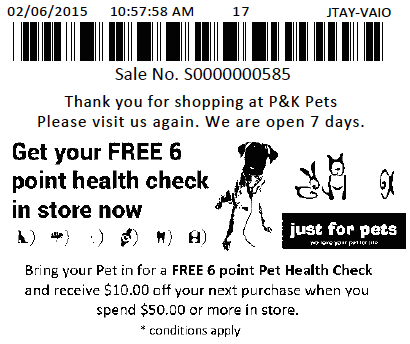
Getting a shopper to return to your independent retail business can be difficult, you need to embrace every opportunity possible. This is where POS software company Tower Systems can help – using our smart POS software you can include on the receipt a coupon or voucher for a variety of purposes including marketing, information, direct discounts or other promotional activity.
The voucher based marketing facilities in our software are being actively used in all specialist channels in which we serve.
It could be a simple discount on return, a promotion of a new service, a discount based what is in this purchase or an offer based on a future bulk buy.
The beauty of the voucher serving technology embedded in the Tower software is that it is flexible and available for use in the business without cost. This ensures that the independent retailers using it are not having to share costs with others. The benefits are as considerable as the flexibility of the service.
And how can I use that information in the business?
This is a question that can stump someone working on the help desk as a POS software company as it goes beyond the what andhow and delves into the why. The answer to this question is a chink of gold that can be mined using smart POS software.
This is a questions the Tower Systems help desk team members can answer because the understand the why: why the software matters, why the data harvested is valuable, why a business owner wanting to grow the business will want to use the data.
This information is vital in small business as it is information that unlocks the real value of POS software for these small independent business users.
We can help small business owners understand data on reports as they relate to their specific businesses. Context is everything as they say and we know POS software cannot be one size fits all. A datapoint could be used by three different businesses in different ways depending on other metrics and KPIs. This is where our help desk team is smart and engaged.
Beyond the shat and how, our POS software help desk team loves to delve into the why.
Here is another fresh and free training video for employees of retail businesses using our POS software. This video explains how to se.. We have plenty more on this topic at our website including videos, advice sheets and more.
Small business retailers could have thousands of dollars of stock sitting on their shelves taking up space. If stock is not selling, it’s costing you. Once you have identified stock that is not selling you can begin to quit this stock, by putting the stock on clearance and continually reducing pricing until it’s sold out. Even if this means selling it below cost, it will save you money in the long run.
Tip: You can work out how much your shop space is worth by dividing the rent by how many square meters of space you have.
If a product hasn’t sold for six months then it’s costing you money to warehouse it. Quitting the stock will stop the cost from building up further and allow you to replace it with stock that will sell. Here is advice on quitting dead stock using our smart POS software.
NOTE: To effectively use this advice you need accurate stock on hand levels. Poor stock management will mean the results here can’t be used. You need to be able to trust your QOH figure is correct for this advice to be useful.
Finding The Stock
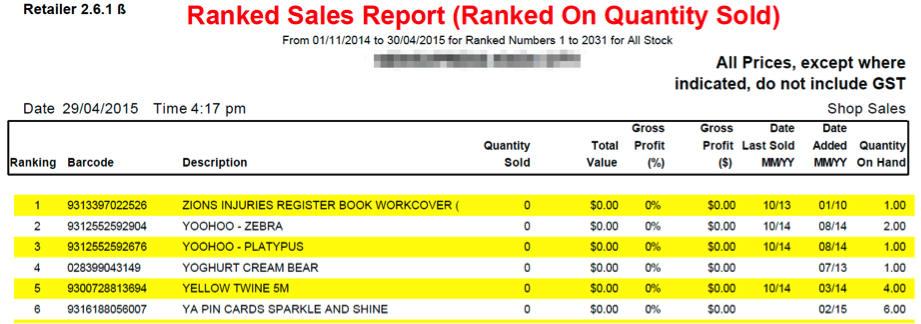
Use the ranked sales report with the following settings to work out what isn’t selling and put that stock on clearance.
Go to Reports > Sales Reports > Ranked Sales Report.
Set your Start date back six months from today and the end date to today’s date. Set the rest of the report settings as below.
When the report runs you will see the following:
Here you can see when the last time an item was sold (if at all) and the last time it was arrived.
Note: Items can show up that have only recently been arrived.
Ignore these items unless they haven’t sold in 4 to 5 months, then you may want to look into them.
The bottom of the report will give you a total cost of stock Inc and Ex GST. Consider this figure the value of dead stock in your store. You need to reduce this as much as possible.
Once you have the report print it out and start working through the list.
Set up a clearance table or bin somewhere in store and put product there with a clearance price. Simply advertise the area as Clearance Stock, Prices as Marked.
Keep discounting the product until it sells. Set a goal to get rid of the stock within say two weeks, if stock is still there after one week, discount further.
Now you can start filling that empty space with stock that is selling well. Use the Ranked Sales Report to show you top selling items and begin to build up those lines.
We keen addicting additional free live training sessions for our POS software customers and they keep filling up. So, guess what, we are adding more.
These sessions are more about leveraging the software in the business than how to do this or that. They contain considerable retail business management and operational advice.
We are thrilled with the support from ur customers and grateful to be in a position to offer this training by our skilled training team.
This is POS software customer service at its best. This is the Tower AdvantageTM
Disaster planning is vital for any retail business. Too often, the need for good disaster planning is realised after a disaster has hit the business. This advice from our POS software company offers business and computer related advice which is designed to mitigate the impact of a disaster on your business.
Insurance Protection
Insurance coverage is vital to helping a retail business overcome any type of disaster. In addition to ensuring that your insurance policy covers all disaster situations of concern to you, including flood, theft, water inundation, fire, earthquake, riot—be sure to carefully read the policy, ensure that your insurance policy / policies cover payouts for the following:
Business interruption. The amount should equal your anticipated gross profit for whatever period you choose to be covered.
Data recovery. Including the hiring of experts to recover data from backup sources or the manual entry of data which cannot be automatically recovered. It needs to ensure that you are covered to the point of recovered data being useable in transacting business.
Lost stock. This is stock stolen, lost from the business.
Damaged and unsaleable stock. This is stock which is water damaged, scuffed or dented and which will not attract full price.
Dated stock. This is stock which you cannot sell by the due date.
Glass. Many policies require explicit statement of glass coverage.
Temporary trading premises. Business interruption may cover this. Ensure that it is explicitly stated.
Key person injury and/or death. This will usually be a separate policy. Depending on the disaster, coverage may also be available through the overall business policy.
Ensure that the value of stock, fixtures and fittings covered by your policy is an accurate reflection of the real value of these items. Talk with your insurance company about the best approach to track this on an ongoing basis.
Insurance brokers can provide access to assessors who can advise on the appropriate level of insurance for your situation.
Use your Point of Sale system to track all stock movements in and out. The stock on hand in your software should be your coverage.
Ensure that your insurance policy protects for the seasonal nature of your business
Data Protection
Business data is one of the most valuable assets of the business. Like insurance, the value is often not understood until you need what you do not have. Retailers who are serious about protecting their business data in the event of any disaster follow these steps:
Backup your business data every day, at the end of the day, without fail. Our cloud based backup service is ideal.
Maintain a separate backup for each day of the week. Consider a separate backup for the last day of each month.
Remove the backup medium, usually a USB stick, from the business premises each day.
Store the backup in a safe, dry place.
Check the usefulness of the backup by restoring and checking the data.
Store original business software in a safe off-site location
Disaster Planning
Here are some general suggestions on planning for a disaster.
Keep off site copies of: Business contracts and agreements; employee contact details, business account and other passwords, insurance details, recent photographs of fixtures, fittings and stock.
Maintain a register of all employees in the business at any time.
Prepare and place in a prominent place an evacuation plan.
Maintain a professional grade OH&S compliant first aid kit.
Regularly maintain all fire extinguishers.
Ensure that the business premises is safe and maintained to the local building codes and OH&S regulations.
Finding stock is easy for those using the Tower Systems POS software. While we have comprehensive training, sometimes it is brief top level training that front line employees need. Here is a new brief video created specifically for the front line. It’s fast and easy to learn and is back by far more training in video, text and line one on one form.
Each of our customers has common challenges: BIG business and online business.
We can help you compete with BIG business and online businesses.
Our POS software offers four approaches to loyalty. One, the NEW loyalty, is fresh, unique and loved by shoppers.
We are seeing small and independent retail businesses enjoy double digit growth on the back on our approach.
We back our terrific Aussie software with practical training. We even help you train your employees. Click here to see one two minute video we produced for our customers to share with their employees on our unique Discount Voucher facility (the NEW loyalty). We explain how your employees make make this work for you.
We are not your average software company. We care about independent small businesses. Our software is tailored to the needs of specialist retail channels.
Retailers are embracing the FREE POS software training from Tower Systems in End of Financial Year processes. Developed specifically to serve retailers this year in the run up to June 30, this session is an all you need to know approach to stock, business data and other factors that are vital to being prepared for EOFY.
This training is a continuation of the weekly POS software training tower Systems launched years ago, training the company happily and willingly offers to provide our customers with more free learning opportunities through which to love our software and love our company.
When we say this training is free, there is truly no cost. we even pay for the phone call to provide audio access – anywhere in the world. This is another Tower AdvantageTM .
POS software can do more for small business retailers than they may think. Good POS software, like that from Tower Systems, goes deep into the business, away from the sales counter, helping in many ways.
Help with leveraging shopper loyalty.
Reward to drive deeper shopper engagement.
Track your loyalty liabilities to understand risk.
Track shopper engagement through comprehensive date, time and person engagement to understand the loyalty buttons to push.
Choose the loyalty offer right for you – good POS software will offer multiple loyalty offers for you.
Be consistent in your loyalty offer such that every shopper is offered a consistent pitch.
Un a loyalty program that is different to those around you. For example, if others nearby offer a points based program, go with something different.
Tower Systems has begun an education campaign for small business retailers in Australia in selected specialist retail channels outlining how they can benefit from the immediate asset write-off opportunity announced in the federal budget last night.
Retail businesses turning over $2 million a year or less can immediately write off the purchase of our Point of Sale solution.
Our software delivers the productivity benefits the federal government is keen to see small businesses access.
POS software can do more for small business retailers than they may think. Good POS software, like that from Tower Systems, goes deep into the business, away from the sales counter, helping in many ways.
Help with managing employees.
Easily create rosters and share these with employees how and where they want.
Track sales by employees.
Track sales by time – allowing shift comparisons.
How employees understand performance in the context of what they can do to help the business and themselves.
Cut time taken on everyday tasks such as end of shift.
Eliminate often frustrating tasks such as the daily backup.
Give employees information that helps them more effectively serve the business.
Bring certainty to the counter and help employees be more consistent.
Provide employees with vital information about products so they can be consistently knowledgeable.
Sometimes, POS software help desk advice is not right. It could be they did not understand the question, that you did not completely explain the question or that they got it plain wrong.
A good POS software help desk will offer a structured escalation process where you can take any concern and have it considered away from the help desk. Such an escalation process will involve senior management and have at its heart good communication.
Tower Systems has a structured escalation process with three points of escalation outside of the help desk function. Customers can use this or they can bypass a step as all contact points in the escalation process are published regularly.
Tower customers can speak directly with the owner of the business, Mark Fletcher, on 0418 321 338.
We encourage customers to challenge help desk advice to ensure that the advice is right for the actual question or problem. This can be done in a respectful way with the outcome always on ensuring the best possible customer service experience.
Retailers who actively engage with the POS software help desk process usually achieve a more meaningful and valuable outcome for themselves and their business.
Demonstrating its commitment to innovation, the latest release of POS software from Tower Systems offers a completely new stock take facility.
Completely re-designed from the ground up, this new stocktaking facility works as well with tablets as it does on your traditional desktop.
Packed with new features, this new stock take facility is available for the end of financial year stock take retailers will undertake over the next two months.
Tower Systems is committed to providing its small business retail partners a continuously improving POS software experience through considerable investment in software development.
Preorders are important in several specialist retail businesses. They can help you lock-in shoppers long before product is available. Offering the service is often appreciated, especially by collectors who want to be first with a new product in their area of collection.
Using smart facilities in our POS software, retailers are able to easily manage preorders from payment to order tracking to customer communication.
Our preorder facilities are all about helping retailers grow their businesses and ensuring they do not lose sales.
The more structured your processes around special orders and preorders the more support you will achieve from customers.
Developed with retailers specialising in preorders, the Tower POS software serves this need well.
Software is only as valuable to a business as the contribution it makes. This contribution can be measured in time and money for its from these two that all other benefits flow. Here are ways our point of sale software will help gift shops, jewellers, bike retailers, pet shops and more make more money and free time
Better customer service. Our software guides the sales process and gathers all necessary information, freeing retail staff for selling.
Saving time. Using our software, sales are processed quickly. As retailers ourselves we have focused on delivering fast and efficient processing for sales.
Reducing theft. Stores without a POS system are more susceptible to employee theft. In fact nearly 50% of retail shrinkage comes from employee theft. Our software can help to significantly reduce or eliminate these occurrences. We draw your attention to suspicious behaviour. For more security, you can password protect any area that you do not want employees to be able to access.
Better decisions. We provide access to real-time information. Whether you have one store or 30 stores, you have instant and up to the minute access to sales numbers, stock, margins and more. This ability to have instant and accurate information enables you to make the absolute most out of your investment.
Increased sales. In many ways throughout the business we help with this.
After sales marketing. Using our loyalty program you send targeted letters, emails, and direct mail to customers based on purchases and other criteria. We have several loyalty options.
Payment integration. With integrated Eftpos you can un clutter the counter, streamline sales processing and make record keeping easier. Time and money saved.
Reduced mistakes. Using our software you can cut paperwork and this cuts mistakes. You can rely on the software to advise sales data and thereby stop you buying products which are not selling. Good retailing begins with good buying.
Better integration with suppliers. Thanks to the supplier links in our software you are able to give suppliers data in return for better deals. There are many case studies in our files of this working to the benefit of our retail customers. Good retailing begins with good buying.
The Tower Systems software for jewellers is unique in a number of ways. here are some of them:
We are a software company, not a consulting business using software as a mechanism for driving consulting fees.
We are in your business. Not a contractor we hire, not over the phone, when we install the system we do it in your business, working with you.
Second-hand goods. These facilities have been developed with jewellers and authorities so you have the right records on hand.
These facilities have been developed to help you streamline workflow and keep in close contact with customers throughout.
Manufactured goods. From concept to manufacture, you can manage and track what you make for whom and when. This is a billing and management asset.
Lay-by. Our Lay-by facilities have been developed in close consultation with jewellers, making them unique and comprehensive.
We offer more facilities than any other system. These offer you flexibility for driving purchases in the current visit and for bringing shoppers back more often.
You have access to extraordinary customisation through settings, enabling you to represent your business how you want.
Embedded in our software are facilities for tracking how the software is used. This enables us to help you reduce employee theft.
Retail focussed. A challenge of retail is to uncover opportunities early. Smart reports in the Tower software unlock information about opportunities in your business on which you can rely for business planning.
More than 200 retailers are using our recently launched employee roster software. Even though the software is only in beta release, plenty are using it actively i their businesses to manage rostering of employees and managing the labour costs of the business.
This cloud based FREE roster software from Tower Systems is another way the company is reinvesting into small business retail channels – to provide tools retailers can use to better manage labour costs.
The Tower Systems POS software has had roster software for many years. This latest facility reflects a next generation approach. It is available to any business regardless of the POS software they use.
Small business retailers are set from more suppliers joining the Tower Systems EDI user community offering access to electronic invoices, stock files and other benefits.
With someone dedicated full-time in our business to help wholesales and others connect with retailers, we are well positioned to be able to help overcome hurdles in suppler organisations. This service is one reason we have more suppliers connected with our customers through our software.
The latest supplier coming on board to offer electronic invoices will be a help to many customers as they trade in the newsagency and gift marketplaces – where we serve over 2,000 small businesses.
The moment they are ready we will announce to our customers.
Few small business POS software products report on return on investment, stock turn, return on floor space and return on shelf space. The Tower Systems POS software delivers on reporting on these and other KPIs, enabling retailers to have a better understanding of business performance and through this the opportunity to make better quality business decisions.
Return on investment, stock turn, return on floor space and return on shelf space are the most vital of retail business Key Performance Indicators. That retailers using the Tower software can access these for themselves and easily demonstrates a valuable point of difference.
Since some small business retailers don’t understand the KPIs, the Tower help desk and business management teams offer assistance in understanding and guidance on decisions which can be made as a result of tapping into the KPIs.
Every retail business can sell more to every customer. This is easy when you have good business data and use this to make good business decisions.
Making more money from every sale starts with you understanding shopper behaviour today.
Get a report from your Point of Sale software listing your top ten selling items, by unit sales for the last three months. Do not look at dollars. Unit sales is the far more valuable count since this is a discussion about leveraging volume.
In the Tower software the report is a 10×10 Report. This lists the top 10 items and the ten items selling with those 10 items. (You can set the number to anything besides 10.)
In a typical retail store, the top ten selling items will account for between 30% and 50% of revenue of the business.
Look at your top sellers report and concentrate on the top selling items. Consider these questions about the top selling items:
Do you have appropriate impulse purchase products located on either side of each top item?
Are the top items spread through the store, to maximize customer throughput?
How often do you move the top items?
Do you have the top ten items in multiple locations?
What impulse purchase items do you have at the counter which will appeal to customers who purchase any of the top ten items?
Has the list of top ten sellers changed in the last year? If so, how have they changed and what can you learn from this.
Are there products which you do not currently carry which you could add to the store to sell with the top ten sellers?
Do customers who purchase the top ten sellers ask for any other items?
The idea embedded in these questions is very simple. Use the top ten sellers, or top twenty or top thirty, to focus your attention on items with which you can work to achieve more sales in your business.
By focusing on the top sellers and what you can sell with them you can increase the size of the average shopping basket.
If you can’t see opportunities for achieving more sales by placing products next to or with the top sellers then speak with your team and speak with trusted customers. Don’t rest until you unlock suggestions to try.
There is plenty of additional money to be made from your top sellers. Invest time and attention on this project and get ready to bank the results.
Small business bike shops, jewellers, garden centres, gift shops, pet shops, homewares shops, newsagents and more are using the targeted marketing facilities in the smart POS software from Tower Systems to more closely engage with shoppers.
Our targeted marketing tools leverage shopper details including purchase history to facilitate selective highly-targeted marketing to attract known shoppers back into the business. These smart POS software tools are vital to small business retailers keen to be noticed in a crowded marketplace.
Tower Systems is hosting another free training workshop on targeted marketing for retailers using its software on May 6. This is part of the weekly free training workshops run by the company for many years now. These workshops are a true point of difference for Tower Systems, they are a benefit retailers love.
Linked with loyalty facilities including discount vouchers, the targeted marketing tools in the Tower software are unique to Tower, they offer a genuine point of difference on which small business retailers can rely. We have case studies which offer evidence of engagement growth as a result of using the facilities.
Targeted marketing is another part of the Tower AdvantageTM.
Small business retailers want to grow, who doesn’t? With rent and labour costs increasing each year, growth is mission critical. POS software company Tower Systems helps its customers grow by providing advice on how to use the software to grow.
As retailers ourselves we can provide practical advice on how to use the software to more than transact sales, we can help retailers use the software to grow their businesses. We do this every day on our help desk, through our consulting services, through our knowledge base and through our business mentoring assistance.
We encourage, guide, educate and support our small business retailer customers in their desire to grow their businesses. it’s something we take serviceably.
Even on the weekend. Take today, Saturday … we have been helping one business owner understand opportunities in their slow selling inventory pool to unlock cash and space for more productive use.
We are serious in our commitment to small business retailers from our software through to the practical advice and support we provide.





Recent Comments