Reasons retailers choose Tower Systems
R

The POS Software Blog
News from Tower Systems about locally made POS software for specialty local retailers.
We are all setup and read to go for the Reed Melbourne Gift Fair, which starts today.
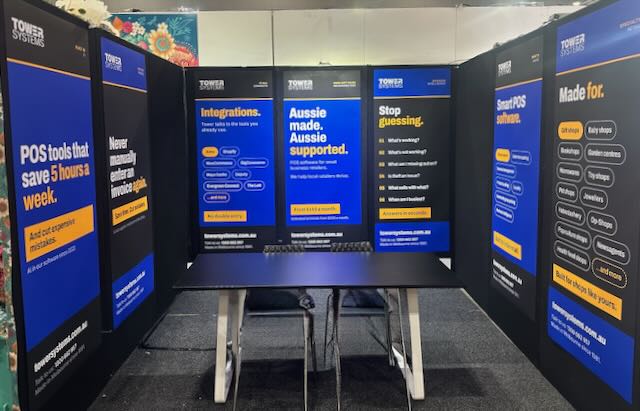
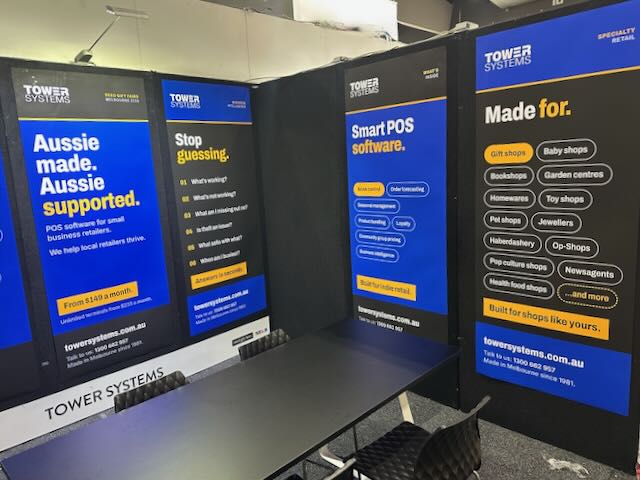
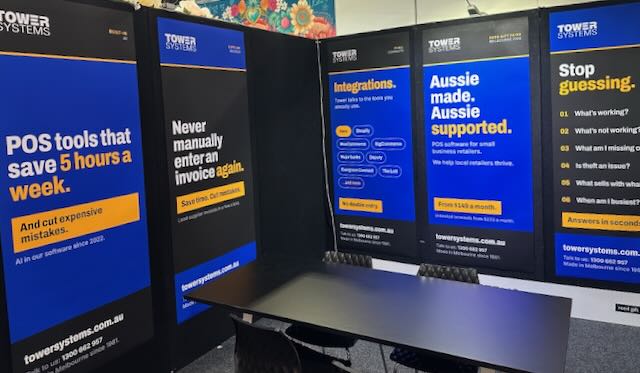
On our stand we will be demonstrating the very latest in POS software for gift shops, jewellers, garden centres, newsagents, toy shops, music shops, bookshops and more.
This is smart POS software. Melbourne made. Melbourne supported.
Gift retail has its own rhythm. Seasonal buying, one-off suppliers, products that need good photos and descriptions to sell online. Our software is built for that. Supplier invoices load in around 30 seconds. AI writes product descriptions and SEO content for you. Reports come with plain advice on what to do next. It connects with Shopify, BigCommerce, WooCommerce and Xero, so your shop floor and your online store stay in step.
If you are walking the fair with buying on your mind, five minutes at our stand could save you hours every week back at the shop. Bring your questions. We like the hard ones.
What sets us apart we think is the help behind the software. Our help desk is in Australia, staffed by people who know retail, and training is part of the deal rather than an extra. When you call, you speak with someone who understands what a busy Saturday in a gift shop looks like. Plenty of the retailers on our software came to us from bigger-name systems where they felt like an account number.
AI is doing real work in our software, and it has been since 2022. We call it Retailer AI, and it draws on Gemini, Claude and ChatGPT inside the POS software itself. A typical business saves between 5 and 8 labour hours a week, worth $175 to $280 at a $35 an hour pay rate. One retailer used it to find more than $10,000 in dead stock. There is plenty of AI hype about at the moment. This is not that. It is invoices loading themselves, reorders drafting themselves and reports that tell you what to do next.
The Melbourne Gift Fair is the best week of the year to see all of this in person. Bring a sales report or a supplier invoice from your own shop if you like, and we will show you what the software does with it on the spot. No script and no canned demo. If you cannot make it to our stand, book a free demo and we will bring the software to you after the fair.
More newsagents have chosen Tower Systems than any other POS software. We didn’t set that label ourselves. Newsagents did, one shop at a time, by choosing us over everything else on offer.
We don’t take that lightly, and we don’t think it happened by accident.
We’re the only POS company in this space that has owned and run its own newsagencies. Our founder bought their first shop in 1996 and built our software off the back of what that business actually needed, not what looked good in a sales pitch. That’s still true of every update we ship, even though our company today does not own a newsagency.
The traditional core of a newsagency, magazines, papers, lottery, is a smaller part of the business than it used to be, and it keeps shrinking. The newsagents doing well are the ones shifting shelf space and attention toward gifts, cards, stationery and collectables. Software built for a magazine-and-lottery counter doesn’t help with that shift. Software built by people who’ve made that shift themselves does.
That’s where features like our loyalty tools earn their keep. You can market to a customer based on what they’ve bought, which means turning a regular lottery shopper into someone who browses the gift wall, or a magazine reader into someone who tries the stationery range. That’s not a feature for its own sake. It’s the whole point of the software.
A newsagency runs on integrations most other retail software doesn’t bother with. We link directly to The Lott through XchangeIT, so lottery sales are captured without manual entry. Magazine arrivals and returns run through XchangeIT too, so your stock and your credits stay accurate without someone doing it by hand. Greeting card suppliers load in as electronic invoices in seconds instead of an afternoon of data entry.
Beyond the newsagency-specific stuff, the software connects to Shopify, Magento and WooCommerce if you sell online, to Xero for your books, and to EFTPOS with every major bank. If you pass on card fees, the system calculates the surcharge for you. We don’t charge a fee per transaction, ever.
The AI tools built into the software write product descriptions for new gift lines, help you compare prices, and turn a stack of sales data into something you can act on, which categories are growing, which need attention, without you having to dig for it.
None of this makes us the biggest software company. It makes us the one most newsagents chose. If you want to see why, we’re happy to show you.
Book a free demo, or call 1300 662 957 in Australia and 0800 444 367 in New Zealand.
Our help desk is human, and it’s local: people in Australia and New Zealand, not an offshore call centre reading from a script. That matters because retail is personal, and so is fixing it when something goes wrong.
But even a good help desk can only work as fast as the conversation allows. A lot of what determines how quickly a problem gets solved isn’t the technician, it’s how the call itself goes.
Support calls usually happen while the shop is open, which means a customer at the counter, and the customer always comes first. Fair enough. But every time a call gets put down mid-troubleshooting, the technician loses the thread. Getting back to where you were takes longer than the interruption itself did. A five-minute pause can turn a ten-minute call into thirty.
Nobody’s fault. It’s just what happens when technical support runs into a trading floor.
A few habits make a real difference to how fast a fix comes through:
If you’re short-staffed and it’s not a good time, say that. It costs nothing, it lets us manage the queue properly, and when you do call back, you get someone’s full attention instead of a rushed half-conversation.
None of this is about making things easier for us at your expense. A call that isn’t interrupted gets solved faster. That means less time away from your counter. Everybody’s better off.
That’s the kind of help desk we’re trying to run: local, human, and worth your time.
Switching POS software is one of those decisions that feels bigger than it is — and then turns out to be exactly as big as you thought.
Retail business owners: Take your time. Do your research. Make decisions only when you are ready. This decision is 100% about you and is best made by you, not a consultant, not your accountant. Choose software that is best for you. If you are not sure, wait. Make sure every claim, every promise is documented.
The actual switch is usually straightforward. The regret comes when you’ve committed to a new platform and discover something important you didn’t ask about before signing up.
Here are the questions worth asking any POS vendor before you make a decision.
The best POS vendors will answer all of these questions clearly, in writing, before you sign anything. If a vendor is reluctant to provide written answers or a real demo, that’s useful information too.
Tower Systems is happy to answer every one of these questions. We’ll put it in writing.
Generic POS software isn’t bad software. For many businesses — a coffee shop, a pop-up market stall, a simple fashion boutique — it does the job.
But for specialty retailers, it often creates a slow accumulation of frustrations. Workarounds that take extra time. Features that are almost right but not quite. Data that doesn’t reflect how your business actually works.
If you consider your business to be unique, you want to choose software that supports your uniqueness, that serves it well, for you.
Here are five ways generic software lets specialty retailers down.
Generic POS assumes you sell individual units at a fixed price. But a garden centre sells plants by pot size, bulk soil by the bag, and services by the hour. A fabric shop sells material by the metre or fraction thereof. A produce business sells grain by weight on a government-certified scale. A jeweller sells items with serial numbers that need to be tracked individually.
Independent specialty retailers buy through buying groups and industry-specific suppliers. Newsagents use XchangeIT. Bike shops use Bike Exchange. Produce businesses use AIRR. Bookshops use TitlePage and Pacstream. These connections save hours every week. Generic POS doesn’t know these networks exist.
Many specialty retailers also repair, restore, or service products. Bike shops, jewellers, music shops, and sewing businesses manage repairs with parts, labour, warranty, and customer notification. Generic POS has no concept of a repair job.
A newsagent needs to track magazine returns, lottery income, and greeting card performance by range. A jeweller tracks sales by metal type, stone type, and occasion. Generic reporting gives you sales by product and date — useful, but not enough.
Generic POS support staff are trained on the software. They may not know what XchangeIT is, how a magazine return works, or why your scale integration is measuring incorrectly. Specialty POS support staff deal with your type of business every day.
Purpose-built POS software for your specific retail type has these answers already built in. Not as upgrades. Not as third-party integrations. Built in.
Tower Systems serves 19 retail categories with purpose-built tools for each. We’ve been doing this for over 40 years.
Here’s a number most retailers don’t calculate until it’s too late: the total cost of transaction fees in their POS software every year. The cost of transactions is part of the total cost of ownership of your POS software when it is a mandatory cost imposed by the POS software supplier.
Some POS platforms charge a percentage of every EFTPOS transaction. A common rate is 1.4%. Some charge 1.75%. Some charge 2–3%.
If your shop takes $400,000 a year in card payments:
That’s on top of your monthly software subscription. On top of your merchant facility fees. On top of your hardware costs. It’s best to calculate these costs before you sign up to use POS software as some POS software companies can value customers by their transaction value rather than value them as a POS software customer, a retailer. There is a difference.
Some platforms require you to use their own payment processing system. If you choose a different EFTPOS provider — your bank, Tyro, whoever you prefer — they add a significant monthly penalty fee. This is effectively the same cost, structured differently. And it removes your choice about who processes your payments.
Get the answers in writing and compare on the same basis — not advertised prices, but actual all-in costs for your transaction volume.
Tower Systems charges a flat monthly subscription: $220, $246, or $275 per month (as at May 2026) depending on your plan (GST inclusive). That is the cost.
No transaction fees. No EFTPOS penalty fees. No per-terminal charges. No turnover limits. Your EFTPOS provider is your choice — we work with Tyro, Linkly, and others.
We also don’t lock you in. No minimum term. Cancel any time.
Transparent pricing shouldn’t be a differentiator. But in this market, it is.
AI is everywhere right now. Most of it is background noise.
But there are a few specific places where AI genuinely removes time-consuming, tedious work from a small retail business. We’ve been building these tools into our software since 2022. Here’s what they actually do, from within out POS software.
This was the first AI tool we built, because we heard the same complaint constantly: entering new stock from supplier invoices takes forever.
The manual process: open the invoice PDF, read product codes, type them in one by one, match quantities, update costs, check for pricing changes. For a busy shop receiving multiple supplier deliveries a week, this can consume hours.
The AI process: drop the PDF invoice into the software. The AI reads it, identifies products, quantities, and costs, matches them to your inventory, and updates everything automatically.
One of our customers put it this way: “I am saving 5 hours of paid labour time every week. That’s a saving of over $8,000 a year for our business.”
Our AI tools write professional, SEO-ready product descriptions for your website automatically — based on the product information already in your POS. The same tools can generate social media posts and blog content for your business.
Click AI Insights on any report in Tower. The software gives you a plain-English summary: what’s selling, what isn’t, where your margin is healthy, where it’s under pressure. No spreadsheet skills needed.
AI monitors your stock levels against your sales patterns and generates suggested reorder lists for your approval. Stock arrives before you run out — without manual checking.
The hours saved on admin are hours you spend on the floor, with customers. That’s where independent specialty retailers win — personal service and product knowledge that a big box store can’t replicate.
AI handles the back office. You handle the relationship.
Tower is the only specialty retail POS in Australia with these tools built in. They’re available on Advanced and Ultimate plans.
In independent retail, one size rarely fits all. Whether you are running a bike shop in a busy suburb or a stockfeed business in a rural town, your customers interact with your brand differently. At Tower Systems, we believe your loyalty program should reflect that unique relationship rather than forcing you into a rigid, “copycat” box.
The biggest hurdle for many small business retailers is the pressure to launch a “perfect” loyalty scheme. Our advice is simple: just start. The place you land for the long term will likely be quite different from where you began.
The beauty of the Tower Systems loyalty toolkit is that it allows you to learn and adjust on the fly. You can implement a strategy today, observe the data, and pivot tomorrow to better serve your shoppers.
We provide a diverse range of facilities that you can mix, match, or switch between as your business grows:
The Discount Voucher Powerhouse: This is a proven winner, with some retailers seeing sales growth of up to 20%. You control the value and the rules, and it takes only minutes to set up.
Traditional Points: Perfect for retailers who want a classic “spend and earn” model where points convert to cash rewards.
Digital “Clip-the-Ticket”: Ideal for high-frequency businesses like newsagents or coffee shops, managed entirely within your POS software.
Frictionless Loyalty: You can even reward customers without requiring a formal sign-up process, removing barriers at the sales counter.
The data hidden within these programs is fascinating. For instance, our evidence shows that a 50-cent voucher can be just as effective at driving engagement as a $50.00 one. We also see distinct behavioural patterns: men are more likely to redeem a voucher on the day they receive it, while women often return about seven days later to use their reward.
Having access to this level of detail allows you to pull specific levers to increase visit frequency and guide shopper behaviour.
Our loyalty tools are built directly into our software at no extra cost. We are proud to support a massive range of Aussie small businesses, including:
Home & Garden: Garden centres, farm supply, and stockfeed businesses.
Hobbies & Leisure: Toy shops, bookshops, music shops, and bike shops.
Fashion & Gifts: Jewellers, gift shops, and boutique fashion.
Services & Health: Pet stores, repair shops, health food shops, and mobility scooter businesses.
Your loyalty program should be a tool for growth, not a source of stress. Start your journey today, see the evidence in your own business, and evolve your way to success.
…
Call: 1300 662 957 or 0800 444 367
Email: sales@towersystems.com.au
Choosing POS software feels like a big decision. And it is. The software you run in your shop touches nearly everything — sales, stock, customers, suppliers, reporting, stagey, compliance, and your online store.
Most retailers start by Googling “best POS software Australia.” The results show the same handful of platforms over and over. Most of them are built to work for any retailer, like, literally, any type of retailer.
That’s worth pausing on.
A generic POS handles the basics well: processing sales, tracking inventory, running reports. For a café or a clothing boutique that sells finished goods at fixed prices, that’s probably enough.
But if your shop sells items by weight, manages customer repairs, tracks serial numbers, handles second-hand goods, processes special orders, or connects to industry-specific suppliers — generic software starts to feel like wearing someone else’s shoes.
You make it work. But it doesn’t quite fit.
If your shop is not generic, why consider generic POS software?
Software built for your specific type of business includes the tools your business actually uses, set up the way your business actually works.
For a jeweller, that means stone-level inventory management, valuation certificates, and repairs tracking with parts and labour. For a garden centre, it means selling by weight, managing plants that grow and change price, and printing weatherproof labels for outdoor stock. For a bike shop, it means workshop management, serial number tracking, and direct connection to Bike Exchange.
These aren’t add-ons. They’re built in.
At Tower Systems, we’ve spent four decades building software for specific types of retail shops. Not all retail — specific retail. Jewellers. Newsagents. Garden centres. Bike shops. Pet shops. Fishing shops. Toy shops. Bookshops. And more.
Every vertical has tools built in that reflect how that business actually works. Not how a generic platform thinks it works.
If you run a specialty retail shop and your current software feels like a compromise, it might be time to look at what purpose-built actually means.
There is a version of the AI conversation that is genuinely unhelpful for independent retailers.
It involves large language models, disruption curves, and predictions about the future of work. It is written for technology publications, not for someone who needs to open the shop at 8am, manage a casual employee, and check in with a supplier about a delayed delivery.
This is not that conversation.
This post is about what AI is actually doing, right now, in independent retail businesses, small businesses, across Australia and New Zealand, and specifically the practical, unglamorous tasks where it is saving time and improving decisions.
Let’s get into real talk about AI and indie retail.
AI-enabled reordering monitors your sales velocity and current stock levels continuously. When a product approaches a reorder threshold, calculated based on your actual sales history, not a fixed number, the software generates a draft replenishment order for your review. You approve it or adjust it. The hard work is done.
For a gift shop managing 1,500 product lines across dozens of suppliers, this is not a small thing. It is hours returned every week.
Every POS system generates reports. Most go largely unread, or are read without the analysis needed to act on them.
Tower Systems’ AI insights tool changes this. Run a sales report, click the AI insights button, and the software surfaces observations: which categories have shifted, what’s trending, where there are anomalies worth investigating. It’s not predicting the future. It’s reading data that was always there but required more time than most owners have to interpret.
Independent retailers going online face a specific challenge: writing product descriptions for hundreds or thousands of products — descriptions that are accurate, readable, and optimised for search engines.
Tower Systems’ software can generate product names and descriptions directly from your POS product data. For a garden centre putting its plant range online, or a gift shop listing its greeting card collection, this removes one of the biggest practical barriers to getting products visible online.
Supplier invoices arrive as documents, in a range of formats. Someone has to read them and enter the data into the POS system. AI-powered invoice reading changes this. The software reads the invoice, identifies the products, quantities, and prices, and converts it to an importable format. What previously took 20 to 30 minutes per invoice takes under two minutes.
A retailer’s website needs content that search engines will rank. Tower Systems’ software can generate and publish blog posts for products managed within the POS system, product-specific content, formatted for the web, published to your website without requiring you to write a word.
AI in retail is not going to replace the things that make independent retail worth visiting: product knowledge, personal service, community connection, and curation.
What AI can do is remove the administrative burden that gets in the way of those human interactions. Less time on invoices, reports, reordering, and product descriptions means more time for the work that actually differentiates your business.
That is a practical and achievable benefit. It is happening right now in independent retail across Australia. Tower Systems has been building AI-enabled POS software for Australian specialty retailers since 2022, serving thousands independent specialty retail businesses.
We reckon it can. Take a look, obligation free.
The conversation happens in retail circles regularly.
One shop owner mentions they’ve been selling online for two years. The other admits they’ve been meaning to set up a website “for a while.” The conversation moves on. But the gap between those two businesses is quietly growing.
If you’re an independent retailer who hasn’t yet moved online, the reason is probably not lack of interest. It’s the perception that it’s expensive, complicated, and requires expertise you don’t have. That perception is out of date.
Setting up an online store does not require:
What it does require:
That third point is the one most retailers don’t know is possible. If your POS software connects directly to your e-commerce platform, you don’t need to manage two separate inventories. When a product sells in-store, stock reduces online. When you update a price, it updates everywhere.
The fastest path to online sales for an independent retailer is not a complex custom build:
Online revenue won’t replace in-store revenue overnight. For most independent retailers going online for the first time, it typically looks like this: months 1–2 for setup and first orders; months 3–4 for first regular customers and growing local search visibility; months 5–6 for a clearer picture of what sells online versus in-store.
The businesses that do this well are not the ones who invest the most money up front. They’re the ones who start simply, learn what works, and add to it over time.
A basic Shopify subscription costs a few dollars a day. Tower Systems’ integration tools connect your POS to your online store. The question is not whether you can afford to go online. It’s whether you can afford not to.
Tower Systems also offers fixed-price Shopify site development to your specific needs. The best way to start is to talk with a sales person to scope out your needs as there are several options, including a cost-saving option plenty of retailers love.
The Tower Systems Shopify development work is done in Australia by a skilled web developer who is part of the Tower Systems staffing team.
If you’ve worked in retail for more than a week, you know the particular anxiety of end-of-day reconciliation.
The shift is done. The last customer has left. You count the drawer and compare it to the system. And it’s off. Again.
Sometimes it’s a few dollars over. Sometimes it’s $15 short. Occasionally it’s something alarming. But it’s almost never exactly right, and finding out why eats time you don’t have at the end of a long day.
Even in this time of card payments dominating cash use, balancing is a challenge.
It’s one of the most common frustrations in independent retail, and it has specific, fixable causes.
After years of working with independent retailers across Australia, the causes of persistent reconciliation problems fall into a predictable set of categories.
When a staff member gives a customer a discount by manually adjusting the price at point of sale, without going through a proper discount code or approved process, it creates a discrepancy between what the system expects and what was actually taken. The fix: set up authorised discount codes in your POS software. All discounts should be applied through the system, not manually overridden.
A customer returns a product. The refund is processed through the till, but not reconciled correctly against the original transaction. The fix: strict refund procedures tied to the original transaction reference. Good POS software enforces this automatically.
In businesses with multiple staff, mid-shift cash handling, float transfers, banking runs, petty cash, creates opportunities for reconciliation errors if not documented in the system at the time. The fix: every cash movement recorded in real time.
High-volume environments sometimes see products sold verbally or by price rather than scanned. The fix: every transaction through the scanner, no exceptions.
Sometimes the imbalance isn’t a human problem — it’s a setup problem. Tax configuration, rounding rules, or payment type settings that don’t match actual banking practice can create systematic discrepancies that appear every day.
Most small reconciliation discrepancies are procedural errors or configuration issues. But persistent unexplained shortfalls — particularly if they follow a pattern (same day of the week, same staff member’s shift) — should be investigated more seriously. Good POS software gives you the transaction-level data to identify patterns.
The question isn’t “why doesn’t my till balance?” The question is: does my POS software give me the visibility to find out why?
If you can pull up every transaction from yesterday, filter by payment type, see every discount applied and by whom, and trace every refund back to its original sale, you can find the problem. If you can’t, you’re managing blind.
It started with a conversation about the weekly wage bill.
The owner of a suburban newsagency sat down with his accountant in early 2024 and did something he’d been avoiding: he calculated exactly how many hours per week his team spent on tasks that, in his words, “a computer should be doing.”
The number was startling. Between manual stock counting, placing reorders over the phone, reconciling supplier invoices against what arrived, and running end-of-day reports by hand, his team was spending close to 12 hours per week on administrative work.
“I had a part-time staff member who was essentially just managing paperwork,” he said. “That’s a real cost. And it was hiding in plain sight.”
For most newsagents and small format retailers, time haemorrhages in predictable places:
None of these tasks requires skill or judgement. They require time. And for a small retail business operating on tight margins, that time has a direct dollar cost.
After switching to Tower Systems software and configuring it for this business, four things changed.
First, automatic reordering. The software now monitors stock levels in the background and generates a replenishment order when levels drop below a threshold. The owner reviews and approves it — which takes minutes — rather than generating it from scratch each time.
Second, AI-powered invoice processing. When a supplier PDF invoice arrives, the software reads it automatically and converts it to an importable format. What previously took 20 to 30 minutes per invoice now takes under two minutes.
Third, AI report insights. Rather than reading a dense sales report and trying to identify patterns, the AI insights button surfaces specific observations: which categories are up, which are down, what’s trending, what needs attention.
Fourth, end of shift backups ended thanks to cloud backup.
The combined effect: 8+ hours per week recovered. These were hours the owners was paying for in wages.
For newsagents specifically, the efficiency opportunity is larger than in most retail categories. High transaction volumes, multiple supplier relationships, and tight margins mean that small process improvements compound quickly.
A typical newsagency can cut invoice entry time bay at least 5 hours a week. At $35 an hour cost, that’s $9,100.00 a year in savings!
Automation doesn’t replace the value of an experienced team member. It removes the tasks that waste their time, which means they’re available for the tasks that actually require a human: serving customers well, building relationships with regulars, and managing the unexpected.
You know the feeling. You walk the shop floor before opening and there it is, a display area or a section of shelving that hasn’t moved in months, it looks good, you like it, but it hasn’t moved.
Typically, these are products you were certain would fly off the shelves, products you fell in love with at a trade show, products that are now quietly costing you money every single day they sit there.
Dead stock is one of the most common and least talked-about problems in independent retail.
Retailers don’t like talking about dead stock.
Most gift shop owners we speak to are genuinely surprised when they run their first proper dead stock report. The number is almost always higher than they expected. For a shop turning over $500,000 per year, it’s not unusual to find $25,000 to $40,000 worth of inventory that hasn’t sold in more than six months.
That’s not just money tied up on a shelf. It’s cash that could be buying products your customers actually want. It’s space that could be displaying your best performers. It’s your shop looking fresh and curated rather than cluttered.
In a busy shop, reordering often happens on autopilot. A rep visits, you place an order based on instinct and what sold well last season. A supplier runs a trade deal and you buy more than you need to hit the minimum. A new range arrives and the old one doesn’t get cleared properly.
None of these decisions feel wrong at the time. But over 12 months, they compound. And because the stock is spread across hundreds of product lines, it’s invisible in your day-to-day operations.
The retailers who manage this well aren’t more disciplined than everyone else. They have better visibility. They know, at any point, exactly which products haven’t sold in 90 days, 120 days, or six months. And they act on that information before it becomes a problem.
Retail software, POS software, should make this straightforward. A good stock control report lets you filter products by days since last sale, sorted by quantity on hand and value on hand. That combination, products with high stock levels that haven’t sold recently, is your dead stock.
Once you have that list, the path forward is clear:
Tower Systems’ AI-enabled POS software takes this further. Rather than running a report and manually identifying patterns, the AI insights tool analyses your report data and surfaces specific, actionable recommendations. It’s smart, helpful, and on your side.
The goal isn’t just to clear today’s dead stock. It’s to stop it accumulating again next season.
If your shop is holding $30,000 in slow-moving stock, that’s capital sitting idle. Reinvested in your top 20 bestselling lines, the same capital could generate significantly more revenue. The first step is knowing the number. Run the report. Be honest about what you see.
Book a free demo at towersystems.com.au.
Effective communication is the foundation of a successful partnership between a retail business and its software provider. When a technical issue arises, the quality of the interaction with a help desk determines how quickly a solution is reached. Adopting a collaborative approach ensures that both the retailer and the support team achieve their goals efficiently.
In a busy retail environment, customer service is always the priority. However, technical support calls often occur while a store is open. This can lead to situations where a staff member must pause a technical discussion to serve a patron. While understandable, these interruptions can hinder the troubleshooting process.
Frequent pauses disrupt the flow of a technical investigation. It makes it difficult for the technician to maintain focus on the root cause of an issue. When a call is fragmented, it takes longer to re-establish context. This delay can lead to frustration for the retailer and impacts the performance metrics of the support team. A win-win approach recognises that time is a shared resource.
To ensure a more productive experience, retailers can adopt a few strategic habits. These practices help the support team provide the best possible service.
Prioritise Email Contact: Starting a support request via email is often the most effective method.
Provide Full Context: Emails allow for the inclusion of screenshots and detailed descriptions without the pressure of a live conversation.
Faster Resolution: With all the information available upfront, the help desk can often find a resolution before a phone call is even needed.
Dedicated Focus: If a phone call is required, try to call when you can focus entirely on the conversation.
Managing Interruptions: If the shop becomes too busy, it is often better to offer to call back later.
A successful relationship relies on transparency. If a store is understaffed, letting the help desk know you will call back at a quieter time is helpful. This allows the support team to manage their queue effectively. It also ensures that when you do speak, you receive their undivided attention.
By following these guidelines, retailers and software providers work together more effectively. This approach respects the professional requirements of both parties. It keeps retail operations running smoothly and ensures technical issues are resolved with minimal stress. When we value each other’s time, everyone wins.
Here at Tower Systems we strive to provide professional customer service that respects our whole community.
Artificial intelligence is not the exclusive domain of large retailers with dedicated technology teams. AI is accessible to any business, including small retail businesses
AI is a game changer for local indie retail.
The AI tools are accessible, affordable, and built directly into the software that small retailers use every day.
Here is what is changing, and what it means for your business.
One of the most practical applications of AI in retail is predictive ordering. Rather than manually reviewing stock levels and making educated guesses, AI-assisted software analyses sales history, seasonal patterns, and supplier lead times to suggest optimal reorder quantities. For small retailers managing thousands of SKUs, this reduces both overstock and stockouts, two of the most costly inventory problems in independent retail.
Most small retailers have access to far more data than they use. AI tools embedded in POS systems can surface patterns that a manual review of sales reports would miss, for example, identifying that a particular product category performs significantly better on weekends, or that a specific supplier’s lines have declining sell-through rates. These insights allow faster, more confident decisions.
If your POS software does not have AI tools embedded in the POS software, you’re missing out.
POS software embedded AI tools can import just about any supplier in any format from PDF to Word doc to spreadsheet and more. EDI tools are no longer needed for industry specific invoices. AI can manage it easily and quickly. There are retailers saving 5 and more hours a week in their shop thanks to the AI invoice import tools. There are fewer mistakes and the business is set up for better decision making.
Time saved, mistakes reduced, insights provided, these are some of the benefits of the AI facilitated invoice import that’s changing how small business retailers operate.
AI-assisted automation handles repetitive tasks, generating purchase orders, categorising transactions, reconciling supplier invoices, that previously consumed hours of a business owner’s time each week. For a small retailer operating with minimal staff, recovering that time has direct commercial value.
Tower Systems has integrated AI capabilities directly into its retail software platform, making these tools available to newsagencies, gift shops, garden centres, and other independent retailers without requiring any technical expertise. The functionality is built in — you do not need a separate system or a technology team to use it. Visit www.towersystems.com.au/ai-pos.html to learn more.
Tower Systems offers AI-enabled POS software built for independent retailers. Book a free demo at www.towersystems.com.au.
This post is for newsagents, gift retailers and any business selling greeting cards. Greeting cards are a high-frequency, habitual purchase. They offer strong margins, typically 50 to 60 per cent on a retail basis. And they are, in the hands of most retailers, managed poorly based on our years of experience.
Greeting cards respond to attention in retail. Manage them well and make more money.
The result is a category that should be a consistent profit engine but often disappoints. Slow lines sit in prime fixtures while bestsellers run out. Returns are processed late. Supplier credits are missed. And the owner, buried in the daily demands of running a busy shop, never quite has time to audit what is actually happening on the card stand.
Here is how the retailers who manage this category well do it.
The greeting card category has a long tail. Most card publishers offer designs across dozens of occasions, price points, and aesthetics. The temptation is to stock broadly and trust that customers will find what they need.
The data tell a different story. (By the way, we use data as plural since it is. Data points in the singular while data is a collection of data points. Sorry to get nerdy about this.) In most retail environments, a relatively small proportion of a card range, Usually 20 to 30 per cent of the titles, generates the majority of sales. The remaining stock ties up fixture space, fixture capacity, and working capital without earning its keep.
Effective card management starts with knowing your sell-through rate by title, by publisher, and by occasion. Your POS software should be able to produce this report quickly.
Every facing on a card fixture has a dollar value. The positions at eye level, at the entrance to your card section, and adjacent to your most-visited areas are worth more than the positions on the bottom row or in the back corner.
Place your bestselling titles — the everyday occasions, the humour lines, the price-pointed birthday cards that your customer base buys regularly — in your highest-traffic positions. Reserve your lower-traffic positions for niche occasions and slower lines.
Review your fixture allocation at least every quarter. A card range that was well-merchandised for Christmas does not necessarily suit the mix you need for the back-to-school and Valentine’s Day period.
Most greeting card publishers operate a returns or rotation system. Slow-selling titles can be returned for credit within specified periods. It sounds straightforward. In practice, it is one of the biggest sources of margin leakage in the card category.
Common problems include:
Your POS software should help you manage this systematically, flagging stock that has been on the floor for longer than your agreed rotation period, tracking the value of outstanding credits with each publisher, and reconciling credits when they arrive.
Retailers who manage this process carefully recover meaningful value that would otherwise quietly disappear.
Greeting cards are a discretionary purchase, customers choose whether to buy, what to spend, and where to buy. This means your pricing needs to be competitive, but it does not mean discounting erodes your margin.
The retailers who win in the card category are those who offer clear price architecture: a good selection at entry-level price points, a solid core range at mid-price, and premium options for customers who want something special. This structure lets the customer self-select rather than feeling pressured, and it maximises the average transaction value across your card buyer base.
Be cautious about deep discounting on card stock. A card returned at 40 per cent off has probably lost you money once you factor in freight, handling, and the fixture space it occupied. Sell it through correctly priced, or return it in time for a credit.
We have seen retailers only stock cheap cards, saying their customers will not buy expensive cards only to find that a trial of more expensive cards results in excellent sales. Too many retailers limit their business because of their own price bias.
The best greeting card buyers in independent retail use their POS data to have better conversations with their publisher representatives. When a rep visits, they come prepared: sell-through rates by title, average sales per week by occasion, and a clear view of which new designs they want to trial and in what quantities.
This data-led approach puts you in control of the ranging conversation rather than the publisher. It also protects you from being oversold on new ranges when your existing stock is already well-represented.
Tower Systems newsagency and gift shop software gives retailers the category-level data they need to manage their card range actively. If your current system makes this reporting difficult, it is worth understanding what a purpose-built platform can do.
The greeting card category rewards active management. Tower Systems gives you the data to do it well. Book a free demo at towersystems.com.au.
If you ask most independent retailers whether they have a loyalty programme, the answer is yes. If you ask whether it is actually driving repeat visits and increasing customer spend, the answer is usually much less certain.
We see too many local indie retailers run a loyalty program as a piece of work without managing it for success for the business.
Your loyalty programme has to work for your business. It’s got to be commercial for if it’s not, why put in the work?
The gap between having a programme and running one that genuinely changes customer behaviour is significant, and it costs retailers real money in unrealised revenue.
Here is why most loyalty programmes underperform, based on our years in this space and what the ones that actually work do differently.
The most common loyalty programme structure in independent retail is a points accumulation model: earn one point per dollar spent, redeem 500 points for a five-dollar discount. It sounds reasonable. In practice, it fails for a straightforward psychological reason, the reward is too far away. People don’t understand it.
A customer who spends $30 in your store and earns 30 points has no meaningful sense of progress. They cannot visualise what they are working towards. They will not change their behaviour, where they shop, how often they visit, how much they spend per visit, for a reward that feels abstract and distant.
The loyalty programmes that change behaviour are those that create a sense of immediate progress and a near-term, tangible reward. People have got to be able to feel it.
In many shops the loyalty programme exists in the software but is not actively promoted at the point of sale. Staff do not mention it. Receipts do not highlight the customer’s points balance or their progress towards a reward. Signage is minimal or outdated.
If your customers do not know their loyalty balance and cannot easily understand what they are working towards, the programme will not change their behaviour. Loyalty requires regular reinforcement, not a sign by the door that most customers stopped reading six months ago.
Your POS software should be doing this work automatically.
Most points-based programmes reward customers for how much they spend, not for how often they return. This is a missed opportunity.
The most valuable customers for a small independent retailer are not necessarily those who spend the most in a single transaction, they are the ones who come back regularly. A customer who visits twelve times a year and spends $40 each visit is worth more to your business than one who visits twice and spends $200. But a standard points programme treats them identically per dollar spent.
If yours is a business that has people visit once-off when passing through town, the loyal shopper is the one who does 2, 3 or even 4 transactions in a visit. It’s easy to configure loyalty to drive this for you.
Consider whether your loyalty structure rewards appropriately to your situation and to your needs.
Your loyalty programme is, among other things, a data collection mechanism. Every transaction a loyalty member makes tells you something: what they buy, how often they visit, what they spend, which categories they return to, and which they have never tried.
Most small retailers collect this data and do almost nothing with it.
The retailers whose loyalty programmes drive real results are those who use their customer data actively, to identify lapsed customers and re-engage them, to promote relevant products to customers based on their purchase history, and to understand the lifetime value of different customer segments.
If your loyalty database has 800 customers in it and you have never sent them a targeted communication, you are sitting on an asset you are not using.
One of the most effective loyalty mechanisms for independent retail is also one of the simplest: a discount voucher printed on the bottom of the receipt, triggered when the customer reaches a spend threshold, with a short expiry date.
This approach works because:
Retailers who have switched from a points model to a receipt voucher model consistently report higher programme engagement and more frequent return visits. The mechanics are simpler, the reward is clearer, and the customer has a physical reason to come back.
If your loyalty programme is underperforming, the fix does not require a complete rebuild. Start with these steps:
A good and sell setup loyalty programme can represent a meaningful increase in annual revenue. It is worth taking the time to make it work.
Tower Systems POS software includes loyalty tools designed for independent specialty retailers, including the automated receipt voucher system described above. If your current software is not supporting your loyalty programme effectively, it is worth seeing what is possible.
Tower Systems loyalty tools are built for independent retailers. See them in action — book a free demo at towersystems.com.au
Rising operational costs are a significant concern for Australian independent retailers. As we navigate 2026, the pressure on margins is intense. Inflationary trends and changing regulations require a proactive approach to business management. Good Point of Sale (POS) software is a strategic tool designed to protect your bottom line.
In our Tower Systems POS software we specifically target driving sales, maximising margin opportunities, reducing stockout and more to nurture a healthy retail; business bottom line.
One of the most effective ways to combat rising costs is through precise inventory management. Dead stock is tied-up capital. Modern POS systems identify slow-moving items with accuracy. This allows you to clear stock and reinvest in high-margin categories. Reducing your inventory footprint minimises storage costs and waste.
In our Tower Systems POS software we help retailers identify and quit dead stock.
Staffing remains one of the largest expenses for any retail business. Smart scheduling tools within your software analyse historical sales data. You can identify peak periods and quiet times. This ensures you are never overstaffed during lulls. Improving staff productivity through automated tasks also reduces labour hours. Features like automated supplier invoice imports save hours of manual data entry.
In our Tower Systems POS software we help staff members enjoy their job and contribute to the business.
The upcoming Reserve Bank of Australia changes regarding surcharging present a new challenge. To protect your margins, your POS must support least-cost routing. This technology automatically directs transactions through the most economical network. Small savings on every card tap add up to thousands of dollars annually. Your software should provide clear reporting on these transaction costs.
In our Tower Systems POS software we support EFTPOS platform choice.
Loss prevention is another critical area for margin protection. Shrinkage, whether from theft or administrative error, erodes profit. Advanced reporting highlights discrepancies between theoretical and actual stock levels. Tightening these processes ensures that every item purchased is eventually sold for a profit.
In our Tower Systems PSO software we help retailers reduce theft.
Finally, your POS software helps you understand your “true” margin. It should account for freight, discounts, and loyalty redemptions. When you have a clear view of your net profit per item, you can make informed pricing decisions. In a high-cost environment, guessing is a risk you cannot afford.
In our Tower Systems POS software we deliver actionable insights to retailers.
Leveraging these digital tools allows you to work smarter. You can maintain a healthy business even when external costs rise. Focus on the data, automate the mundane, and protect your hard-earned margins.
Contact Tower Systems and find out: 1300 662 957 or 0800 444 367 in New Zealand, or email sales@towersystems.com.au.
Shrinkage is a challenge every retailer faces. But for garden centres and nurseries, it has unique qualities: living stock.
Plants die. They are damaged. They deteriorate on the floor before a customer picks them up. And because they are organic, every day they sit unsold they are either growing more valuable, or less.
Plant shrinkage is one of the most significant margin threats facing independent garden centres in Australia and New Zealand. The good news is that purpose-built POS software gives you tools to measure it, manage it, and reduce it meaningfully.
Garden centres thrive from using software made specifically for them.
The first step in reducing plant shrinkage is understanding its scale. Many garden centre owners have a rough sense of what they lose, but very few have quantified it accurately. Until you measure shrinkage systematically, you are making decisions based on estimates.
A good POS system allows you to record shrinkage at the point of loss, when a plant is removed from the floor as unsaleable, when a pot is damaged, when a line is written down, or written off, after a weather event. This creates an accurate shrinkage record by category, by supplier, by time of year, and by location within your centre.
These data (we say it as plural by the way because the word data is plural meaning a collection of data points – phew we’re glad we got bit of geekiness that out of the way), reviewed regularly, reveals patterns. Perhaps your bare-root roses have a consistently higher write-off rate than your potted stock. Perhaps one particular bay of your nursery suffers disproportionate damage. Perhaps a specific supplier’s stock consistently arrives in poor condition. Without measurement, these patterns stay invisible.
A significant proportion of garden centre shrinkage is traceable to the receiving dock, not the sales floor. Stock that arrives in poor condition but is received at full value; deliveries that are short but invoiced in full; plants that are damaged during unloading and absorbed into the business without being recorded — these are all losses that begin before the stock reaches the floor.
Robust receiving processes, supported by software that lets you record the condition and quantity of stock at arrival, catch these losses early and create accountability. When your supplier knows you are checking every delivery against the purchase order, the quality of what arrives often improves.
One of the less obvious forms of shrinkage in a garden centre is ordering more of a slow-moving line because your stock figures are inaccurate. If your system does not reflect current on-hand quantities, because write-offs have not been recorded, or because receiving has not been processed, you may reorder lines you already have in surplus.
Real-time stock visibility means your buying decisions are based on what is actually on the floor, not what should theoretically be there. This is particularly important for seasonal lines: knowing exactly how much stock of a particular variety you have on hand in week six of spring helps you decide whether to top up or hold.
Not all plant losses need to result in a write-off. Many garden centres reduce shrinkage by implementing a structured markdown policy: stock that has been on the floor for a defined period is automatically moved to a clearance section at a reduced price. Selling a plant at 40 per cent off is almost always better than writing it off entirely.
Your POS software could support this by allowing you to:
The retailers who manage this most effectively build the markdown schedule into their weekly routine, rather than waiting until stock is unsaleable.
Garden centres face a risk that almost no other retailer does: a single weather event, a hailstorm, an unseasonal frost, an extreme heat wave, can destroy significant stock in hours. How you record and manage these losses matters, both for your own insurance purposes and for your ongoing financial reporting.
POS software could make it easy to record an exceptional write-off event. This documentation is essential if you are making an insurance claim, and it also provides a historical record that helps you plan for risk in future seasons.
Reducing plant shrinkage is ultimately about improving the profitability of your nursery stock categories. When your POS software gives you margin reporting by category, after shrinkage is accounted for, you can see clearly which lines are genuinely profitable and which are consuming resources without returning an adequate margin.
This insight changes buying decisions. Some categories that appear attractive at the gross margin level look very different once shrinkage is factored in. Others surprise you in the other direction. Without the data, you are guessing.
Tower Systems garden centre POS software is built for the specific management challenges of nurseries and landscape suppliers across Australia and New Zealand. It handles living inventory, seasonal stock, bulk landscape supplies, and the detailed shrinkage tracking that helps garden centre owners protect their margins.
Managing plant shrinkage starts with measuring it. Tower Systems gives garden centres the tools to do both. Book a free demo today at www.towersystems.com.au.
Not to be a downer but we see gift shop owners making mistakes that are easily avoided. This post offers advice based on what we have seen in an effort to help more avoid the mistakes and run a healthier and happier gift shop.
Running a gift shop looks Luke fun to many while it’;s hard work to those in it.
A gift shop is a business. Treat it as such and it will be more likely to thrive.
With hundreds of SKUs, dozens of suppliers, seasonal peaks, and the constant pressure of cash flow, inventory management is where many gift retailers quietly lose money , without ever quite identifying where it went.
These are the five mistakes we see often, and what you can do about each of them.
Walk into any trade show or supplier showroom and the temptation is real. A beautiful new range catches your eye, the sales rep is enthusiastic, and before you know it you have committed to a minimum order of something you have no evidence will sell.
Too many gift shop owners love shopping for stock. That’s it. That’s the statement. They love to shop. The rest of the work running a shop too often is less loved.
Buying on instinct is the most expensive habit in gift retail. Your sales data — by SKU, by category, by price point, by season — is the most valuable buying tool you own. Before placing any order, ask yourself: what does my data say about this category? What price points have moved in this space in the past twelve months? What is my current sell-through on similar lines?
Good POS software makes this analysis fast. If pulling this data takes more than five minutes, your software may be working against you.
Some gift retailers operate with a rough sense of what is on the floor, restocking when shelves look thin, writing off losses at year-end without ever understanding their source. This is inventory management by feel, and it is expensive.
Tracking stock at the SKU level means you know, at any moment, how many units of each line you have on hand, what it cost you, what it is worth at retail, and how fast it is moving. This precision prevents two of the most common losses in gift retail:
The investment in setting up your software correctly, with every product accurately coded and categorised, pays dividends for years. Do it once, properly. Follow the advice of your software supplier.
Shrinkage, the gap between your theoretical stock and your actual stock, has multiple causes: theft, supplier short-shipment, point-of-sale errors, and damage. Most gift retailers only discover their shrinkage once a year at stocktake, by which time the losses are already embedded.
A better approach is to conduct regular cycle counts on high-value or high-risk categories throughout the year. Spend thirty minutes each week counting a different section of your store. Discrepancies caught early can be investigated. Discrepancies found at year-end can only be written off.
Your POS software should make cycle counting straightforward, a quick comparison between your system’s expected count and a physical count, with the ability to log the result and flag variances for review.
Hampers, gift sets, and curated bundles are powerful margin-builders in a gift shop. But they create an inventory management problem if your software is not set up to handle them correctly.
When you sell a hamper containing a candle, a ceramic mug, and a box of shortbread, your software needs to deduct each individual component from stock automatically at the point of sale. If it does not — if you are managing bundles manually or recording them as a single custom item — your stock figures for each component become unreliable.
Unreliable stock figures lead to over-ordering, under-ordering, and the kind of end-of-year surprise that makes stocktake deeply unpleasant. The right POS software handles bundle building natively, keeping your component stock accurate in real time.
You order 24 units. The supplier sends 22. You receive the invoice for 24. If your team is processing invoices manually and under pressure, which is most of the time in a small gift shop, this discrepancy may never be caught.
Structured invoice reconciliation, where your received quantity is checked against your invoiced quantity before the invoice is approved for payment, is one of the simplest ways to protect your margins. It is also one of the most frequently skipped.
POS software with AI-assisted invoice importing makes this process fast. Supplier invoices can be imported electronically, matched to purchase orders, and flagged for any quantity or pricing discrepancies, without manual data entry and without the risk of human error that comes with it.
Every one of these mistakes has the same root cause: operating without reliable, timely data. The gift retailers who avoid them are not necessarily working harder, they are working with better information.
Tower Systems POS software is built specifically for gift shop retailers. It handles high-SKU inventory, bundle management, electronic invoice importing, and AI-powered business insights. If your current software is not giving you this level of control, it is worth taking thirty minutes to see what is possible.
Tower Systems is purpose-built for gift shop retailers. See it in action — book a free demo at towersystems.com.au
Seasonal trading in local small business retail is exciting, and most stressful. Get it right and your peak periods deliver the cash flow that sustains your business for months. Get it wrong and you are left holding slow-moving stock, eroded margins, and the uncomfortable task of explaining a write-down to your accountant.
In our experience working with thousands of local small business retailers over the years is that managing seasonal stock is a skill that improves with the right data and the right tools.
Here is how we have seen experienced independent retailers approach it.
The most common mistake retailers make with seasonal buying is relying on memory. Memory is optimistic. Your POS data is not. Before you place a single order for Christmas, Easter, or Mother’s Day, pull your sales reports from the same period last year.
Look at:
This data tells you far more than intuition. It also helps you have better conversations with your suppliers, because you are negotiating from fact rather than feeling.
Successful seasonal management begins months and sometimes close to a year before the trading event itself. Work backwards from your target trading dates and set deadlines for ordering, receiving stock, pricing, merchandising, and markdown.
A simple calendar might look like this for Christmas trading:
The discipline of a written calendar prevents the two most expensive seasonal mistakes: ordering too late and marking down too late.
Open-to-buy (OTB) planning gives you a framework for how much inventory you can afford to bring in across a season without damaging your cash flow. It factors in your projected sales, your current stock on hand, and your desired closing stock level.
Even a simple OTB calculation, projected sales minus stock on hand plus desired closing stock, will prevent the trap of over-buying because a supplier’s minimum order looks attractive.
Your POS software should be doing this work for you. If you are calculating OTB in a spreadsheet, it is worth asking whether your software is giving you the inventory intelligence your business needs, like comparing trading over the last two Mother’s Day, Christmas or school holiday periods, for example.
Many retailers under-price seasonal lines at the start of a season in an attempt to drive volume, then find themselves without enough margin to absorb a late-season clearance. The better approach is to open at full margin, hold your price through peak demand, and introduce markdowns only when data — not anxiety — tells you to.
A good rule of thumb: if you have more than eight weeks of stock on hand with four weeks to go, it is time to move. If you have four weeks of stock with four weeks to go, hold your price. Your POS reports will show you exactly where you stand.
For lines that sell consistently through a season, popular greeting card ranges, bestselling gift items, core nursery plants, set reorder triggers in your software so that replenishment happens without you having to watch stock levels manually. This frees your attention for the lines that need active management.
The cost of carrying unsold seasonal stock into the next period — in storage space, tied-up capital, and eventual write-down — is always higher than the cost of a well-timed markdown. Decide your clearance trigger before the season begins, not in a panic at the end.
Set a target: for example, any seasonal line with more than six weeks of stock remaining when there are three weeks of the season left gets marked down by 25 per cent. Apply the rule consistently. Your future self will thank you.
The retailers who manage seasonal stock most effectively are those who use their POS data actively, not just for end-of-month reporting, but as a daily decision-making tool. The right software will show you your sell-through rate by category, flag slow-moving lines before they become a problem, and help you place more accurate orders the following year.
Tower Systems POS software gives independent retailers the inventory intelligence they need to trade each season with confidence. If your current software is not helping you make these decisions, it may be time to see what is possible.
Tower Systems helps independent specialty retailers manage seasonal stock with confidence. Book a free, no-obligation demo at towersystems.com.au
We’re closed today for Anzac Day. Customers with an urgent query can use our ChatBot which is live 24/7, or call the office and it will be forwarded to someone on call.

Recent Comments