The POS Software Blog

The POS Software Blog

News from Tower Systems about locally made POS software for specialty local retailers.

CategoryCustomer Service

Advice for retailers: how to get the most out of your POS software help desk

A

The secret to faster POS support is simple: Lead with a clear question. Decades of supporting specialty retailers have taught us that clarity at the outset beats a long backstory every time. To get the best from our POS software help desk, or any other, leave no room for interpretation and start with the answer you’re seeking.

Okay, that’s there 15 second pitch. Now let’s get into the meat.

The usefulness of the help retailers get from contacting their POS software help desk is more connected to the question you ask than the skill of the help desk staff.

Ask a clear question, that’s easily understood, that relates to the software, any they will know what you’re talking about, how the part of the POS software involved and, likely, have an answer for you quickly.

Talk about how you got somewhere and got off track for a bit and complain without asking a question and the POS software help desk person needs to figure out what you’re seeking help with. They have to decode what you’ve said, find your question or make one up in their head and then consider their response.

Being clear from the outset is key to getting an outcome you are happy with from your POS software help desk interaction.

This is our advice from decades supporting small business retailers using our Tower Systems POS software. The best outcome from contact with our help desk, with any POS software help desk for that matter, starts with a good question, a clear question. Leave no room for doubt, no room for interpretation as to your question.

By starting with a question, you’re seeking an answer.

If you meander with commentary, it is likely you are sharing information not key to answering your actual question – even though you likely think everything you share and want to share is important to your question.

Our approach to POS software help desk engagement is to approach each interaction as a conversation. We don’t use scripts. We don’t put our customers through a rigid q&a. Rather, we have a conversation, one that starts with a question.

We only serve local small business retailers who trade in specialty retail channels. This means plenty of our queries are retail channel specific. Our help desk team members know plenty about each of the channels we serve and about the software we have created for them. They are ready to answer questions. This is why we love to start with a question and it’s why we recommend to retailers calling our POS software help desk or any POS software help desk to start with a question.

So, start with a question. Once that is answered, you can explore conversation for context, or other topics, or even to provide feedback on the software.

POS software help desk interaction is  a partnership between two people trying to solve a challenge. By leading with a clear, specific question, you respect your own time and empower the person on the other end of the line to be the expert you need them to be. In an era where “AI slop” and automated scripts are becoming the norm, a clear, human-to-human conversation remains the fastest way to get your business back on track. Save the stories for the coffee shop, give your help desk the question, and let them give you the solution.

Our Tower Systems POS software help desk takes somewhere between 100 and 150 calls each day. The success of each call relies on the opening sentence from the customer. Thanks for being concise with your question. It helps us serve you better.

We learn, too, from each interaction. It can help us fine-tune our advice, improve the content in our knowledge base and, sometimes, improve the software itself. This is a benefit of human delivered customer service.

…

The right POS system for any retail business depends on the specific needs of the retail business. Tower offers POS software made specifically for local small business retailers in a selection of retail channels. To see if we might help you…, request a free, no-obligation demo today. 

Call 1300 662 957 in Australia or 0800 444 367 in New Zealand. Or, email sales@towersystems.com.au. 

Merry Christmas, and have an awesome 2026

M

It’s Christmas Eve and while we are here and serving our local small business customers, today will be quiet, like Christmas Eve in past years.

We’re closing at 1pm and heading off to our families to get Christmas celebrations under way.

Our after hours support arrangements are in place – call the office and our phone system does the rest.

Our chatbot will be working all through.

Thanks for an awesome 2025, have a wonderful Christmas, and have a 2026 full of goals achieved and plenty of smiles.

Merry Christmas from all of us here at Tower Systems!

Video: Unlocking the Power of Tower Systems POS & Shopify Integration

V

Running a physical shop and an online store shouldn’t feel like managing two separate businesses. When your Point of Sale (POS) software talks seamlessly to your eCommerce platform, it saves time, reduces errors, and helps you sell more.

A few days ago, on November 26, 2025, we hosted a special session with a group of our customers to dive deep into exactly this topic. We recorded the session, and we are sharing it here, completely unedited, tech challenges and all—because we believe in transparent, practical advice. Scroll down to see the video or click here: https://youtu.be/womF3dR9c3g

Real-world retail advice, not just theory

That’s right. The advice we share in the video is fresh, from the shop floor and the shop back office. This is retailer to retailer advice from lived experiences in small business retail. Whether you are just setting up your first online store or managing a multi-million dollar eCommerce empire, the integration between Tower Systems POS and Shopify is the engine room of your success.

In this video, our team sits down with retail experts and developers to answer the most common questions we get from our user base. We explore real-world examples of how to streamline operations, avoid common pitfalls like “app overload,” and refresh your website’s look without breaking the bank.

What you will learn

We cover a lot of ground in this session. By watching, you’ll get actionable advice on:

  • Real-world success: See how a retailer manages multiple Shopify websites using Tower Systems POS.

  • A syncing masterclass: Learn exactly how to control data flow, force syncs, and manage product details between your POS and website.

  • Shopify optimisation: Get expert tips on refreshing your site’s theme, using meta fields, and why you should be careful with third-party apps.

  • Marketing & SEO: Discover proven strategies to drive free traffic using blogs and Shopify’s built-in email marketing tools.

The Tower Systems difference

We’re proud of this!

It is not common for POS software companies to have current, real-world retail experience. At Tower Systems, we do.

Our founder (who sold the business last year but still works here) owns retail shops. Our software is used every single day in the shops. These shops face the same challenges you do, from stock syncing issues to marketing on a budget. This video shares advice based on lived experience finessing not only the tech but how we use it in service of success.

This is practical, everyday advice that small business retailers can action themselves.

Who is this for?

This session is valuable for any retailer looking to tighten their operations, including Jewellers, Garden Centres, Bike Shops, Toy Shops, Produce Businesses, Farm Supply Businesses, Fishing Shops, Pet Shops, Charity Businesses, Landscape Gardening Businesses, Antique Shops, Sewing Shops, Haberdashery Businesses, Newsagents, and more.

Watch the Video Below:

Melbourne Cup

M

While it’s the Melbourne Cup public holiday and our head office is closed, we have crew elsewhere on deck and helping customers. Plus, the terrific resources online are available 24/7. We’re here for our customers.

How small business retailers help POS software evolve

H

Join us in a discussion about =t the Software Ideas platform from Tower Systems.

At Tower Systems, we believe the best insights for improving our POS software come directly from the specialty retailers who use it every day, small business retailers with the kind of boots in the ground experience that is key to helping us make best-practice POS software. That’s why we created our Software Ideas platform—a democratic and transparent space for you to help shape the future of your software.

Through the platform, you can submit your suggestions for enhancements and vote on ideas shared by other retailers. This collaborative process ensures our development roadmap is guided by the real-world challenges and opportunities you face. Every software update we release includes features born from this platform, proposed and prioritized by our customer community.

This unique approach turns you into a key partner in our development. An idea from a single local business can blossom into a feature that saves time, streamlines workflows, or unlocks new revenue streams for thousands of retailers across the country. It creates a direct channel from your shop floor to our coding team, ensuring your front-line expertise becomes our development priority.

To show you how it works, we’ve created a video that walks you through submitting an idea and our consideration process. We’ve shared it publicly on our YouTube channel as a training resource and as another example of the transparency we champion.

Tower Systems is a POS software company focused on the needs of niche, small business retailers. With Software Ideas, your voice doesn’t just get heard—it gets built into the next version of the software you rely on.

Here’s how Software Ideas makes an impact:

  • A Voice for Every User: Submit your own suggestions for new features and improvements, giving you a direct line to our development team.
  • Democratic Prioritization: Vote on ideas submitted by the entire community. The most popular suggestions rise to the top, guiding what we build next.
  • Transparent Process: Our open platform means every idea and vote is visible. We believe sunlight is good for democracy, and it’s great for software development too.
  • Real Results in Every Update: Each new version of our POS software includes enhancements sourced directly from the Software Ideas platform. You’ll see your influence in the tools you use every day.
  • From Your Shop to Our Code: You are the expert. This platform ensures your front-line knowledge is translated into powerful features that save time, improve workflows, and create new opportunities for thousands of retailers.

We are grateful to our POS software customers for their engagement with Software Ideas.

It’s a public holiday in Melbourne today and we’re here for you

I

Our head office in Melbourne is closed today for the AFL Grand Final public holiday. The good news is we are here for you regardless. Our help desk phone numbers are live and staffed by your regular POS software experts ready to answer calls, our support email is live and giving immediate responses, our Software Ideas platform for enhancement suggestions is live, our Knowledge Base is live and available and our awesome ChatBot is live and helping people.

Retail is personal and businesses like ours that support retailers understand the value of personal service.

Your Business, Your Language: Next-Level Support for Multilingual Retailers

Y

The small business retail community across Australia and New Zealand is a vibrant tapestry of cultures and backgrounds. For many dedicated business owners, English is a second, third, or even fourth language, not the one they use most comfortably in their day-to-day communication.

At Tower Systems, we believe that language should be a bridge, not a barrier, to getting the most from your (our) point-of-sale software.

Our commitment to this isn’t new. We first introduced Mandarin and Cantonese language support from our help desk back in 2002, later adding Vietnamese. We saw then how vital it was to offer support in the languages our customers speak most fluently.

Fast forward to today, and we’ve taken this support to a new level. Leveraging a professional and secure AI platform, we can now offer assistance in a vast array of foreign languages. This technology is powered by a structured knowledge base we have built over many years, containing more than 700 articles and hundreds of videos on how to use our POS software.

The system is designed for ease and flexibility. Our customers can type a query in their preferred language and receive a clear, written response in that same language. If it’s easier to explain an issue out loud, they can simply speak their query. The platform listens, considers the question, and responds verbally. Users can even record their query and upload the file for a prompt response.

Foreign language support is vital in local retail today. It empowers retailers to use their software more effectively, unlocking benefits for their businesses and the communities they serve. Before we released this capability publicly, we tested it thoroughly to ensure the process was seamless, trustworthy, and even enjoyable. After all, a positive customer service experience is paramount.

We started with our own high school-level French, German, and Spanish. Then, we invited some of our customers to put the system through its paces, and they went far beyond our basic skills. It was a genuine treat to see people so happy and satisfied with their engagement.

While we embrace technology, we know that retail is personal. We haven’t forgotten that. Access to the people here at Tower Systems remains as easy as ever—there are no barriers or roadblocks. In fact, by having our chatbot handle many common questions in multiple languages, our human team is freed up for more complex interactions that truly benefit from personal engagement.

Helping local retailers thrive has been our driving force for decades. Offering broader foreign language support for our POS software is another way we are innovating for them. Local small businesses are the heart of our communities; they carry the local narrative and enrich our culture. Helping them succeed is good for our economy and our community spirit.

By providing this service, we are giving our retailers new opportunities to thrive. We like that. No, we love it. Because a thriving local retail sector means a thriving community for everyone.


Find out more about our foreign language POS software support:

Email: sales@towersystems.com.au Phone (Australia): 1300 772 957 Phone (New Zealand): 0400 444 367

Customers are loving being able to ask POS software questions in any language

C

Our Tower Systems small business retail customers are loving the ability for our Intercom FIN chatbot to answer POS software queries in languages other than English. There is no switch for them to turn on. All our small business retail customers need do is start by speaking or typing in their language of choice. The interaction is a joy to watch.

Check out this interaction from the other day.

French, Japanese, Spanish, Dutch, German, even Pidgin English.

All one of our POS software customers need do is to ask a question in their preferred language.

Our ChatBot responses only come from the knowledge we have provided. This closed approach provided a quality interaction for even the most complex of questions put by our small business POS software customers.

Now, our ChatBot has been live for years. Its skill is growing daily. And, more of our POS software customers are using it. Their productivity is up as a result, as is ours.

What’s interesting is that our staffing of the help desk has not been cut as a result of the AI ChatBot that’s in place. rather, team members are freed to be more efficient in other ways, and this benefits our customers for ore complex queries and other work that benefits our goal of helping local small business retailers thrive.

By handling routine and repetitive queries, the ChatBot frees up our help desk staff to tackle more complex and nuanced customer issues. This shift allows our team to focus on the truly human aspects of support, building relationships, providing in-depth guidance, and offering personalised solutions that the AI cannot. It means our human team members can dedicate their time to high-value interactions, ensuring that our small business customers feel heard and supported, ultimately strengthening our commitment to their long-term success.

We continue to provide human oversight of the ChatBot responses, to ensure they are correct and to look for ways we can improve the knowledge feed to the ChatBot so that its response are even better.

Ai is not a replacement for good customer service. Rather, it is an enhancement to customer service in so many ways.

Key to the success our ChatBot has at providing responses to our small business POS software customers is the structured knowledge source we provide. This has been a hallmark of our company for decades and continues to evolve today. This is not your regular user manual or other documentation software companies produce. rather, it is structured step-by-step information, knowledge, peer-reviewed and checked to ensure its accuracy and understandability by people and by tech that have no retail reference point yet for which retail context is vital.

At the heart of the C hatBot advice is human knowledge and here at Tower Systems that’s not going anywhere. We know that retail is all about the personal experience, especially local small business retail.

We are grateful to our POS software customers for engaging with our ChatBot, providing feedback and engaging as we continue to evolve this smart tech service.

…

While the right POS system for any retail business depends on the specific needs of the retail business, Tower Systems was built to serve Australian and New Zealand local small business specialty retailers. To see how we can help you…, request a free, no-obligation demo today. 

Call 1300 662 957 in Australia or 0800 444 367 in New Zealand. Or, email sales@towersystems.com.au. 
Customer service matters in retail, and it matters in businesses that serve retailers

C

The most important differentiator in retail is the service provided to customers. It’s the services customers receive that they are more likely to talk about than any product they purchase.

Customer service in retail really is that important. It’s something online retailers struggle to match, because no matter how hard they try, shopping online is not personal.

Too often retail staff are treated as a cost to business, a burden to bear, an overhead. An alternative view is that retail staff are an asset of the business, the asset, the differentiator.

Staff who are respected, appreciated and motivated make the difference for a business, and this can be a game changer.

If staff are paid the award wage set by the Fair Work Commission, it’s possible they see their role as average, that they don’t feel motivated beyond being average. Of course, there are plenty of ways retailers can motivate and nurture employees beyond the pay cheque.

While fair compensation is essential, the best retailers understand that building a great team requires more than just a regular pay cheque. Investing in your employees in other ways shows you value them, which in turn inspires them to provide exceptional service.

  • Offer training and development: Don’t just teach staff how to use the cash register. Invest in training that helps them grow, whether it’s learning about new products, mastering sales techniques, or developing leadership skills. This shows you’re committed to their future, not just their current role.
  • Empower them to make decisions: Trust your employees to handle customer complaints or find creative solutions without needing to ask for permission. When you give them autonomy, they feel a greater sense of ownership and are more invested in the business’s success.
  • Recognise and appreciate their efforts: A simple “thank you” can go a long way. Publicly recognise staff who go above and beyond, whether it’s through a “Customer Service Star” award, a shout-out in a team meeting, or a personalised note. Recognition is a powerful motivator that costs very little.
  • Build a positive team culture: Foster a work environment where employees feel supported, respected, and part of a team. When staff enjoy coming to work and feel a connection to their colleagues and managers, they are far more likely to be enthusiastic and go the extra mile for a customer.

Ultimately, the competitive advantage for brick-and-mortar retail isn’t just about the products on the shelves; it’s about the people on the floor. While online stores can offer convenience and endless options, they can’t replicate a genuine, positive human interaction.

By treating your staff as your most valuable asset—and investing in their growth, happiness, and motivation—you’re not just improving morale. You’re creating the kind of memorable, personal experience that customers will talk about, return for, and make your business stand out from the rest.

Now, why is a POS software company writing about this? We work with thousands of small business retailers across a range of retail channels. We talk with plenty daily and help not only with the tech but beyond. Retail is in our DNA.

Our customer service is personal. Call, and we answer.

We love helping local indie retailers at every opportunity.

When we see opportunities for local retailers to differentiate and thrive, we talk about it. This area of employee motivation and support is one such area. Our software plays a role here. It can support employees to be empowered and help local retail businesses to provide a level of service that does set them apart.

…

Tower Systems is not your usual POS software company. We help local independent t retailers thrive.

Call 1300 662 957 in Australia or 0800 444 367 in New Zealand. Or, email sales@towersystems.com.au. 
Learning how to use POS software can save businesses – it’s like learning to drive a car

L

Driving a car without learning how to drive a car is dangerous. The same is true for POS software, good POS software that comes with options for tuning it to serve your needs.

Learn how to drive your POS software and your business will reap rewards.

Here at Tower Systems we provide retailers and retail employees with personal training and plenty of other POS software training options.

We understand the importance of a skilled and confident retail team. Our POS software has user-friendliness at its core, complemented by easy-to-access training resources.

Our POS software training is empowers local small business retail staff to become POS software experts quickly, maximising its potential to streamline your retail operations.

In addition to our personal one-on-one training, staff can access a library of up-to-date video tutorials covering a wide range of topics, from core functionalities to advanced features. This allows them to learn at their own pace, regardless of prior experience and regardless of their situation.

This easy access to POS software training for retail staff is vital for any retail business, especially so in local independent small retail businesses where staff have to multi-task, where they need to help the business be efficient so the it may compete with bigger and better resourced retailers.

For those seeking a structured approach, we offer a subject-matter focussed curriculum that guides them through the software functionalities step-by-step. Alternatively, staff can dive right into specific topics by choosing individual video tutorials or in-depth articles from our extensive and up to date POS software knowledge base.

POS software training resources from Tower Systems are freely available and accessible 24/7, making them a valuable addition to your existing training regime. Additionally, they seamlessly integrate with our POS software help desk service, which provides further support for any questions or challenges your staff might encounter.

Helping local retailers thrive is core to what we offer at Tower Systems, through our POS software, and through the training resources provided with our POS software. The training assets are enhanced regularly, to ensure genuine value for our small business retail customers.

To learn more about our Tower Systems POS software and our comprehensive training resources, call 1300 662957 or email sales@towersystems.com.au or visit our website at www.towersystems.com.au.

New website: Rodney’s relics, Bingara, NSW

N

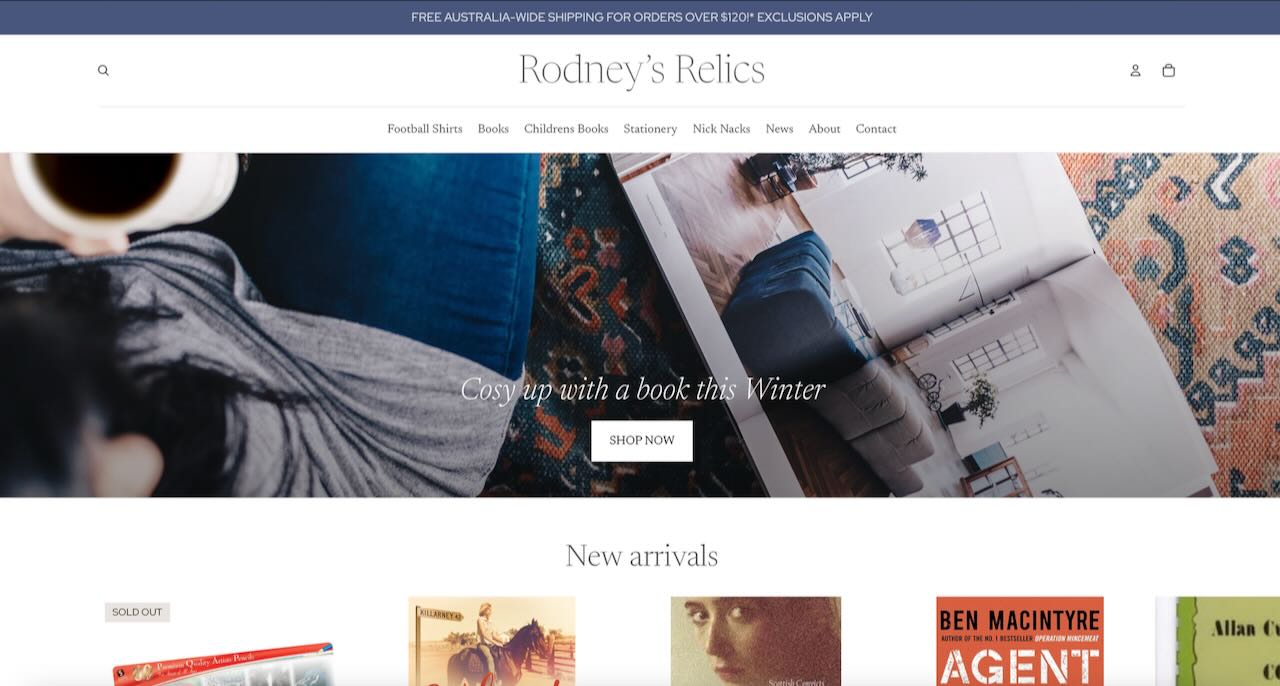
Rodney’s Relics https://rodneysrelics.com.au is a new website created by Tower Systems. It’s connected to Bingara newsagency located in the small town of Bingara, on the Gwydir River in the New England region of New South Wales.

We are grateful to count them as a Tower Systems customer and that they trusted us to create this POS software connected website for their business. From zero to live in a month. It’s part of our fast-track low-cost website build for local indie retailers.

Screenshot

Check them out online https://rodneysrelics.com.au or, better still, in beautiful Bingara.

#SmallBusiness #retail #POSsoftware#Shopify #Gifts

Are you looking for a POS Software alternative to Retail Express?

A

Here at Tower Systems we serve local independent specialty retailers, small business retailers: garden centres, bike shops, jewellers, newsagents, pet shops, music shops, bookshops, fabric shops, produce businesses, firearms dealers, homewares shops, fashion shops and more. We don’t supply big businesses or franchises.

A potential client recently asked how our Tower Systems POS software compares to Retail Express. The most honest answer is that we don’t have a direct comparison, and this is by design. Our philosophy is to invest our resources in developing our software and supporting our retail partners, rather than analysing competitive products.

We believe the only comparison that matters is the one that proves which software is the best fit for you, and that only you can make that comparison.

If you are looking for an alternative to Retail Express, consider Tower, we may be a good choice. Take your time though, look around.

A Transparent Approach to Your Decision

We are committed to making your evaluation process as simple and transparent as possible. We invite you to see our software’s functionality firsthand through our publicly accessible Tower Systems YouTube channel—no signup needed.

For a more in-depth analysis, we welcome the opportunity to provide a personal demonstration. We can walk you through our system and even conduct a function-by-function comparison with Retail Express, allowing you to see precisely how each platform addresses your specific operational needs.

Your Needs Come First

Our goal is your success. From our sales consultants to our help desk, our entire team operates on a core principle: to put the needs of your business first. We won’t pressure you or deliver a hard sales pitch. If the Tower Systems POS software isn’t the right fit, we’ll be the first to say so and wish you the best in your search.

The right software should feel like a partnership. With features and enhancements driven by suggestions from the 3,000+ local businesses we serve, our software is constantly evolving to meet the real-world demands of retail.

The definitive way to know which system is better for you is to compare them side-by-side in the context of your own business. We are ready to facilitate that comparison with Retail Express or any other software whenever you are.

Good decisions are informed ones. We offer a personal, no-obligation demonstration where you can compare our software’s features directly against any competitor. This transparent, function-by-function review is the most effective way to determine which platform will best serve you.

If you are looking for an alternative to Retail Express, do your research, and we would be grateful for Tower Systems to be part of that.

A POS Software alternative to Univex

A

If you are looking for an alternative POS Software solution top Univex, Tower Systems may be the answer. We’d love to find out. No pressure though.

We are happy for you to compare our software to Univex if that’s what you are using, to see how we stack up. If you ask for something of the software that we know we do not do, we will say so. We love serging happy customers and happiness starts with software that serves your needs.

We think our POS Software may be a good alternative to Univex. Our software is robust, built for specialty retailers, developed locally, supported locally and made to serve a range of specialty retail channels like garden centres, toy shops,  music shops, appliance shops, gift shops, fishing and outdoor shops and more. It’s interesting to see on checking today that Univex lists marketplaces similar to ours. It seems they think we may be a competitor.

If you are using Univex and are looking for a software alternative, take your time, do the research, look at difference software packages, especially in the areas you may want better covered than you experience today. Always be on control of the timing, accept no pressure. If a sales person claims the software does something that you want / need, ask them to show it to you so you can see it and assess it for yourself.

We back our specialty retail POS Software with personal training and support. We love helping retailers get the most from their POS Software. That’s our own retail experience shining through.

Tower Systems is grateful to help Univex POS Software users consider an alternative, to see if this move could be good for the business and those who rely on the business.

We serve specific niche markets, from garden centres and jewellers to bike shops and newsagents. This focus allows us to build features that genuinely matter to each unique retail environment.

We believe in empowering local, independent businesses to thrive.

Our development and support teams are here to understand your specific opportunities, offering a level of personalised service that can make a real difference to your daily operations and long-term success.

Looking behind the scenes at POS software training at Tower Systems

L

In this insightful interview, Michael, a full-time trainer for Tower Systems’ retail software, shares his expertise on the crucial aspects of training new customers for a smooth transition. Drawing on his retail background, Michael highlights key software functionalities that retailers often prioritize, such as supplier ordering and managing product variants for online sales. He also discusses how his experience in the Army Cadets helped shape his effective training methods. Michael touches on the software’s capabilities for specialized businesses like jewelers and firearms dealers, and expresses excitement about the embedded AI tools designed for data analysis. He concludes with valuable advice for new customers on how to best prepare for training sessions.

This is another in our series about who we are, what we do and what we stand for at Tower Systems.

How can I keep my staff trained in the POS software we use in the shop?

H

It’s vital all staff in a retail business know how to use the POS software the business operates. The business benefits, customers benefit, the staff benefit. It really is a win, win, win – to be cliché.

So, How can I keep my staff trained in the POS software we use in the shop? If you are a Tower Systems POS software customer there are several ways your staff can be up to date and knowledgable in using ur POS software:

Training videos. All of our customers have free access to a comprehensive library of training videos. these are what we call stackable videos, short, single topic. They run for under ten minutes each. We have them organised in a curriculum so you can go down a path of learning for each part of the software. There is no limit to how many times you watch a video. You don’t need to have our software running on a PC to access a video.  Also, our videos are regularly updated – to make the currency of the software. We also make videos based on customer requests.

Knowledge base. This is a library of 700+ articles on how to use the software, organised by topic, accessible from anywhere and easily read by anyone regardless of technical knowledge.  Our Tower Systems POS software knowledge base is our user manual. It goes where you go. It is maintained as the software evolves.

User meetings. we host online forums where customers can learn from our POS software experts. Anyone is welcome to attend. They are recorded, too, and the recordings shared with all of our customers.

One-on-one training. Every one of our customers has access to this. It’s a paid-for service with training tailored to your specific business needs.

Help desk support. Live. Human delivered. Answering queries and pointing you to the best resources for your needs.

AI chatbot. This has been trained in our software and only our software. It’s success rate is excellent.

Here at Tower Systems we make it easy for staff in a retail business in which our software is used to tap into resources for learning how to use the software and through this how the business can thrive.

Good knowledge of the current software is vital to the success of the business. If you have a need outside of what we do, please reach out and we will do our best to help.

How important is the help desk to what you achieve with POS software?

H

How important is the help desk to what you achieve with POS software? This is a good question to ask when you are considering new POS software for your retail business. No matter how knowledgable you are, how confident you are, the help desk for your POS software supplier will likely play a vital role in the benefits you achieve using the software.

Good help desk people understand your type of business and will provide context beyond do this or that. Contact can be everything in your getting more value from your POS software in your business. Context and help you make better business decisions.

Here at Tower Systems our POS software help desk people have retail experience, they can provide useful and appreciated context when helping retailers use our software. We think our help desk colleagues can help you get more from using our Tower Systems POS software.

Being locally based, our help desk team members understand local retail settings and needs, this plays into the context piece we are talking about here. They don’t use scripts. A call to the help desk is a conversation. being local means we can be more aware of local situations impacting software use, such as local payments problems or other tech factors that can impact using any software.

Help desks located off shore don’t have some of the local insights.

Too often, we see help desk staff in other businesses use rigid scripts that can cause a call take way too long to resolve. You only have to call an internet service provider or a bank to experience this.

So, when it comes to the Tower Systems POS software help desks – no scripts used or allowed. let’s talk!

By having a conversation we can often understand the query and provide the appropriate advice. The customer feels better and we feel better.

A good POS software help desk person will also look beyond the question, in case there is something they can see that you are not seeing, something from which your business can benefit if you act early. We have one customer we advised of a possible theft situation based on data we saw, this early intervention could have saved them thousands. In another business we identified thousands of dollars in dead stock they were missing and not acting on.

A good POS software help desk team will be vital to the benefits you achieve in your retail business. Consider help desk services when considering new POS software.

Queen’s Birthday holiday

Q

While our offices are closed today for the Queen’s Birthday public holiday our after hours numbers are open for urgent calls. Better still, our awesome chatbot is up and running with correct answers to more than 80% of customer queries. Access to this is available 24./7 and it’s free.

Navigating the Cost of Living Crisis: helping small business retailers demonstrate value to their customers

N

The current economic climate is a topic of considerable discussion, and it’s undeniably influencing consumer confidence. Showcasing the value your business offers is more crucial than ever. For small business retailers, this is about actively nurturing stronger customer relationships and, in turn, securing better outcomes for your business.

When we speak of value, we’re referring to the benefits and savings shoppers perceive when they choose to engage with your business. While price is a component, true value often extends further. An item might have a higher initial cost but offer greater longevity, or a purchase could include more units or an added benefit that enhances its overall worth. It’s about demonstrating a clear advantage for the discerning shopper.

For small business retailers businesses utilising our Tower Systems’ POS software, there are built-in tools that help you communicate this value effectively. Here are five practical strategies you can implement to resonate with customers navigating the pressures of increased living costs:

  1. Clear Savings with Discount Vouchers: Our Retailer (yep, that’s the name of our product since 1997) software allows you to issue discount vouchers, providing a tangible saving that customers can readily understand. A specific dollar amount off is often more impactful than loyalty points, offering immediate relief. You can structure these vouchers to ensure your costs are covered while clearly showing shoppers the direct financial benefit they receive.
  2. Community Support and Customer Savings: Consider partnering with local charities, community groups, or clubs. You could offer their members a special discount, for example, 5% off their purchases. Simultaneously, a percentage of their spend, perhaps another 5%, could be donated to the organisation. This initiative not only drives new foot traffic from a supportive community base but also positions your business as one that gives back, offering indirect value to customers who appreciate social responsibility.
  3. Rewarding Loyalty on Regular Purchases: For frequently bought items such as coffee, pet food, greeting cards, magazines, or garden supplies, implementing a ‘coffee card’ style discount can foster customer loyalty. An offer like “buy nine, get the tenth free” provides a clear path to savings on habitual purchases, encouraging repeat business and making essential or regular buys more affordable over time.
  4. Unique Value Through Product Bundling: Create exclusive product bundles that offer a combined value proposition shoppers won’t find elsewhere. By curating complementary items into a single, attractively priced package, you can highlight savings compared to purchasing each item individually, providing a unique and compelling reason to choose your store.
  5. Savings Through Volume Pricing: Implement volume pricing strategies where the unit cost of an item decreases as the quantity purchased increases. This directly addresses the desire for savings, allowing customers to economise by buying in larger amounts while simultaneously encouraging increased sales for your business.

These five strategies represent just a starting point. The Tower Systems POS software for small business retailers provides a comprehensive suite of tools to help you systemise your approach to pitching value. Consistency in these efforts is paramount to their success, reassuring customers that your business is mindful of their financial pressures.

Tower Systems is committed to offering more than just technical POS software support. We provide business management advice, like these insights, to all our customers. Our aim is to extend our help desk experience beyond the software itself and onto your shop floor, empowering local small business retailers to maximise the value they gain from our systems, especially during challenging economic periods.

Two new POS software customer forums this week

T

This week we are hosting two forums for our customers. We shared the details in our regular customer service emails:

Customer forum: Tuesday May 27 @ 11am.
Please join us online this Tuesday at 11am Melbourne time as we talk through the AI tools in the software, preview some software enhancements coming your way and answer all your questions on all topics. Everyone is welcome.

Web development forum: Tuesday May 27 @ 2pm.
If you are considering having a website developed for your business, join us this Tuesday at 2pm Melbourne time. We’ll talk through the process, what’s involved, the costs and we will answer all of your questions.

As usual, we will record the sessions and make these recordings available to all customers.

Small business retailers local easy access to POS software help on a Saturday

S

Tower Systems is proud to provide live POS software help desk support on Saturdays as a standard part of our comprehensive support coverage. This service has been an integral part of our offering for many, many years, and there are no extra charges associated with accessing our support, including on Saturdays.

Our Saturday support is delivered by our dedicated help desk team, offering full service assistance, not a limited on-call arrangement.

Here’s what some of our small business retail customers have shared about the value of our Saturday POS software help desk support:

“Saturdays are when I get time to work on the business. Your availability means I can get the help I need then, rather than waiting until Monday.”

“One of the reasons we chose Tower Systems was because we were tired of waiting days to get in touch with support for our previous software.”

“I appreciate that I can call on a Saturday and speak to a real person who listens to my non-technical explanation and provides assistance, right then and there.”

“Our weekend staff aren’t as familiar with the software, so their ability to call your help desk allows us to have a smoother weekend operation.”

“Software issues don’t adhere to Monday to Friday office hours. Having access to your help desk outside of these times is incredibly beneficial for our business.”

“It’s what small businesses value – local support that’s easily reachable when we need it.”

“I’m always delighted when I email a non-urgent question on a Saturday, expecting a Monday response, and instead receive a reply or even a call on Saturday. It’s fantastic.”

We take pride in offering a level of after-hours POS software help desk access that is truly distinctive. While the majority of our customers may not require it frequently, its availability and ease of access provide crucial support when needed, setting us apart and demonstrating our commitment to our customers.

A less effective approach to Saturday POS software help desk support is through offshore call centres. We believe this does not offer the same level of understanding and service.

All members of our Tower Systems POS software help desk team possess in-depth knowledge of our software, understand the nuances of local retail, and can converse in a way that resonates with local business practices. They are skilled in engaging in meaningful conversations rather than adhering strictly to scripts.

Ultimately, we recognise that Saturday POS software help desk support is a genuinely valuable resource for local small business retailers.

Best practice POS software help desk AI chatbot approach avoids hallucination

B

In the context of AI, “hallucination” refers to an AI model generating false or misleading information, presented as accurate, due to limitations in its training data or design.This is a real problem. Hallucinations undermine trust in AI models.

Hallucinations in AI results are more common in open AI models, models with a low cost and that draw knowledge from not only the expertise of the business offering access to the AI chat.

Here at Tower Systems we have offered AI chat solutions for years and are grateful to leverage that experience and the leading-edge customer service specific AI LLM that we have partnered with for quite some time now. This LLM has only beed trained by us. It is closed too, meaning that it is not drawing any knowledge or experience outside of that in which we rain it.

The approach we have taken is more expensive and more complete, more certain.

For well over a year of using this professional help desk model we have reviewed responses and used what we have learned from the human review of responses to further train the AI to provide even better responses.

Being years into live use provides us with an advantage for which we are genuinely grateful.

The pay off for us is when we see fewer responses from the AI that could be improved.

None of this detracts from our human delivered personal customer service. We love talking with retailer, chatting retail and learning from how we can better serve their needs. What the AI does is provide access to support in the middle of the night covering all manner of queries from the simple to the complex. Its;s track record in offering this help is excellent. It has a record of accurate resolution we are proud of and that customers have let us know they are grateful for.

While many websites offer chatbot access, the majority today are not using a closed LLM such as what we pay to access. In our case we looked at the best practice approach of AI facilitated customer service. The quality of what we deliver matters more than the cost of delivery as we know this is what our customers will appreciate. We are glad to see no hallucination in our AI chatbot responses.

Advice for small business retailers on handling community group donation requests

A

Requests from schools, charities, and other local community groups can be a challenging for a small retail business. We know of retailers who are asked daily for a cash or product donation. Often these requests come from people unknown to the business.

If you don’t have a structured approach, you’ll end up giving away a lot for little or no return.

The advice we share here is advice we first offered our customers many years ago. It has been refined over time.

Here are our tips on handling a donation request from a local community group or charity:

  • Manage your philanthropy like any business activity. Decide how much money (or commercial value) you are willing to donate each year, and then stick to that budget.
  • Get on the front foot. Write to community groups at the start of the year and ask them to submit a proposal if they’d like your support. This way, you can choose the groups that are a good fit for your business and your community. It also gives you a response when you are asked for support.
  • Support the groups that support you. Look for groups that have members who are also your customers. This way, you’re helping both the group and your business.
  • Let your shoppers choose. If you offer discount vouchers, you could let customers donate their vouchers to a local group. This is a great way to get your customers involved in your community giving.
  • Reward engagement. You could offer a discount to customers who are members of a local group. This would encourage them to shop at your business, and it would also support the group. This is critical advice. There has to be a commercial benefit for your business if you are to be able to help these community groups into the future.
  • Educate groups about good engagement. Let groups know that you’re looking for ways to work together to benefit the community. You could ask them to do things like promote your business on their social media pages, or write about you in their newsletters.
  • Write about your engagement. Once you’ve chosen the groups you’re going to support, write about it on your website and social media. Don’t be boastful or arrogant, be grateful. This will help to raise awareness of the groups, and it will also show your customers that you’re committed to giving back to the community.

Your giving should serve both your heart and your business. By following these tips, you can make sure that your donations are a valuable investment for both you and your community.

Here are some additional tips:

  • Be clear about your expectations. Let groups know what you’re looking for in a partnership, and what you expect from them in return.
  • Be professional. Even if you’re dealing with a small community group, it’s important to be professional in your dealings with them.
  • Be grateful. When a group partners with you, be sure to thank them for their support.

By following these tips, you can build strong relationships with community groups and make a real difference in your community.

…

Why this advice from our POS software company matters.

Every day we connect with small business retailers about their businesses, through our help desk, in sales situations and elsewhere. Owning and running a local small business retail shop is challenging, time-consuming. Coming up with fresh ideas is hard. It’s necessary though. The ideas we share here are things we have tried, and found to work.

POS software customer service chatbot delivering awesome results

P

Our customer service chatbot is providing terrific advice and customer service 24/7. Relying solely on what we train it and with no external knowledge access, this chatbot is made for Tower Systems customers. It frees our terrific help desk team for support calls that require human knowledge and experience. This is what our customers are loving too.

The chatbot answers the query and provides links to the knowledge sources on which it has relied to provide the advice.

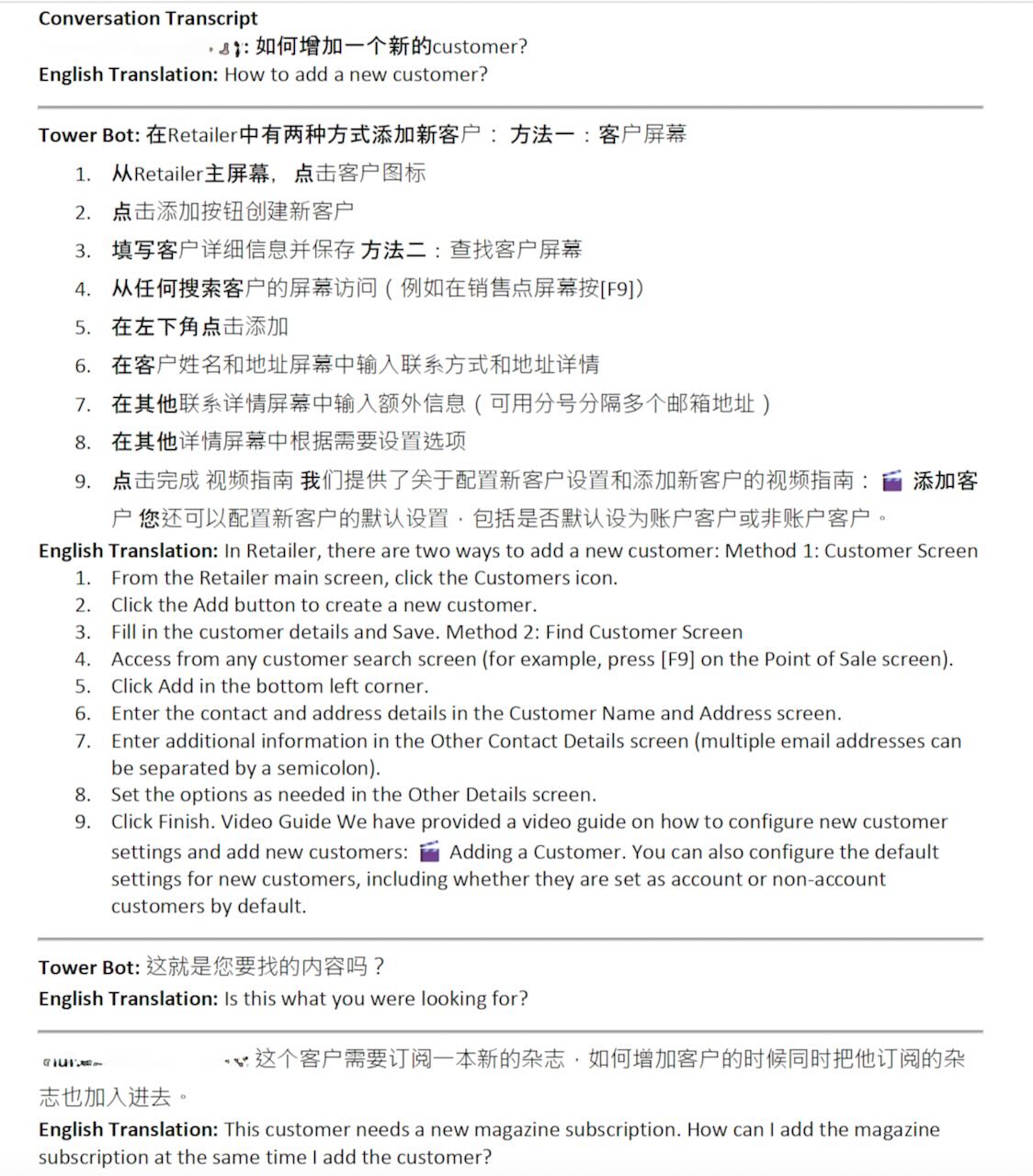
Here are some live chatbot examples (without the source details included for this public post):

Customer query: No retailer data found.

Chatbot response: The “No Retailer Data Found” error typically occurs when your computer can’t connect to the MAIN/SERVER computer or is looking in the wrong location for the data. This is often due to network issues blocking the connection between PCs.
To resolve this:

Check if you can access the internet on both your PC and the MAIN computer. If not, try restarting your router/modem.

If internet access is working, the issue might be with the IP address settings on your POS/CLIENT computer. To fix this:

• Open Retailer Backup on the CLIENT PC
• Click Settings -> Database Settings in the left menu
• At “Server IP or Name”, enter your MAIN/SERVER computer’s name

If these steps don’t resolve the issue, you may need to perform more advanced network troubleshooting or contact our support team for assistance.

Customer query: Cash drawer not opening.

Chatbot response: There are several reasons why your cash drawer might not be opening. Here’s how we can troubleshoot and fix the issue:

Check your receipt printer: The cash drawer is typically triggered by the receipt printer. Make sure it’s turned on and printing correctly.

Inspect cable connections: Shut down the computer, then check the cable connections between the till and the printer at both ends. Ensure they’re firmly plugged in and not damaged. Unplug and replug if necessary, then restart the computer and try again.
Verify Retailer settings:

• Go to Setup -> General -> Pay Types tab. Ensure appropriate payment types are ticked to open the cash drawer.
• Go to Setup -> Point of Sale -> Terminals tab. Check that the current terminal has a till ID ticked to have a cash drawer (verify under Till Setup).
Confirm Retailer configuration:
• Click Setup -> Point Of Sale -> Terminals tab
• Note the Till ID for the highlighted row
• Go to the Till Setup tab
• Tick ‘Cash Draw’ for the noted Till ID
• Save, close, and restart Retailer

If these steps don’t resolve the issue, please contact our support team for further assistance.

Customer query: export customer list from Retailer.

Chatbot response: We offer multiple ways to export a customer list from our Retailer software. Here’s how you can do it:
Using the Export Data utility:

• Go to Utilities -> Import/Export Files -> Export Data
• Choose your export options (Basic or Advanced)
• Select the customer fields you want to include
• Click Export and choose where to save the file (TXT or CSV format)

Using the Customer Listing Report:
• Go to Reports -> Customer -> Customer Listing
• Select customer categories and sorting options
• Run the report to view or export customer information

Using Marketing Tools (if you have the Marketing module):
• Go to Marketing -> Marketing Tools
• Create a new template or modify an existing one
• Generate your customer list
• Export to CSV or Excel, or use it for SMS campaigns

Choose the method that best suits your needs. If you need more detailed instructions for any of these options, please let me know.

Customer query: My eftpos is not connecting

Chatbot response: I understand you’re having issues with your EFTPOS not connecting. Before we proceed with troubleshooting, could you please tell me which EFTPOS provider you’re using? This information will help me provide more accurate and specific guidance for your situation.

Customer response: NAB

Chatbot response: To troubleshoot your NAB EFTPOS connection issue, we recommend the following steps:

Check your internet connection: Ensure both your computer and the EFTPOS terminal have a stable internet connection. If not, try restarting your router or modem.

Verify cable connections: Shut down your computer, then inspect the cable connections between the EFTPOS terminal and your computer. Make sure they’re firmly plugged in and not damaged. Unplug and replug if necessary, then restart your computer and try again.

Restart the EFTPOS terminal: Hold down the Function and Clear buttons to restart the terminal. If it doesn’t restart automatically, hold the Enter key until you see the start-up screen.

Check Retailer settings: Go to Setup -> Point of Sale -> Terminals tab. Ensure the current terminal has the correct EFTPOS settings.

Update Retailer software: Make sure you’re using the latest version of our software, as older versions may have EFTPOS-related issues.

If these steps don’t resolve the issue, you may need to contact NAB directly for further assistance, as they handle the EFTPOS integration on their end.

Customer query: emails are not sending.

Chatbot response: There are several reasons why your emails might not be sending. First, check the Mail Queue Manager (Tasks -> Mail Queue Manager) to see the status of your emails. Here are some common issues and solutions:

If emails have a ‘Failed’ status:

• Check the Response column for specific error messages.
• Common issues include incorrect username/password, expired credentials, or authentication problems.

If emails have a ‘New’ status:

• You may need to complete the email setup.
• The Mail Queue service might have stopped responding.

If emails have a ‘None’ status:

• For Gmail users, redo the Email Setup and ensure you tick ‘Send email on your behalf’ during the login steps.

To fix these issues, you can try:

Re-entering your email password in the setup.

Restarting the Mail Queue service.

Resending failed emails by right-clicking and selecting ‘Resend Email’ or ‘Resend All Failed Emails’.

If problems persist, updating to the latest version of Retailer may help resolve email authentication issues.

The POS Software Blog

Categories

Categories

Categories

Recent Comments

Monthly Archives